Do you think IIT Guwahati certified course can help you in your career?
Introduction
Cinder is a C++ library for programming with an eye toward aesthetics, or what is often known as creative coding. This covers areas including computational geometry, audio, video, and graphics. With official support for macOS, Windows, Linux, iOS, and Windows UWP, Cinder is cross-platform.
A cinder is a production-tested tool that is strong enough to serve as a professional's primary tool while being appropriate for experimentation and learning.
In this article, we will learn about setting up Cinder in your local window machine.
Windows Setup
This guide will assist you with installing Cinder on Windows. If you haven't already, begin downloading Cinder from the website's Download Page. If you still need Visual C++ installed, pick the 2013 version.
Microsoft Visual C++
Cinder works with paid Professional and Community editions of Visual Studio 2013 and Visual Studio 2015. We'll walk you through installing the 2015 edition if you still need to install one of those versions.
Installing Visual C++ is the first step; click the Download Community Free button on the Visual Studio download page. Launch the installation next. Select the Visual C++ option from the Programming Languages menu, then click the Install button.
You should be good to go using one of our packaged releases. You should adhere to the build instructions in our Cinder + Git tutorial if you're working from GitHub.
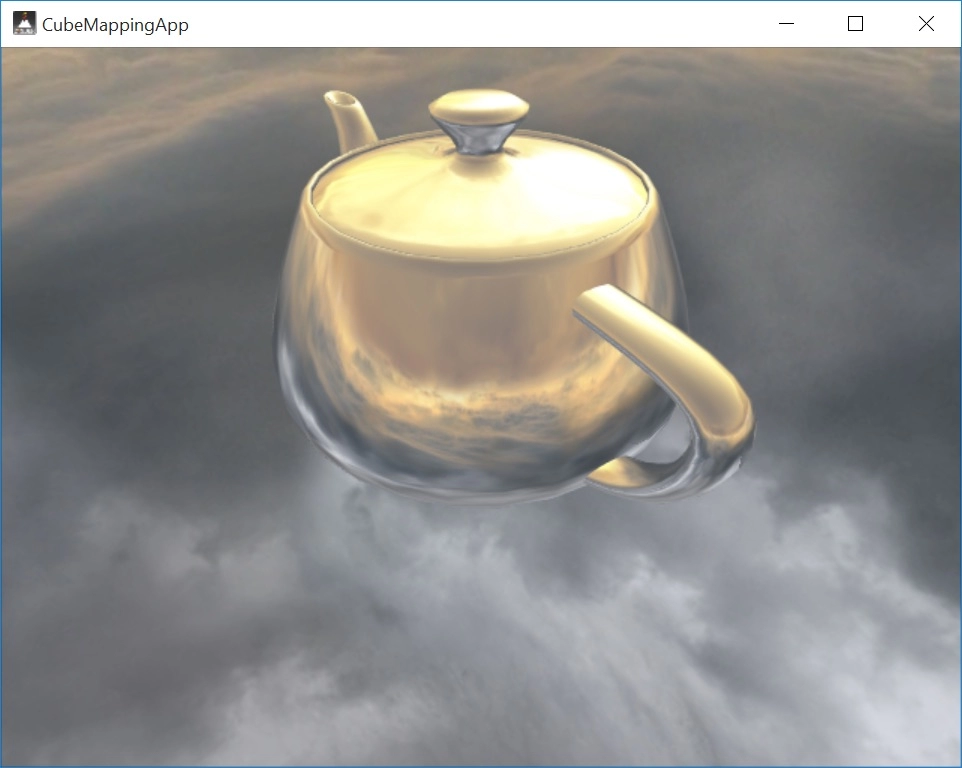
Try opening and constructing one of the samples to check the installation. Open CubeMapping.sln by navigating to
the cinder\samples\_opengl\CubeMapping\vc2013 folder in Windows Explorer.
When prompted to create the project, pick Yes under the Start Debugging option in the Debug menu. The CubeMapping example will start and present itself as follows:
The GUI tool for Cinder for quickly and easily creating new projects is called TinderBox. The project is hosted on GitHub if you want to stay up to date with the most recent Cinder developments.
Cinder + Git
You should set up a clone of Cinder's git repository if you're interested in staying current with its development. The GitHub page for Cinder is located at
https://github.com/cinder/Cinder.
Typically, the main branch is where Cinder's active development takes place. The latest official Release's minor updates are intended to be reflected in the release_* branch (for instance, release v0.9.0).
Installing git on Windows
Start downloading the Git installer from this page if Git isn't already installed on your computer.
We advise you to choose the Use Git from the Windows Command Prompt option when the installation asks you to change your PATH environment. We also advise using the default, Checkout Windows-style, commit Unix-style configurations for line-ending configurations. Launch the Git Bash program once Git has been installed. Navigate to the directory where you want to install Cinder, then type the following command:
The only command you need to remember if you're unfamiliar with Git is git pull, which, when used from your new cinder master directory, will update your copy of Cinder. Don't forget to rebuild Cinder (see description below) whenever you do this.
Building on Windows
Ensures the rest of your development environment is set up as instructed in the Windows Setup page before beginning to build Cinder on Windows. Open the Visual Studio solution located in the directory cindervc2013cinder.sln next. Build the Debug and launch versions of the project as any other Visual C++ project.
The files cinder-v120.lib (for Release) and cinder-v120 d.lib (for Debug) will be created at the path cinderlib following the completion of your build.
OpenCV
Due to its size, Cinder's OpenCV support is maintained separately from the main distribution. Cd to your blocks directory and run the following command to set up OpenCV support:
cd blocks
git clone git://github.com/cinder/Cinder-OpenCV.git.
OpenStack Block Storage (Cinder) is open-source software built to build and administer a service offering persistent data storage for cloud computing apps. The project for OpenStack Block Storage is known as Cinder.
What language is Cinder?
Cinder is in C++ language.
What is the cinder framework?
One of the most intriguing frameworks for creative coding is Cinder. It is made in C++ for improved performance and enables rapid development of interactive applications with complex visuals.
What are the different categories in the cinder framework?
The categories include computational geometry, maths, audio, video, images, and graphics.
What distinguishes Swift from Cinder in OpenStack?
Cinder cannot save volumes directly, but it can control several storages through drivers and use them to store data. The virtual machine gives you room. Swift is a persistent, distributed virtual object store that manages space and offers external object storage services.
Conclusion
This article taught us about Cinder, its different categories, and how to set it up in windows. Further, we discussed how to get the latest cinder development environment using git on different operating systems such as windows.







 1+ registered

