




Introduction
Google's Cloud Translation service offers quick translations between the source language and more than 100 other languages. The add-on is extremely helpful for those that offer the store content in multiple languages. Since it drastically cuts down on time requirements. It is simple to obtain a literal translation with just one click. Simply add a new product, and an automatic translation into the target language or languages is generated.
In contrast to internet translators, Google Cloud Translation stores the translated text in a database. As a result, search queries can use the results.
For example, you may have a global support team that gets client cases in a variety of languages. To convert those customer cases into the native tongue of your support team members, you can add translation to your process.
Translation increases the overall efficiency of your support team because they no longer need to manually translate text or rely on others.
Cloud Translation Editions
Cloud Translation has two editions available:
-
Cloud Translation - Basic (v2)
-
Cloud Translation - Advanced (v3)
Cloud Translation - Basic (v2)
HTML or plain text can be used as the input text. Cloud Translation - Basic only translates text between HTML elements in the input. Due to variances between the source and target languages, the output keeps the original HTML tags while, when possible, translating the text inside the tags. Due to word order changes during translation, the output HTML tags may not appear in the same order as the input text.
Translating input strings
Follow Node.js setup instructions in the Translation quickstart using client libraries before attempting this sample.
Implementing in Node.js
// Imports the Google Cloud client library
const {Translate} = require('@google-cloud/translate').v2;

// Creates a client
const translate = new Translate();

/**
 * TODO for developer, uncomment the following lines before running the sample.
 */
// const text = 'The text to translate, e.g., Hello, world!';
// const target = 'The target language, e.g. ru';

async function translateText() {
  // Translate the text into the target language. "text" can be a string for
  // Translating a single string or an array of strings to translate multiple texts
  let [translations] = await translate.translate(text, target);
  translations = Array.isArray(translations) ? translations : [translations];
  console.log('Translations:');
  translations.forEach((translation, i) => {
    console.log(`${text[i]} => (${target}) ${translation}`);
  });
}

translateText();
Model Parameter
When you submit a translation request to Cloud Translation - Basic, your text is translated using the Google Neural Machine Translation (NMT) model. No other model is permitted. Use Cloud Translation - Advanced to translate text using AutoML models.
Cloud Translation - Advanced (v3)
Cloud Translation - Advanced supports translating text using customized AutoML Translation models and generating glossaries to ensure that the Cloud Translation API accurately translates a customer's domain-specific terminology.
You can select the translation model to utilize when submitting a translation request to Cloud Translation - Advanced. The nmt model is applied if no model is specified.
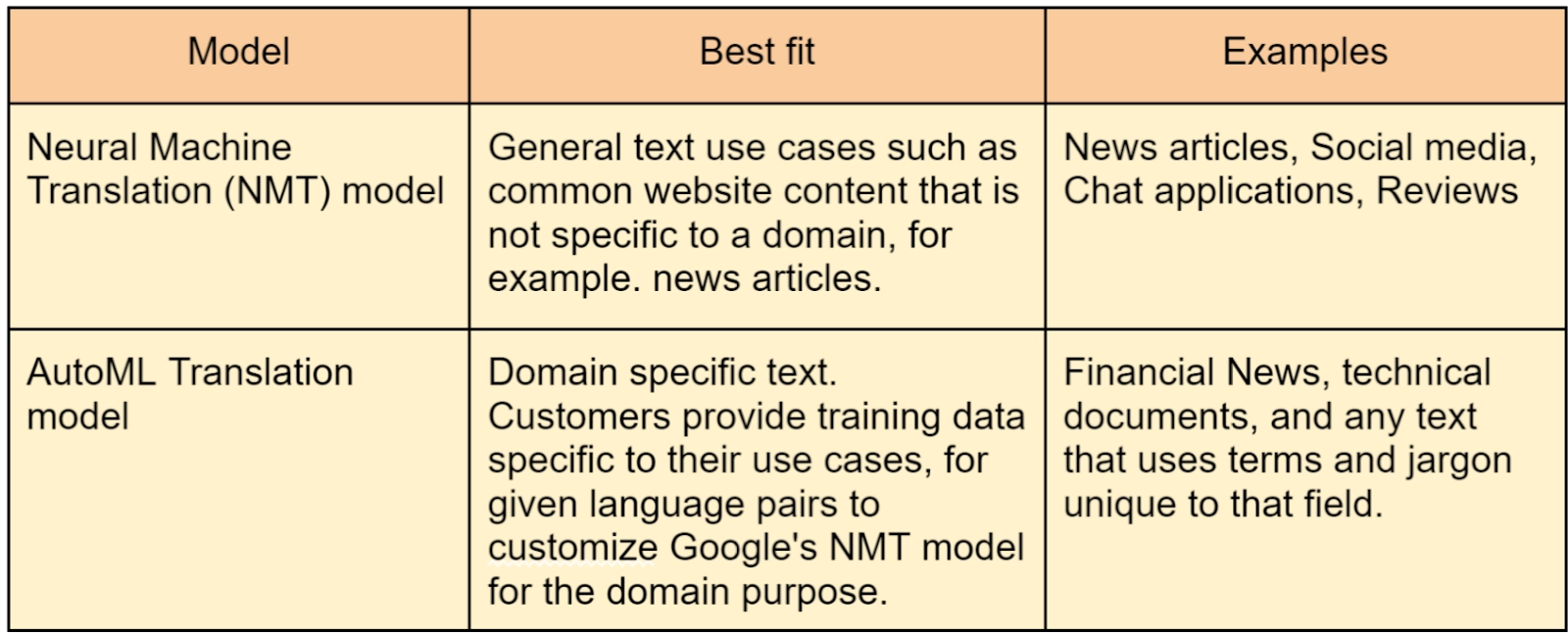
By using its model ID, you can specify the translation model. The model ID for the NMT model is general/nmt. For details on AutoML Translation model IDs, see the section that follows.
Translating text
HTML or plain text can be used as the text input. Only text included within HTML tags is translated using the Cloud Translation API. To the maximum extent, the output retains the (untranslated) HTML tags with the translated content between the tags due to linguistic differences between the source and destination languages. The output HTML tags may not be in the same order as the input text due to word order changes during translation.
Implementing in Node.js
/**
 * TODO for developers, uncomment these variables before running the sample.
 */
// const projectId = 'YOUR_PROJECT_ID';
// const location = 'global';
// const text = 'text to translate';


// Imports the Google Cloud Translation library
const {TranslationServiceClient} = require('@google-cloud/translate');


// Instantiates a client
const translationClient = new TranslationServiceClient();


async function translateText() {
  // Construct request
  const request = {
    parent: `projects/${projectId}/locations/${location}`,
    contents: [text],
    mimeType: 'text/plain', // mime types: text/plain, text/html
    sourceLanguageCode: 'en',
    targetLanguageCode: 'sr-Latn',
  };


  // Run request
  const [response] = await translationClient.translateText(request);


  for (const translation of response.translations) {
    console.log(`Translation: ${translation.translatedText}`);
  }
}


translateText();
AutoML Translation custom model to translate text (Node.js)
/**
 * TODO(developer): Uncomment these variables before running the sample.
 */
// const projectId = 'YOUR_PROJECT_ID';
// const location = 'us-central1';
// const modelId = 'YOUR_MODEL_ID';
// const text = 'text to translate';

// Imports the Google Cloud Translation library
const {TranslationServiceClient} = require('@google-cloud/translate');

// Instantiates a client
const translationClient = new TranslationServiceClient();
async function translateTextWithModel() {
  // Construct request
  const request = {
    parent: `projects/${projectId}/locations/${location}`,
    contents: [text],
    mimeType: 'text/plain', // mime types: text/plain, text/html
    sourceLanguageCode: 'en',
    targetLanguageCode: 'ja',
    model: `projects/${projectId}/locations/${location}/models/${modelId}`,
  };

  // Run request
  const [response] = await translationClient.translateText(request);

  for (const translation of response.translations) {
    console.log(`Translated Content: ${translation.translatedText}`);
  }
}

translateTextWithModel();
Model Parameter
Rest and CMD line
The model query parameter allows you to specify which model to use for translation. To use the NMT model, for example, enter nmt. The instance below demonstrates how to use the model parameter in a translate request. Make the following substitutions before using any of the request data:
-
PROJECT_NUMBER_OR_ID: your Google Cloud project number or ID
HTTP method and URL:
POST https://translation.googleapis.com/v3/projects/PROJECT_NUMBER_OR_ID/locations/global:translateText
Request JSON body:
{
  "model": "projects/PROJECT_NUMBER_OR_ID/locations/global/models/general/nmt",
  "sourceLanguageCode": "en",
  "targetLanguageCode": "de",
  "contents": ["Come here!"]
}
Using Powershell to send your request:
Save the request body to a file called request.json and run the command:
$cred = gcloud auth application-default print-access-token
$headers = @{ "Authorization" = "Bearer $cred" }


Invoke-WebRequest `
 -Method POST `
 -Headers $headers `
 -ContentType: "application/json; charset=utf-8" `
 -InFile request.json `
 -Uri "https://translation.googleapis.com/v3/projects/PROJECT_NUMBER_OR_ID/locations/global:translateText
" | Select-Object -Expand Content
You should get a JSON answer that looks similar to this:
{
  "translations": [
    {
      "translatedText": "Komm her!",
      "model": "projects/project-number/locations/global/models/general/nmt"
    }
  ]
}
 5+ registered

