Table of contents
1.
Introduction 
2.
Draw color-filled shapes in Turtle
2.1.
fillcolor(*args)
2.2.
begin_fill()
2.3.
end_fill()
3.
Drawing a color-filled square
3.1.
Output
4.
Drawing a color-filled circle
4.1.
Output
5.
Drawing a color-filled triangle
5.1.
Output
6.
Drawing a color-filled star
6.1.
Output
7.
Frequently Asked Questions
8.
Conclusion 
Last Updated: Mar 27, 2024
Easy

Color-Filled Shapes in Turtle

Author Teesha Goyal
1 upvote

Introduction 

This article will discuss how to draw color-filled shapes in python using the turtle module. Turtle is a pre-installed module in python that lets you draw various shapes and figures using python with a provided virtual canvas. Using this, you can create graphics, pictures, and games.

Also see, Merge Sort Python

Draw color-filled shapes in Turtle

Turtle module of Python has three functions fillcolor(), begin_fill(), and end_fill(), which can be used to draw color-filled shapes. These three functions are the primary keys that will be used to draw all sorts of color-filled shapes like squares, triangles, circles, stars, etc.

The description of each of these three functions is discussed below:

fillcolor(*args)

This function returns or sets fill color. I

The parameters to fillcolor method can be passed in the following 4 formats:

  1. fillcolor(): When no arguments are passed, the fill color() method returns the current fill color. This returned value can be used as a parameter to other functions like color, setcolor, or fillcolor.
     
  2. fillcolor(colorstring): This format sets the color to colorstring specified. The colorstring is a Tk color specification string such as “blue”, “red”, “#ffffff”.
     
  3. fillcolor((r, g, b)): This format sets the color to the color represented by the tuple r, g, and b. Each of r, g, and b in the tuple is a floating-point number in the range 0 to color mode, where color mode can be either 1.0 or 255.
     
  4. fillcolor(r, g, b): This format sets the color to the color represented by the values of r, g, and b. Each of r, g, and b is a floating-point number in the range 0 to color mode, where color mode can be either 1.0 or 255.

begin_fill()

This function indicates the starting point of the shape to be filled. It should be called just before you start drawing the shape that needs to be filled with some color.

end_fill()

This function should be called after the begin_fill() function and when you are done drawing the shape. It fills the color inside the shape created after the last begin_fill() function. 

Read about, Fibonacci Series in Python

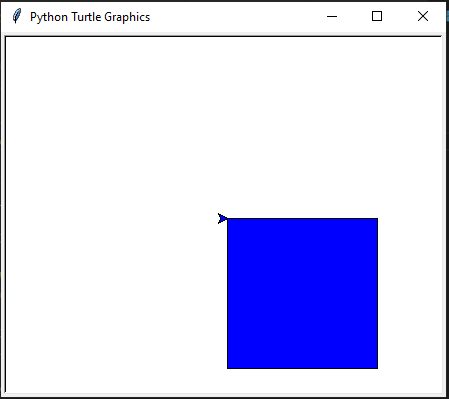
Drawing a color-filled square

Following is the python implementation to draw a color-filled square using turtle programming.

import turtle
tt = turtle.Turtle()
 
# Set the fillcolor
tt.fillcolor(“blue”)
# Marks the starting of the shape to be filled
tt.begin_fill()
 
# Drawing the square of side 100
for i in range(4):
  tt.forward(150)
  tt.right(90)
 
# Filling the color to the shape created after the last begin_fill()
tt.end_fill()

turtle.done()
You can also try this code with Online Python Compiler
Run Code

Output

You can compile it with online python compiler.

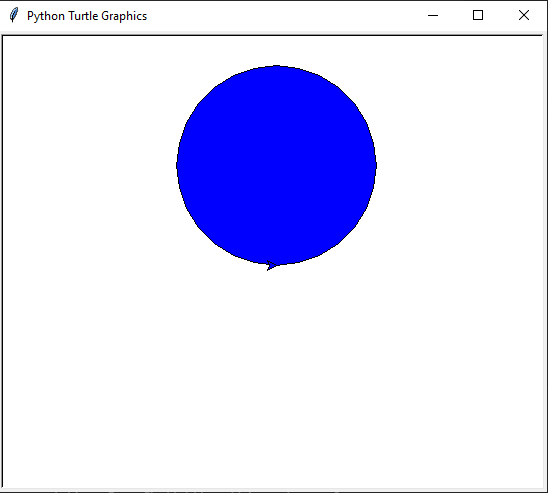
Drawing a color-filled circle

Following is the python implementation to draw a color-filled circle using turtle programming.

import turtle
tt = turtle.Turtle()
 
# Set the fillcolor
tt.fillcolor("blue")

# Marks the starting of the shape to be filled
tt.begin_fill()
 
# Drawing the square of side 100
tt.circle(100)

# Filling the color to the shape created after the last begin_fill()
tt.end_fill()

turtle.done()
You can also try this code with Online Python Compiler
Run Code

Output

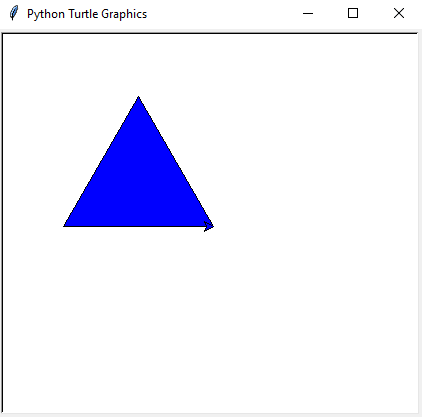
Drawing a color-filled triangle

Following is the python implementation to draw a color-filled triangle using turtle programming.

import turtle
tt = turtle.Turtle()
 
# Set the fillcolor
tt.fillcolor("blue")

# Marks the starting of the shape to be filled
tt.begin_fill()
 
# Drawing the square of side 100
for i in range(3):
    tt.left(120)
    tt.forward(150)

# Filling the color to the shape created after the last begin_fill()
tt.end_fill()

turtle.done()
You can also try this code with Online Python Compiler
Run Code

Output

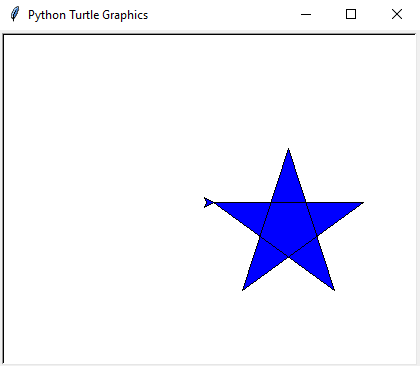
Drawing a color-filled star

Following is the python implementation to draw a color-filled star using turtle programming.

import turtle
tt = turtle.Turtle()
 
# Set the fillcolor
tt.fillcolor("blue")

# Marks the starting of the shape to be filled
tt.begin_fill()
 
# Drawing the square of side 100
for i in range(5):
    tt.forward(150)
    tt.right(144)
# Filling the color to the shape created after the last begin_fill()
tt.end_fill()

turtle.done()
You can also try this code with Online Python Compiler
Run Code

Output

So, we can say that just by changing the shape between the begin_fill() and end_fill(), we can quickly draw all sorts of color-filled shapes in python using turtle programming.

You can also read about Palindrome Number in Python here.

Frequently Asked Questions

  1. What does the end_fill() function do in turtle programming?
    The end_fill() function is called after the begin_fill() function. It fills the color inside the shape created after the last begin_fill() function. 
     
  2. What does the begin_fill() function do in turtle programming?
    The begin_fill() function indicates the starting point of the shape to be filled. It should be called just before you start drawing the shape that needs to be filled with some color.
     
  3. What is the use of turtle programming in python?
    Turtle programming is used to create graphics, pictures, and games. Students or kids can create fun programs with only a few lines and code with turtle programming.
     
  4. Is turtle a pre-installed library?
    Yes, turtle comes in the standard python package, so it does not need to be downloaded explicitly. You can import it directly into your program.
     
  5. How can we draw a color-filled shape in python using the turtle module?
    A color-filled shape can be drawn using the turtle module with the help of three functions that are fillcolor(*args), begin_fill(), and end_fill(). The shape must be drawn between the begin_fill() and the end() methods.

Conclusion 

In this article, we discussed drawing color-filled shapes in python using turtle programming. We also discussed some examples of drawing color-filled shapes using the turtle module. Hope you would have gained a better understanding of these topics now!

Recommended Readings: 

Nmap commands

Are you planning to ace the interviews of reputed product-based companies like Amazon, Google, Microsoft, and more? 

Attempt our Online Mock Test Series on Coding Ninjas Studio now!

Happy Coding!

Live masterclass