Table of contents
1.
Introduction
2.
What is cout in C++?
2.1.
Syntax of Cout in C++
2.2.
Anatomy of a cout Statement
2.3.
cout with Multiple Items
2.4.
Using endl with cout
3.
More Examples of Cout in C++
4.
Frequently Asked Questions
4.1.
What is the purpose of cout in C++?
4.2.
Can cout output variables of different types?
4.3.
Can we use cout without including iostream?
5.
Conclusion
Last Updated: Oct 3, 2024
Easy

Cout in C++

Author Gunjan Batra
0 upvote
Career growth poll
Do you think IIT Guwahati certified course can help you in your career?

Introduction

`cout` is an object in C++ that represents the standard output stream, typically the console or terminal. It is part of the `iostream` library and is used to display text or values on the screen. The `<<` operator, known as the insertion operator, is used with `cout` to output data. `cout` provides a convenient way to display information and interact with users in C++ programs. In this article, we will learn about cout in C++ in detail.

Cout in C++

What is cout in C++?

In C++, cout is an object of the ostream class in the iostream library, which is part of the standard library. It represents the standard output stream in C++. In simpler terms, cout is the command you use when you want to send data to the standard output, which is usually your computer screen.

Syntax of Cout in C++

The syntax of `cout` in C++ is : 

cout << data1 << data2 << ... << dataN << endl;

In this syntax : 

1. `cout`: It is the object representing the standard output stream, typically the console or terminal.

2. `<<`: The insertion operator (`<<`) is used to pass data to the `cout` object for display. It is used between `cout` and the data you want to output.

3. `data1`, `data2`, ..., `dataN`: These represent the data or expressions that you want to display. They can be variables, literals, or any valid C++ expressions. You can output multiple data items by separating them with the insertion operator (`<<`).

4. `endl`: It is a manipulator that inserts a newline character and flushes the output buffer. It moves the cursor to the next line after displaying the data. Alternatively, you can use `\n` to insert a newline character without flushing the buffer.

Anatomy of a cout Statement

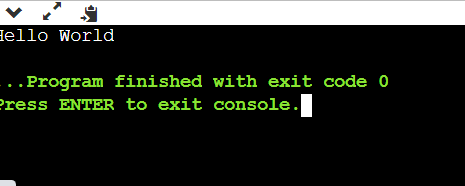
The cout statement is typically used with the insertion operator (<<), which pushes the data that follows it to the output. Here's a simple example of a cout statement:

cout << "Hello World";

Output

Output

In this example, "Hello, world!" is a string that is sent to the output stream (i.e., displayed on your screen) when the program is run.

cout with Multiple Items

The cout statement can also output multiple items at once. Here's an example:

int apples = 5;
cout << "I have " << apples << " apples.";

Output

Output

In this example, the sentence "I have 5 apples." will be displayed. The cout statement can seamlessly combine literals and variables for display.

Using endl with cout

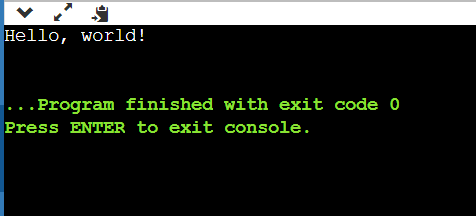
endl is another important feature of cout. It stands for 'end line', and it inserts a new line character and flushes the output buffer. Here's how you can use endl:

cout << "Hello, world!" << endl;

Output

Output

When the above code is run, "Hello, world!" is outputted and the cursor moves to the next line, ready for any subsequent output.

Also see, Abstract Data Types in C++ File Handling in CPP

More Examples of Cout in C++

Example 1: 

int age = 25;
string name = "Akash";
cout << "My name is " << name << " and I am " << age << " years old." << endl;
You can also try this code with Online C++ Compiler
Run Code

Output :

My name is Akash and I am 25 years old.


Example 2:

int a = 10, b = 20;
cout << "The sum of " << a << " and " << b << " is " << (a + b) << endl;
You can also try this code with Online C++ Compiler
Run Code

Output:

The sum of 10 and 20 is 30


Example 3:

#include <iostream>
using namespace std;
int main() {
   string name;
   int age;
   double height;
   cout << "Enter your name: ";
   getline(cin, name);
   cout << "Enter your age: ";
   cin >> age;
   cout << "Enter your height (in meters): ";
   cin >> height;
   cout << "\nHello, " << name << "!" << endl;
   cout << "You are " << age << " years old and " << height << " meters tall." << endl;
   cout << "\nBMI Calculator:" << endl;
   cout << "Your BMI is: " << (height / (height * height)) << endl;
   return 0;
}
You can also try this code with Online C++ Compiler
Run Code

Output:

Enter your name: Gunjan Batra
Enter your age: 25
Enter your height (in meters): 1.75
Hello, Gunjan Batra!
You are 25 years old and 1.75 meters tall.
BMI Calculator:
Your BMI is: 0.326531

Frequently Asked Questions

What is the purpose of cout in C++?

cout is used to output or display data to the standard output, typically the screen.

Can cout output variables of different types?

Yes, cout can output variables of different types including integers, floating-point numbers, strings, and more.

Can we use cout without including iostream?

No, iostream is the library that defines cout. You need to include it to use cout.

Conclusion

The cout statement is one of the fundamental building blocks in C++, enabling us to output data to the screen. Its versatility and ease of use make it a crucial tool in every C++ programmer's toolkit. So, the next time you want to display something in your program, just give cout a shout! Keep practicing and continue diving deeper into the fascinating world of C++.

Check these out:

Check out some of the amazing Guided Paths on topics such as Basics of PythonOops in pythonBasics of C, etc., along with some Contests and Interview Experiences only on Coding Ninjas Studio

Do check out The Interview Guide for Product Based Companies as well as some of the Popular Interview Problems from Top companies like AmazonAdobeGoogle, etc. on Coding Ninjas Studio.
Happy Learning!!
 

Live masterclass