Do you think IIT Guwahati certified course can help you in your career?
Introduction
I am sure you are aware of CSS. Cascading Style Sheets (CSS) is a popular language used to style web pages. It is one of the powerful features of CSS is its ability to use functions to manipulate the values of CSS properties. So welcome back Ninja, In this blog, we will explore CSS functions and how they can be used to create dynamic and responsive web pages.
CSS Functions
Surfing through the web is as easy as clicking a button. But have you ever wondered about the trouble behind putting up a website? What if you opened Facebook and the page looked like this:
Pretty boring?
But if you apply the CSS it will take a new view see below:
That’s how important it is to style a webpage.
The primary markup language used to style web pages is CSS (cascading style sheet). I’m pretty sure you already knew that, but did you know that, like any other programming language, there are functions in CSS too?
To formally define them,
CSS functions are predefined functions in CSS that enhance the presentation of web pages by altering colours, layout, and fonts.
Don’t worry if you didn’t, because in this article we’ll learn all about some CSS functions.
RECAP
We also saw that CSS functions differ from normals functions in the following ways:
They are always predefined.
They always give an output in the form of changes in the presentation of web pages.
Almost everyone has fooled around with the greyscale filter on Instagram, so we probably already know that greyscale means removing all the colour from an image. Let’s see how it’s done in CSS using a function with our old example.
This function inverts the colours in an image. For example, white (rgb(255,255,255)) will become black (rgb(0,0,0)) and red (rgb(255,0,0)) will become blue (rgb(0,0,255)).
We have already seen how we can modify the opacity of coloured elements by adding the alpha value to them. The same can be done for images, too, as shown below.
This method is used to shift the hue of each pixel in an image by the amount specified as the parameter.
For example, if we rotate the hue by 90 degrees in the picture of the C, orange will become green and green will become blue. (red --> 90deg rotate -->green --> 180 degree rotate --> blue --> 180 degree rotate --> red).
When we view someone’s profile on Facebook or even Instagram, their profile picture is displayed inside a circle. Using the shape functions in CSS, we can do it ourselves! Let’s see how.
circle( )
This function creates a circular mask for an image. In other words, a picture is displayed inside a circle, as shown below.
No matter how much we don’t like Maths, it never really leaves us alone, does it? Well, look here’s again - mathematical functions in CSS, but wait, isn’t that a good thing? Now we won’t have to do the maths ourselves since there are functions for the same!
calc( )
This function is most commonly used to size and scale elements to their original size.
With the advancement of technology, web development has had its advances too. CSS grid is one of them. With its help, websites are optimised to display on any device and any browser correctly. Some grid functions are:
Function
Use
fit-content( )
This function is used to fit the content in a particular row or column by adjusting the size of the element or lines of text.
minmax( )
This function limits the width and height of rows and columns in grid rows and columns.
repeat( )
This function replicates the attributes of a row or a column in the grid layout.
Animation Functions
If we get the choice to read a short paragraph or watch an animation of it, which one will we choose?
I’m sure most of us will choose to watch the animation. So, adding visual effects to a web page is an important part of styling it. To do that, there are certain animation functions like steps( ), path( ) and cubic-bezier( ). We can learn more about CSS animations here.
Difference Between CSS Functions and Normal Functions
Before moving on to the actual CSS functions, let us see some basic differences between functions in CSS and the functions we usually use in any programming language.
In any other programming language, functions may be predefined or user-defined. In contrast to this, CSS functions are only predefined. A concept similar to user-defined functions can, however, be implemented using CSS selectors.
Apart from this, in any programming language, the result of functions are usually returned and then used elsewhere in the program.
For example, in the Python code below, the function returns the sum of two numbers, which is used to find the average numbers in a list.
def sum(a,b):
  return a+b

numbers = [1,2,3,4,5]
avg = 0
for each in numbers:
  avg = sum(avg,each)
print(avg)
Output :
15
In CSS functions, an output is produced, which is visible in the layout of the webpage.
For example, the colour of an element may be specified using the rgb( ) or rgba( ) method.
Don’t worry if these functions' names confuse you because next, we’ll learn about the different CSS functions.
Types of CSS Functions with Examples
So far, we only know a bit about CSS functions, but we haven’t seen any examples.
Then what are we waiting for?
Let’s see the different types of CSS functions.
CSS Custom Properties
Do you remember what a big advantage of using functions was?
If you’re thinking about reusability, you’re right.
The var( ) function in CSS is used for reusability too. To understand this better, let us see an example.
HTML
<!DOCTYPE html>
<html lang="en">
<head>
    <meta charset="UTF-8">
    <meta http-equiv="X-UA-Compatible" content="IE=edge">
    <meta name="viewport" content="width=device-width, initial-scale=1.0">
    <title>Coding Ninja</title>
    <link rel="stylesheet" href="style.css">

</head>
  <body>
    <h1 class="first-para">Hello Ninja, In the root, we have defined two colours.</h1>
    <h2 class="second-para">This heading will use colour 1 </h2>
    <h2 class="third-para">This heading will use colour 2 </h2>
  </body>
</html>
In the style sheet, two colours, red and blue, were already specified. Then, for the three headings (from the HTML code), we specified the colours of each heading using the var( ) function.
Colour Functions
There are two colour functions in CSS - rgb( ) and hsl( ). These two again have another variation - rgba( ) and hsla( ), where ‘a’ denotes alpha which determines the opacity of the colour. You can read more about CSS colour here.
We have all seen tables where every other row is of a different colour, making the table background look striped.
Have you ever wondered how they are made?
Well, pseudo-class selector functions are the answer. There are two kinds of these functions that can be used to style a page. Let’s see what they are.
nth-child( )
This function takes an argument that is an equation in n to style only those elements.
The example given below styles every other paragraph.
HTML
<!DOCTYPE html>
<html lang="en">
  <head>
    <meta charset="UTF-8" />
    <meta http-equiv="X-UA-Compatible" content="IE=edge" />
    <meta name="viewport" content="width=device-width, initial-scale=1.0" />
    <title>Coding Ninja</title>
    <link rel="stylesheet" href="style.css" />
  </head>
  <body>
    <h2 class="first-para">Hello, my name is Neelakshi. How are you?</h2>
    <h2 class="second-para">What's your name?</h2>
    <h2 class="third-para">Do you know about CSS functions?</h2>
    <h2 class="fourth-para">I guess not.</h2>
    <h2 class="fifth-para">Let us learn about CSS functions</h2>
  </body>
</html>
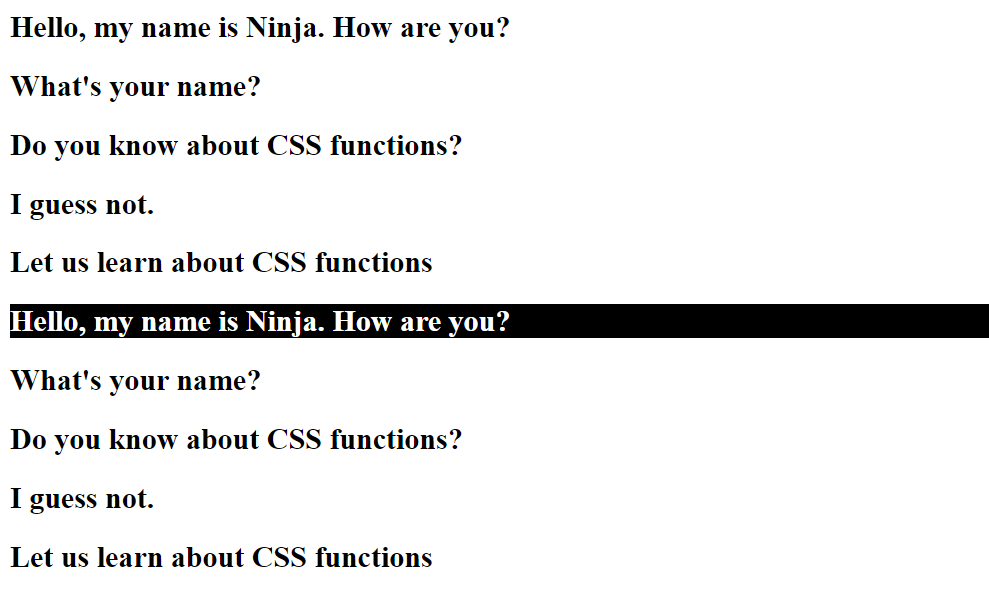
This method starts counting from the end and styles the elements accordingly.
For example, in the code below, every 4th element from the end is styled.
HTML
<!DOCTYPE html>
<html lang="en">
  <head>
    <meta charset="UTF-8" />
    <meta http-equiv="X-UA-Compatible" content="IE=edge" />
    <meta name="viewport" content="width=device-width, initial-scale=1.0" />
    <title>Coding Ninja</title>
    <link rel="stylesheet" href="style.css" />
  </head>
  <body>
    <h2 class="first-para">Hello, my name is Ninja. How are you?</h2>
    <h2 class="second-para">What's your name?</h2>
    <h2 class="third-para">Do you know about CSS functions?</h2>
    <h2 class="fourth-para">I guess not.</h2>
    <h2 class="fifth-para">Let us learn about CSS functions</h2>
    <h2 class="first-para">Hello, my name is Ninja. How are you?</h2>
    <h2 class="second-para">What's your name?</h2>
    <h2 class="third-para">Do you know about CSS functions?</h2>
    <h2 class="fourth-para">I guess not.</h2>
    <h2 class="fifth-para">Let us learn about CSS functions</h2>
  </body>
</html>
Here, we can specify the type of the element, for example, even or odd. We can also mention the position of the element.
Example 1
HTML
<!DOCTYPE html>
<html lang="en">
  <head>
    <meta charset="UTF-8" />
    <meta http-equiv="X-UA-Compatible" content="IE=edge" />
    <meta name="viewport" content="width=device-width, initial-scale=1.0" />
    <title>Coding Ninja</title>
    <link rel="stylesheet" href="style.css" />
  </head>
  <body>
    <h2 class="first-para">Hello, my name is Ninja. How are you?</h2>
    <h2 class="second-para">What's your name?</h2>
    <h2 class="third-para">Do you know about CSS functions?</h2>
    <h2 class="fourth-para">I guess not.</h2>
    <h2 class="fifth-para">Let us learn about CSS functions</h2>
    <h2 class="first-para">Hello, my name is Ninja. How are you?</h2>
    <h2 class="second-para">What's your name?</h2>
    <h2 class="third-para">Do you know about CSS functions?</h2>
    <h2 class="fourth-para">I guess not.</h2>
    <h2 class="fifth-para">Let us learn about CSS functions</h2>
  </body>
</html>
<!DOCTYPE html>
<html lang="en">
  <head>
    <meta charset="UTF-8" />
    <meta http-equiv="X-UA-Compatible" content="IE=edge" />
    <meta name="viewport" content="width=device-width, initial-scale=1.0" />
    <title>Coding Ninja</title>
    <link rel="stylesheet" href="style.css" />
  </head>
  <body>
    <h2 class="first-para">Hello, my name is Ninja. How are you?</h2>
    <h2 class="second-para">What's your name?</h2>
    <h2 class="third-para">Do you know about CSS functions?</h2>
    <h2 class="fourth-para">I guess not.</h2>
    <h2 class="fifth-para">Let us learn about CSS functions</h2>
    <h2 class="first-para">Hello, my name is Ninja. How are you?</h2>
    <h2 class="second-para">What's your name?</h2>
    <h2 class="third-para">Do you know about CSS functions?</h2>
    <h2 class="fourth-para">I guess not.</h2>
    <h2 class="fifth-para">Let us learn about CSS functions</h2>
  </body>
</html>
This is similar to nth-last-child, where the elements are counted from the end and styled accordingly.
For example, the 5th element from the end, i.e., the first element, will be styled only in the code below.
HTML
<!DOCTYPE html>
<html lang="en">
  <head>
    <meta charset="UTF-8" />
    <meta http-equiv="X-UA-Compatible" content="IE=edge" />
    <meta name="viewport" content="width=device-width, initial-scale=1.0" />
    <title>Coding Ninja</title>
    <link rel="stylesheet" href="style.css" />
  </head>
  <body>
    <h2 class="first-para">Hello, my name is Ninja. How are you?</h2>
    <h2 class="second-para">What's your name?</h2>
    <h2 class="third-para">Do you know about CSS functions?</h2>
    <h2 class="fourth-para">I guess not.</h2>
    <h2 class="fifth-para">Let us learn about CSS functions</h2>
    <h2 class="first-para">Hello, my name is Ninja. How are you?</h2>
    <h2 class="second-para">What's your name?</h2>
    <h2 class="third-para">Do you know about CSS functions?</h2>
    <h2 class="fourth-para">I guess not.</h2>
    <h2 class="fifth-para">Let us learn about CSS functions</h2>
  </body>
</html>
In the introduction, we saw a picture of Facebook without any styling. None of the elements was scaled or arranged correctly on the page. So how do we scale the elements?
By using the sizing and scaling functions, of course!
Let’s see the different sizing and scaling functions in CSS.
The scaleX( ), scaleY( ), scaleZ( ), scale3d( ) and scale( ) are used to scale elements along the x-axis, y-axis, z-axis, all three axes and in a 2-d plane, respectively.
The value given as a parameter determines the fraction of scaling.
The code below shows how the scaleX( ) function scales elements along the x-axis.
HTML
<!DOCTYPE html>
<html lang="en">
  <head>
    <meta charset="UTF-8" />
    <meta http-equiv="X-UA-Compatible" content="IE=edge" />
    <meta name="viewport" content="width=device-width, initial-scale=1.0" />
    <title>Coding Ninja</title>
    <link rel="stylesheet" href="style.css" />
  </head>
  <body>
    <h2 class="first-para">Hello, my name is Ninja. How are you?</h2>
    <h2 class="second-para">What's your name?</h2>
    <h2 class="third-para">Do you know about CSS functions?</h2>
    <h2 class="fourth-para">I guess not.</h2>
    <h2 class="fifth-para">Let us learn about CSS functions</h2>
    <h2 class="first-para">Hello, my name is Ninja. How are you?</h2>
    <h2 class="second-para">What's your name?</h2>
    <h2 class="third-para">Do you know about CSS functions?</h2>
    <h2 class="fourth-para">I guess not.</h2>
    <h2 class="fifth-para">Let us learn about CSS functions</h2>
  </body>
</html>
CSS
h2
{
    transform: scaleX(0.7);
}
OUTPUT
translateX( ), translateY(), translateZ(), translate3d(), and translate()
Similar to the scale function, the translate function can translate any element along all three axes’ individually and simultaneously and in a 2-d plane.
A percentage or number of pixels determining the translation is passed as a parameter to the function.
An example of translateX( ) is shown below.
HTML
<!DOCTYPE html>
<html lang="en">
  <head>
    <meta charset="UTF-8" />
    <meta http-equiv="X-UA-Compatible" content="IE=edge" />
    <meta name="viewport" content="width=device-width, initial-scale=1.0" />
    <title>Coding Ninja</title>
    <link rel="stylesheet" href="style.css" />
  </head>
  <body>
    <h2 class="first-para">Hello, my name is Ninja. How are you?</h2>
    <h2 class="second-para">What's your name?</h2>
    <h2 class="third-para">Do you know about CSS functions?</h2>
    <h2 class="fourth-para">I guess not.</h2>
    <h2 class="fifth-para">Let us learn about CSS functions</h2>
    <h2 class="first-para">Hello, my name is Ninja. How are you?</h2>
    <h2 class="second-para">What's your name?</h2>
    <h2 class="third-para">Do you know about CSS functions?</h2>
    <h2 class="fourth-para">I guess not.</h2>
    <h2 class="fifth-para">Let us learn about CSS functions</h2>
  </body>
</html>
CSS
h2
{
    transform: translate(50px);
}
OUTPUT
Here, the heading is translated along the x-axis by 50 pixels.
rotateX(), rotateY(), rotateZ(), rotate3d(), and rotate()
These functions are used to rotate an element along the x-axis, y-axis, z-axis, all three axes’ or in a 2-D plane.
In the example below, we rotate div2 along the x-axis to produce a 3-D effect using the perspective attribute.
Here is a list of some commonly used CSS functions:
calc() - performs calculations to determine property values
rgb() - sets a color using red, green, and blue values
rgba() - sets a color using red, green, blue, and alpha (opacity) values
hsl() - sets a color using hue, saturation, and lightness values
hsla() - sets a color using hue, saturation, lightness, and alpha (opacity) values
url() - sets a background image or other resources
linear-gradient() - creates a gradient color effect
radial-gradient() - creates a circular gradient color effect
var() - sets a variable value
clamp() - creates a range with a minimum, preferred, and maximum value
min() - sets the smallest value among a set of values
max() - sets the largest value among a set of values
attr() - sets the value of an HTML attribute as a CSS value.
transform() - applies transformations to an element such as rotate, scale, skew, and translate
transition() - sets the transition effect for an element when its properties change
animation() - sets an animation effect for an element
cubic-bezier() - creates a custom cubic-bezier timing function for animations
repeat() - repeats an element a certain number of times, either vertically or horizontally
calc() - performs calculations to determine property values
rem() - sets a font-size relative to the root element's font-size
vw() - sets a length relative to the width of the viewport
vh() - sets a length relative to the height of the viewport
rotate() - rotates an element around a specified point
scale() - scales an element up or down in size
skew() - skews an element along the X and/or Y axis
translate() - moves an element horizontally and/or vertically
In the next part we will discuss more CSS Function.
Frequently Asked Questions
What are CSS functions?
CSS functions are predefined functions in CSS that enhance the presentation of web pages by altering colours, layout, and fonts.
How are CSS functions different from regular functions?
They are always predefined. They always give an output in the form of changes in the presentation of web pages.
What are the advantages of CSS functions?
Functions in CSS can be easily used to style web pages. Moreover, they also facilitate reusability like normal functions.
Name some common CSS functions.
Some common functions in CSS are: rgb( ), scale( ), translate( ), rotate( ) and skew( ).
What is the difference between rgb( ) and rgba( )?
The rgb( ) function requires only three parameters - the intensity of red, green and blue, respectively. In contrast, the rgba( ) function requires an additional parameter alpha that determines the opacity of an element.
Conclusion
In this article, we learn what CSS functions are. We also saw some different kinds of functions in CSS and examples of them, but they are not the only functions available in CSS.
There are so many more functions about which we don’t know yet. So without further ado, let’s learn about them in the second part of this article - CSS Functions Part 2.





















 7+ registered

