Do you think IIT Guwahati certified course can help you in your career?
Introduction
We know that directives are unique tokens in the Markup language that asks the DOM elements to do something. So, wouldn’t it be cool if we could make our custom directives! Everybody loves things custom-designed for them, as they are unique and cater to their particular needs. Similarly, in Vue, we can create custom directives that will help us make an element fulfill specific requirements or changes. Let us dive deeper into the topic of Custom Directives.
Custom Directives and how is it different from Built-in Directives
Let us see through a basic coding example how custom directives are different from built-in directives:
src/components/Intro.vue
The first Heading 2 is styled using the built-in directive v-bind. We have given the style object to the v-bind: style. On the other hand, the second Heading 2 is styled using a custom directive called v-magic. The components accept a directives option where you can define your custom directives. As you can see, the purpose of both the directives is the same, but the syntax is quite different.
<template>
 <div>
   <div v-bind:style="{background:'purple',color:'white'}">
   <h2>I am an Heading 2</h2>
   </div>
   <div v-magic>
   <h2>I am the Heading 2 to demonstrate custom directives</h2>
   </div>
</div>
</template>
<script>
 export default{
   directives:{
     magic:{
       mounted(el) {
       el.style.background="purple"
       el.style.color="white"
       }
     }
   }
 }
</script>
src/App.vue
Let’s import the above component in the App.vue and use it.
In the above code, you saw that we used a function called mounted while defining our custom directive v-magic. That was an example of a hook function. The directive definition object can have several hook functions. The following is the list of these hook functions:
created: invoked before any attributes or event listeners are applied to the bound element. This is handy when the directive requires event listeners to be attached that must be called before typical v-on event listeners.
beforeMount: When the directive is first attached to the element, this method is invoked before the parent component is mounted.
mounted: When the parent component of the bound element is mounted, this method is invoked.
beforeUpdate: called before the VNode of the contained component is updated.
updated: invoked when the contained component's VNode and its children's VNodes modified.
beforeUnmount: invoked before the parent component of the bound element is unmounted
unmounted: When the directive is unbound from the element, and the parent component is unmounted, unmounted is called only once.
Dynamic Directive Arguments in Custom Directives
In the previous coding example, the built-in directive we used was v-bind. The v-bind accepted an argument, which was the style. This argument and even the style can be changed dynamically. For instance, it could be v-bind: class. Using v-bind: class, we can make a particular style class active for that element based on certain conditions. Similarly, custom directives can also come with dynamic arguments and values. Firstly, let us have a look at dynamic values for custom directives through the program given below:
src/components/DynamicValues.vue
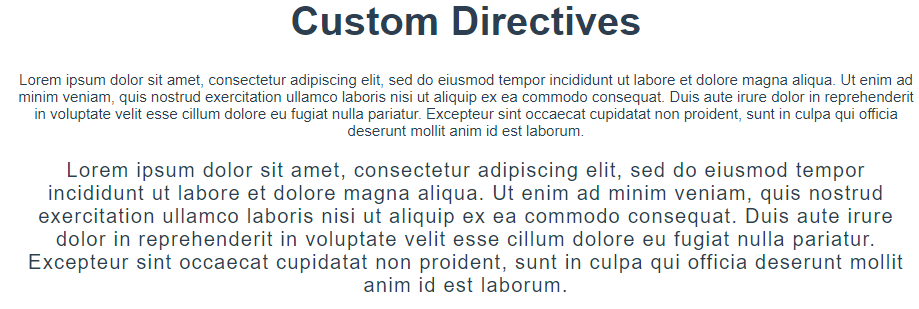
In the code below, changing the value of the custom directive (v-fsize) will change the font size of the second paragraph.
Import the above component to App.vue, and you will get the following:
Now let us look at the code for the dynamic arguments in custom directives.
src/components/DynamicArgs.vue
The following code demonstrates how we can use different arguments for the same custom directives. We can see that the argument of v-length for the first paragraph is font size and the argument of v-length for the second paragraph is letter spacing.
In the first code of this article, the built-in directive v-bind: style was given an object as its value. Similarly, we can make custom directives with Javascript objects as their value. Let us look at it through an example:
src/components/Object.vue
The custom directive v-stylish is given the object {color:'pink',background:'blue',fontSize:20} as its value.
<template>
 <div>
   <p v-stylish="{color:'pink',background:'blue',fontSize:20}">Lorem ipsum text…</p>
 </div>
</template>
<script>
 export default{
   directives:{
     stylish:{
       mounted(el,binding){
         el.style.color=binding.value.color
         el.style.background=binding.value.background
         el.style.fontSize=binding.value.fontSize+"px"
       }
     }
   }
 }
</script>
After import the Object.vue in the App.vue and running the program, you will get the following output:
Using custom directives on components
We can use custom directives on components too. This is demonstrated in the following code:
src/components/Para.vue
<template>
 <div>
   <p>How are you?</p>
   <h4>AWESOME!</h4>
 </div>
</template>
src/App.vue
We have defined the custom directive inside the App.vue so that we can use it on imported components.
<template>
 <div>
   <h1>Custom Directives</h1>
   <Para v-pcolor/>
 </div>
</template>

<script>
import Para from "./components/Para.vue"
export default{
 components:{
   Para
 },
 directives:{
   pcolor:{
     mounted(el){
       el.style.background="gold"
     }
   }
 }
}
</script>
FAQs
In Vue, what is a custom directive? Directives are special attributes that begin with the letter v. When the value of a directive's expression changes, the directive's role is to reactively apply side effects to the DOM.
When would a custom directive be useful? When no additional template is required, attribute directives, also known as custom directives, are utilised. The directive has the ability to run logic and make visual modifications to the element to which it is applied. If you want to change the behaviour or style of existing HTML elements without creating a new component, this is a good option.
What's the difference between a directive and a component? Components are used to divide an application into smaller parts. Directive, on the other hand, is used to create reusable components and is more behavior-oriented.
Key Takeaways
From this article, we learned about Custom Directives. We saw the difference in the syntax of custom directives and built-in directives. We learned how can we use hook functions in custom directives. We looked at dynamic arguments and values in the custom directives. We saw the shorthand function for describing a custom directive. We observed that we can use objects as values for custom directives. We got to know that we can also have custom directives for components. We saw the practical implementation of all of them.
But this is not enough; you need something extra to excel in Vue.js truly. If you want to learn more about Vue.js, you can read our articles on Vue.js or take our highly curated Web Development course.







 1+ registered

