




Introduction
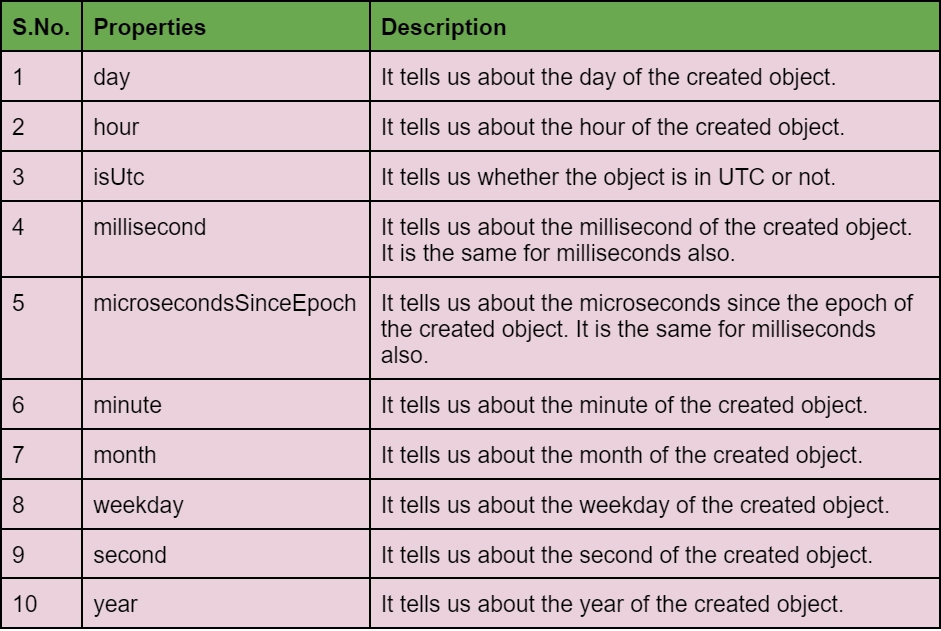
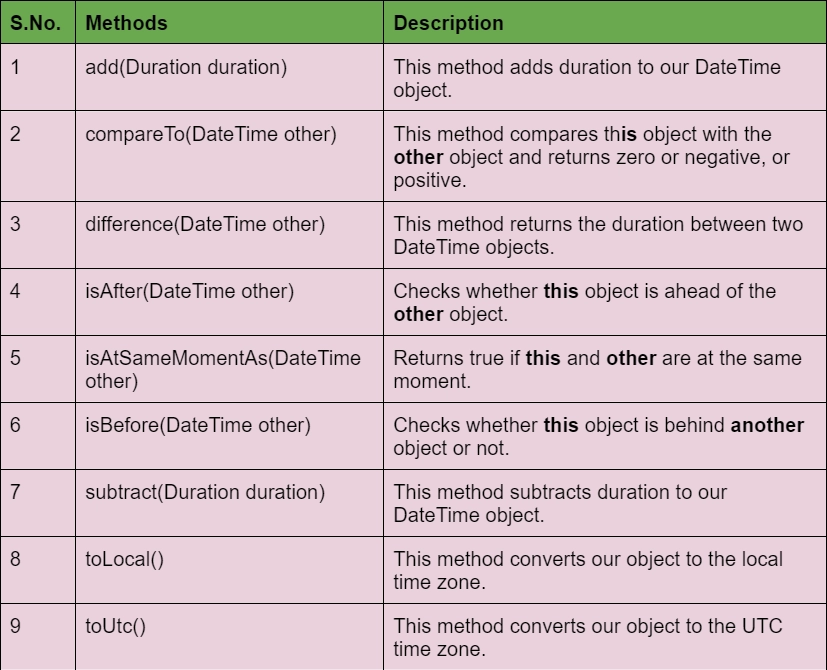
In this article, we are going to learn about the DateTime class in dart. Dart provides us with a beneficial built-in class to deal with the date and time. This class has a lot of constructors, properties, and methods to access the date and time. The date and time we get are either in the form of the UTC convention or maybe in the local time zone of the computer when the object is created. Well, that depends upon the constructor that we use to create the object.
Constructors of DateTime in Dart
DateTime class provides us with a number of constructors to create the objects using different time frames, such as:
a. DateTime.now constructor creates an instance of DateTime using the current date and time in the present time zone.
Syntax:
DateTime.now();
b. DateTime constructor is used to creating an instance, using the specified year, month, day, etc.
Syntax:
DateTime(int year, [int month = 1, int day = 1, int hour = 0, int minute = 0, int second = 0, int millisecond = 0, int microsecond = 0]);
c. DateTime.utc constructor does the same thing as the above constructor but uses the UTC time zone.
Syntax:
DateTime.utc(int year, [int month = 1, int day = 1, int hour = 0, int minute = 0, int second = 0, int millisecond = 0, int microsecond = 0]);
d. Now, there are two constructors which create instances using the milli/ microseconds since the epoch. Another parameter tells us about the time zone, whether it is in UTC or local time zone.
Syntax:
DateTime.fromMillisecondsSinceEpoch(int millisecondsSinceEpoch, {bool isUtc: false});

//And

DateTime.fromMicrosecondsSinceEpoch(int microsecondsSinceEpoch, {bool isUtc: false});
Example: In this example, we are using all the constructors discussed above.
Code:
void main()
{
  // Creating an instance of current date and time.
  var curr = DateTime.now();
  print("Current data: $curr");

  // Specify the date as a UTC time.
  var utc = DateTime.utc(2022);
  print("UTC data: $utc");


  // Create a new DateTime with the local time zone.
  var local = DateTime(1999); // January 1, 2000
  print("Local time: $local");


  // Specifying the year, month and day.
  local = DateTime(1999, 10, 14);
  print("Local time with more params: $local");


  // Specifying a date and time in micro sec. since the Unix epoch.
  var epoch = DateTime.fromMillisecondsSinceEpoch(946684800000,isUtc: true);
  print("Time since epoch: $epoch");
}
Output:
Current data: 2022-05-01 15:56:35.652
UTC data: 2022-01-01 00:00:00.000Z
Local time: 1999-01-01 00:00:00.000
Local time with more params: 1999-10-14 00:00:00.000
Time since epoch: 2000-01-01 00:00:00.000Z
Explanation: Here, we made three objects "curr" which has the current date and time, "utc" which has the UTC time, "local" which shows the local time and "epoch" which shows the date time million seconds since epoch.


 1+ registered

