Get a skill gap analysis, personalised roadmap, and AI-powered resume optimisation.
Introduction
Hey Readers!!
For every lock, there is a key to access it. In RDBMS, to unlock or access the data, we require keys like the primary key, foreign key, etc. Keys are the fundamental requirement for creating relationships between tables.
Suppose you want to create a relationship between tables in RDBMS; then how do you do that? That is where the concept of primary key and foreign key comes into play.
Let's dive into this article to learn about the difference between primary key and foreign key.
We are already familiar with the concept of primary and foreign keys, which are used to establish the relationship between two tables. But now the question is how they are different from each other. So, let's get started by learning the difference between primary key and foreign key.
A Brief Introduction to Primary Key
We have to discuss the difference between primary key and foreign key. So we should start by knowing the primary key first. In DBMS, the primary key is defined as the unique value of the table in each row. A table always has a unique primary key. Also, it helps to access the data in the database table.
Let’s understand this more by taking an example:
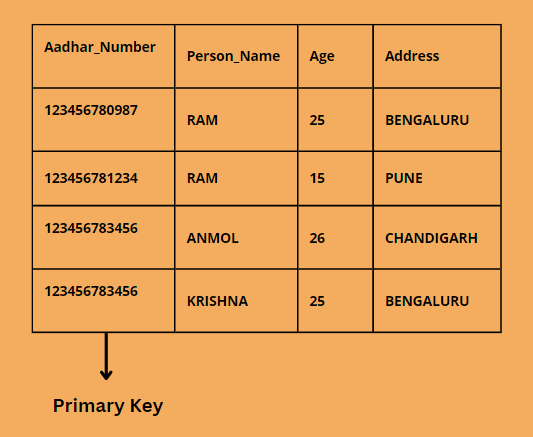
There is a table named Info, with columns named Person_Name, Age, Address, and Aadhar_Number.
Person_Name
Age
Address
Aadhar_Number
In this example, multiple people can have the same name, like Ram, or the age can be the same for different people. So how do you tell that the Ram of age 15 and the Ram of age 25 are two different people? For that, we can use an Aadhar number.
An Aadhaar number is a unique number used to identify any person. Two people can have the same name and age but have different Aadhaar numbers, which help to differentiate and identify two different people.
So in this table, the Aadhar number will be the primary key.
In the next section of the article, we will discuss the features of the primary key.
Features of Primary Key
The primary key must contain a unique value for each row of the table.
CREATE TABLE Information(
  Aadhar_Number int NOT NULL,
  Person_Name varchar(255) NOT NULL,
  Age int (255),
  Address varchar(255),
  PRIMARY KEY (Aadhar_Number)
);
INSERT INTO Information
VALUES ("123456780987","RAM",25,"BENGALURU");
INSERT INTO Information
VALUES ("123456781234","RAM",15,"PUNE");
INSERT INTO Information
VALUES ("123456783456","ANMOL",26,"CHANDIGARH");
INSERT INTO Information
VALUES ("123098780987","KRISHNA",25,"BENGALURU");
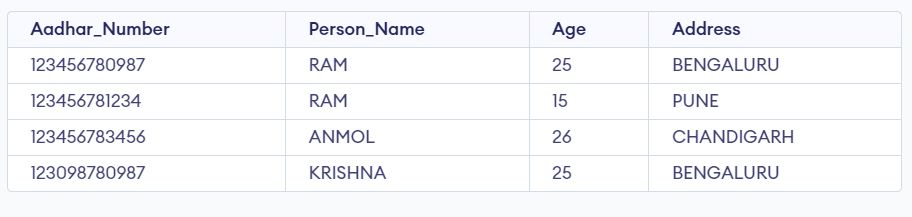
SELECT * FROM Information;
Output
A Brief Introduction to Foreign Key
A foreign key is a column or columns that help in connecting two tables or in establishing a relationship between the tables. The foreign key of Table A is the primary key of Table B. The table consisting of the foreign key is called the child table, and the table consisting of the primary key is called the parent key.
Now let’s learn more about foreign keys with the help of an example.
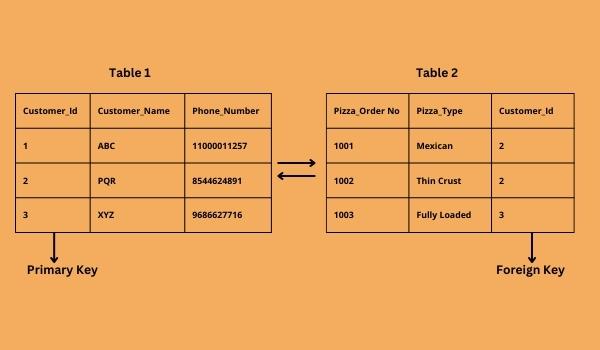
There are two tables, “Customer Details” and “Pizza Details”. The primary key of the Customer Details table is the Customer_Id, and we can also take Phone_Number as the primary key. But in this case, we’ve taken Customer_Id as the primary key.
Customer Details
Customer_Id
Customer_Name
Phone_Number
1
ABC
11000011257
2
PQR
8544624891
3
XYZ
9686627716
Pizza Details
Pizza_Order No
Pizza_Type
Customer_Id
1001
Mexican
2
1002
Thin Crust
2
1003
Fully Loaded
3
Now in the table Pizza Details, there is Customer_Id, which is the primary key of the Customer_Details. Now this will act as the foreign key for Pizza_Details. Now, with the help of foreign keys, we can easily fetch data from the tables.
Now let’s look into the features of Foreign Key.
Features of Foreign Key
A foreign key is a key that is used to connect two tables.
The foreign key can have multiple NULL values.
There are two tables in the concept of a foreign key, the table with the foreign key is the child table, and the table with the primary key is the parent table.
Syntax
CREATE TABLE table_name(
column1    datatype,
column2    datatype,
FOREIGN KEY [column1, column2...]
REFERENCES [ table name having primary key] (List of primary key) ...);
Code
CREATE TABLE Customer(
  Customer_Id int NOT NULL,
  Customer_Name varchar(255) NOT NULL,
  Phone_Number int (255),
  PRIMARY KEY (Customer_Id)
);
INSERT INTO Customer
VALUES (101,"ABC",9876543210);
INSERT INTO Customer
VALUES (102,"XYZ",9872345610);
INSERT INTO Customer
VALUES (103,"PQR",9987654330);


CREATE TABLE Pizza_Details (
  Pizza_Order_no int NOT NULL,
  Pizza_type varchar(255) NOT NULL,
  Customer_Id int,
  PRIMARY KEY (Pizza_Order_no),
  FOREIGN KEY (Customer_Id) REFERENCES Customer (Customer_Id)
);
INSERT INTO Pizza_Details
VALUES (1001,"Mexican",101);
INSERT INTO Pizza_Details
VALUES (1002,"Thin Crust",102);
INSERT INTO Pizza_Details
VALUES (1003,"Fully Loaded",103);
SELECT * FROM Customer;
SELECT * FROM Pizza_Details;
Output
Comparison Table between Primary and Foreign Key
Let's look at the comparison between the primary key and foreign key:
Primary Key
Foreign Key
The primary key identifies rows uniquely.
A foreign key is used to connect two tables.
The primary key is defined as the unique value of the table in each row.
It refers to a field in a table that serves as the primary key for a different table.
In a table, there can be only one primary key.
In a table, there can be multiple foreign keys.
The primary key cannot have null values.
Foreign keys can have several null values.
Deleting the primary key value from the parent table is impossible.
Foreign keys can be deleted.
The table cannot have the same value as the primary key.
Foreign keys can have duplicate values.
We can add as many values as we want in the Primary Key column.
In the Foreign Key column, we can insert values that are only present in the Primary Key column.
The column that contains the primary key in a table is called the parent table in a relationship.
The column that contains the foreign key in a table is called the child table in a relationship.
In the primary key, the indexing is done automatically, and the data is organized in the sequence of indexed clusters.
In Foreign Key, the indexing is not done automatically. The indexing can be created manually if needed.
Frequently Asked Question
What is the major difference between primary key and foreign key?
The main difference between primary key and foreign keys is that the primary key defines the uniqueness of the data. In contrast, the foreign key is used to establish the relationship between the tables.
Can a primary key be a foreign key?
Yes, a primary key can be a foreign key if it connects two tables in the database. If Table A has a primary key and is also a foreign key for Table B, this makes the relationship between Table A and Table.
Can the primary key be NULL?
No, the primary key cannot be NULL because the primary key is used to identify the unique records in the table. But if the primary key's value is null, multiple rows can have unknown, unidentified values.
Why are keys used in DBMS?
Keys are used to identifying all the records uniquely in a table because multiple records may be the same. Keys are important in the database because they define the integrity of the data and help maintain its accuracy.
Why is a foreign key important?
The foreign key is important in RDBMS because it helps in connecting two tables or in establishing a relationship between the tables so that the user can access all the records from both tables.
Conclusion
In this article, we learnt about the Primary Key and Foreign key and the difference between Primary Key and Foreign key.
We hope this article helped you in your learning. If you want to learn more, refer to








 7+ registered

