Do you think IIT Guwahati certified course can help you in your career?
Introduction
Have you ever wondered how R's variables, functions, and packages are managed? How does R avoid naming conflicts and properly organize code elements? The concept of environments holds the answer to the solution.
Environments are important in R programming because they provide a foundation for scoping, encapsulation, and package building.
This article will help you understand the importance of environments in R, the creation of new environments in R, and the process of removing and searching for variables from the environment in R.
Now let us dive into the topic to explore more about the Environment in R.
What is R Environment?
The environment in R is a data structure that stores objects like variables, functions, and data frames. It acts as a container for these objects, allowing them to be accessed and controlled. Consider an environment to be a workspace where you can organize and track your R objects. Each environment has its own set of items and can hierarchically interact with other environments.
How does the Environment differ from the List?
The environment in R differs from the List in the following ways:
Environments have scoping rules, whereas lists do not.
Environments are meant for managing namespaces and hierarchical relationships, whereas lists are meant for more general-purpose storage.
Environments provide systematic organization and object lookup procedures, whereas lists allow flexibility without scoping.
Environments are often used for package namespaces and function environments, although lists are suitable for storing arbitrary collections of items.
Alright!! Let us look at the procedure of creating a new environment.
Use the new.env() method in R to create a new environment. Code:
# Create a new environment
my_env <- new.env()

# Assign objects to the environment
my_env$x <- 10
my_env$y <- "Welcome to Coding Ninjas!!"

# Access objects within the environment
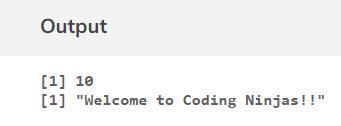
print(my_env$x)   # Output: 10
print(my_env$y)   # Output: Welcome to Coding Ninjas!!
Output:
Explanation:
Using the new.env() function, a new environment named my_env is created. Within the environment, two objects, x, and y, are assigned values. 10 is the value of x, and "Hey Ninjas!!" is the value of y. We can access and print the values of these objects in the environment by using the $ operator.
List of all the Environments
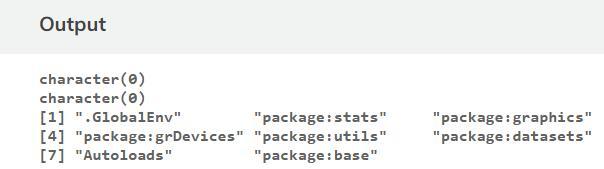
Every environment in R except for one has a parent environment. This is an empty environment with no parents. You can use thels() method to list all environments. It displays the environment names.
The search() function also returns a list of environments identified in the search path. You can list all variable bindings within a given environment by calling ls() with that environment as a parameter.
Let us clearly understand this with the help of an example.
Code:
# R program to illustrate Environments in R

# Prints all the bindings and environments
# attached to Global Environment
ls()

# Create a new environment
newEnv <- new.env()

# Prints bindings of newEnv
ls(newEnv)

# Lists all the environments in the search path
search()
Output:
Explanation:
In this code, ls() prints the bindings and environments attached to the Global Environment without any arguments. ls(newEnv) returns a list of the bindings in the newEnv environment. Finally, search() returns a list of all the environments in the search path.
Now let us briefly look at the environment in the above output.
Globalenv: The interactive workspace is the globalenv() function. This is the normal working environment for you. The last package you attached to the global environment with library() or require() is the parent of the global environment.
Package grDevices: The grDevices package in R is part of the base R distribution and contains functions for managing graphics devices. It provides functionality for building, modifying, and controlling graphical devices used in R to generate plots and graphics.
How to Remove a Variable from an Environment
The rm() function in R can be used to remove a variable from an environment.
Let us look at the syntax ofthe rm() function now.
list: As a character vector, specify the names of the variables you want to remove.
Denver: Specify the environment from which the variables should be removed.
Code:
# Create a new environment
env <- new.env()

# Assign variables
env$x <- 10
env$y <- 20
env$z <- 30

# Removing variable env
rm(env)

# List
ls()
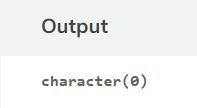
Output:
Explanation:
In the above code new.env() function is used to create a new environment named env, and then we assign values to different variables, and then the new environment env is removed by using the rm() function. Then the ls() function is used to list all the remaining variables and environment.
How to Search for the Variables in an Environment
The ls() function in R is used to search for variables within an environment.
Code:
# Create a new environment
my_env <- new.env()

# Assign variables
my_env$x <- 100
my_env$y <- 200
my_env$z <- 300

# Search for variables in my_env
variables <- ls(envir = my_env)

# Print the variables found
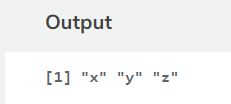
print(variables)
Output:
Explanation:
In this code, we create a new environment calledmy_envand assign variables x, y, and z to it. To locate variables within my_env, we use thels() function with theenvir option set to my_env. The function will return a character vector containing the names of the variables detected in the environment. Finally, we use print() to output the variables.
Frequently Asked Question
What is the programming environment of R?
R is a free software environment and programming language for statistical computing and graphics that is widely used by data analysts, data scientists, and statisticians. This Specialisation focuses on R software development for the creation of data science tools.
What is the use of the environment in R?
R's environment() function returns the environment for a particular function or formula. An environment is a collection of objects like functions and variables. An environment is built whenever we're using the R interpreter.
How do you set an environment in R?
The environment() function in R can be used to create an environment. We can create a new environment or assign an existing one to a variable or function by assigning the desired environment, such as env - new.env().
Conclusion
In this article, you have learned about the environments in R, How does Environment differ from the List, the steps of creating a new environment, the List of all the environments, the steps of removing a variable, and searching for the variable in the environment.
We hope this article briefly helped you learn about the Environments in R.
If you want to learn more, refer to these articles.







 1+ registered

