Do you think IIT Guwahati certified course can help you in your career?
Introduction
Ruby is an entirely object-oriented, open-source programming language. It has many in-built operators who have different operations. These are mainly Unary operators, arithmetic operators, bitwise operators, logical operators, ternary operators, assignment operators, comparison operators, and range operators.
This article will consider Ruby's equality operators, which check equality in various cases. Let us go through them in detail.
Equality operators
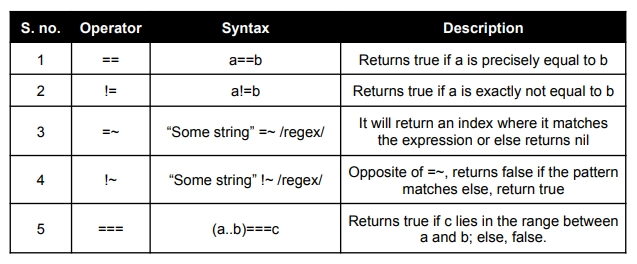
These are used for checking equality in various conditions in Ruby. It contains ==, ===, !=, ~= and !~. The following table defines the use of these operators.
We will study each operator in detail below.
== Operator
This operator returns true if both the operand's values are the same; else, it returns false.
Example
a = "Hello"
b = "Hello"
puts a == b;
Output:
true
=== Operator
This operator is used with when/case statements. It returns true if the value is in a given range or false.
Examples
Example 1
This example is based on the range use of the === operator.
a=1;
b=5;
c=3;
puts (a..b)===c;
Output:
true
Example 2
This example is based on the implicit use of the === Operator.
marks = 15
case marks
  when 40..90
    puts "pass"
  else
    puts "fail"
end
Output:
fail
!= Operator
This returns true if two operand’s values are exactly not the same; else, it returns false.
Example
a=1;
b=2;
puts a!=b;
Output:
true
=~ Operator
A string of characters known as a regular expression defines a search pattern, typically used in string pattern matching. Ruby regular expressions, often called Ruby regex, enable us to identify specific patterns inside a string. Validation and parsing are two applications for ruby regex. Regex expression declarations in Ruby are made between two forward slashes.
This operator returns the index of the first occurrence of the regex in the string; if present else returns nil.
Note: In the boolean value, nil is said to be false, and any value other than nil is taken as true.
Example
puts "Hello there, Welcome to coding ninjas" =~ /Welcome/
puts "Hello there, Welcome to coding ninjas" =~ /Hi/
Output:
13
       #nil
Various Regular Expressions:
Character ranges can be specified using a variety of short expressions:
\w is same as [0-9 a-z A-Z]
\d is the equivalent to [0-9]
\s equals white space
\W anything which isn’t in [0-9 a-z A-Z]
\D for values that are not a number
\S for values that are not a space
Example
a = "xyz1"
b = "xyz"
puts a =~ /\d/;
puts b =~ /\d/;
Output:
3
     #nil
!~ Operator
It’s just the opposite of =~ operator. In this operator, firstly, input goes or calls =~ operator if it returns an index. This operator returns false; if =~ operator returns nil, then this operator returns true as output.
Note: This operator only returns true or false.
Example
a = "xyz1"
puts a !~ /1/;
b = "xyz"
puts b !~ /1/;
What is the difference between == and === operator?
‘==’ operator tests for equality of two values, whereas ‘===’ operator tests equality of a value in the given range.
What is the relation between the ‘=~’ and ‘!~’ operators?
‘!~’ operator works like the inverse of the ‘=~’ operator. It returns only boolean values based on the output of the ‘=~’ operator. If ‘=~’ returns an index, then ‘!~’ returns false or true.
Is there an operator to perform the inverse of ‘===’ like ‘!==’?
No, there is no such operator. To perform negation on the ‘===’ operator, you have to do it manually.
Conclusion
This article on Ruby extensively discussed Ruby's equality operators, including ==, ===, !=, =~, and !~. Initially, we briefly introduced the operators, their syntax, how to use them, and then each of these operators, along with an example.







 5+ registered

