Do you think IIT Guwahati certified course can help you in your career?
Introduction
The World Wide Web Consortium (W3C) formally launched HTML5, the Hypertext Markup Language's (HTML) fifth version, in 2014. Since then, it has been a standard for web development and has grown exponentially in popularity. This article covers the added features of html5 and details about earlier versions of html5, revealing its potent capabilities that have changed how we create and use digital content.
What is HTML?
HTML is an acronym for Hyper Text Markup Language, which is used in the creation of web pages and web applications. HyperText means "Text within a Text," which means HyperText is a way to link multiple web pages(HTML documents) together. A markup language is simply a computer language that makes texts more interactive and user-friendly.
The html5 is the latest version of HTML, and it's also the most famous version of HTML. It provides developers with an edge over previous versions and some unique features. In this blog, we will see some of the most important html5 features which make web development easier.
Earlier Versions of HTML
With emerging technologies and changing industry standards, HTML has evolved to meet these needs. Below is a brief overview of earlier HTML versions.
HTML 1.0
It is the first version of HTML language which was released in 1991. That was the basic version of HTML language with fewer features than the latest versions.
HTML 2.0
HTML 2.0 was developed in 1995 with the intention of improving the first version. This version supported features like forms with basic elements such as text boxes, buttons, etc.
HTML 3.2
After HTML 2.0, HTML 3.2 was released in 1997. This version provided extra features for form elements and could make tables. Another important feature in this version was support for CSS( Cascading Style Sheet). CSS delivers features that make HTML tags look better and style HTML elements. Most browsers nowadays also support this version.
HTML 4.01
This version came in 1999 and provided extra support for CSS. This version supported external styling. Now CSS files need not be embedded in the HTML file itself. Instead, They can be included in HTML. That helped to avoid writing repetitive styles for HTML pages.
HTML5
HTML5 is the current version of the HyperText Markup language, which was developed by two major organizations W3C (Worldwide Web Consortium) and WHATWG( Web Hypertext Application Technology Working Group), and is still under development. The html5 features are vast compared to the previous versions, with a lot of functionality. Now let's look at different html5 features in detail.
Top 11 HTML5 Features
There are several new features added to HTML5, let's look at some of them.
New Doctype
All HTML documents have a Doctype declaration. Doctype is not an HTML tag. Using the doctype declaration browsers, understand what document type to expect. In previous versions of HTML, the syntax to specify the doctype was long and hard to remember. But the HTML5 doctype is a lot easier to remember, and it is case-insensitive as well.
Example:
<!Doctype HTML>
<!-- both are valid - - >
<!doctype html>
New Semantic Tags Header and Footer
The header appears at the top of the page, and the footer appears at the bottom. Because of this, the semantic tag's need for <div> tag is eliminated for separating two parts.
The header mainly contains header elements, author information, icons, or logos, while the footer contains copyright information, contact information, back-to-top links, etc.
Example:
<header>
<!-- contents inside the header-->
</header>

<!-- rest of the code -->

<footer>
<!-- contents inside the footer-->
</footer>
Required Attribute
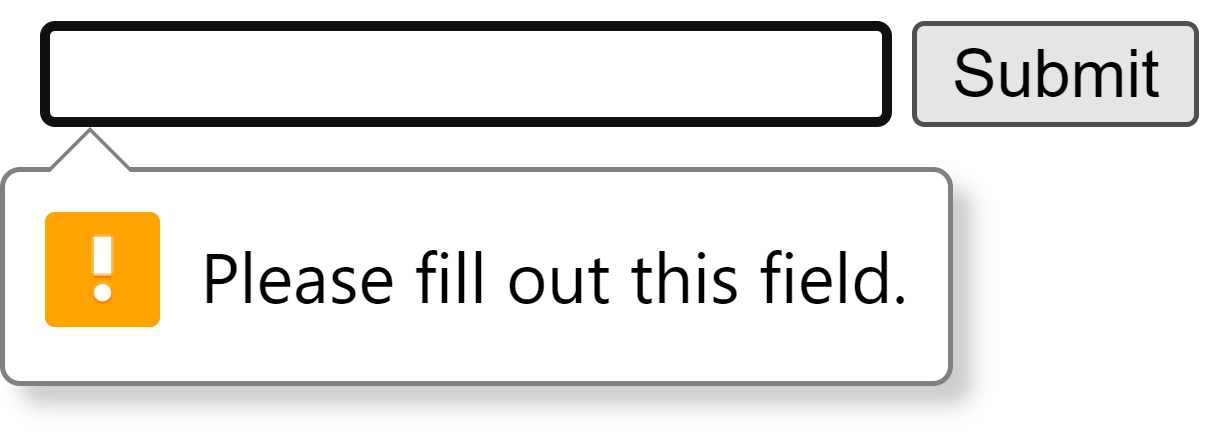
Forms in HTML have required attributes, which specify to the user whether a particular input is required or not.
In the above HTML code, A basic form takes an email address input from the user. This attribute will specify the user to enter the required information.
Video and Audio Tags
Developers can use this tag to insert videos and audio into their web pages for a better user experience.
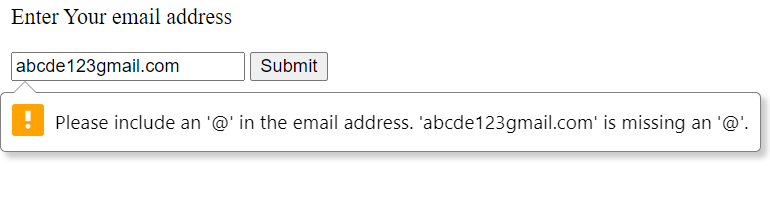
When we use type email for form input, the browser will validate the email address entered by the user. Older browsers were not compatible with this input type, and input would directly turn into a simple textbox.
The <figure> tag is used to mark up photos in a document, and <figcaption> defines a caption for the images. The <figcaption> is a child element of <figure>.
The <nav> tag is used for declaring the navigation sections on a web page. Only the major block of links should be put in the <nav> tag to let the browser know those are not just regular links. They are for the navigation section.
Example:
<!DOCTYPE html>
<html>
	<body>
		<h1> NAV TAG </h1>
		<nav>
			<a href="#"> Course |  </a>
			<a href="#"> Tutorial |</a>
			<a href="#"> Practice |</a>
			<a href="#"> Contests </a>
		</nav>
	</body>
</html>
OUTPUT:
Placeholder Attribute
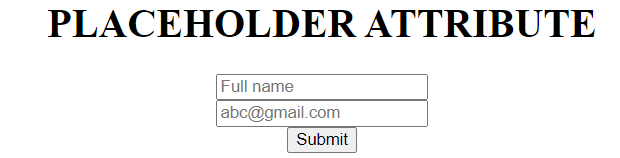
The placeholder attribute intends to give the user a hint about the input field or text area. The text we write in the placeholder will be displayed in the input field before the user enters a value. This html5 feature is helpful for the user interface.
The <canvas> tag is newly added to the html5. It is a rectangular area that is used to draw texts, boxes, gradients, and add images. By default, there is no border and text included in this tag.
One of the best html5 features is web storage. With the help of this html5 feature, web applications can store their data locally within the browser on the client side. This type of storage is the same as cookies, but it is faster and more secure than cookies. Another html5 feature is that we can store the data in the application cache and web SQL database.
Support for Dynamic Web Pages
Web servers send static web pages to the web browser directly without any data modification whenever the user requests the web page. But, with the dynamic web page feature of html5, different contents can be shown to different users while maintaining the same design and layout. This html5 feature is helpful in areas like stock price changes and weather prediction.
Several aspects which give a dynamic feel to web pages are:
Marks: Makes stuff attractive and draws the attention of the user to it.
Time: Display the current date and time on the web page
Meter: Indicates available space on the storage drive
Progress bar: Helps to track the progress assigned to you.
HTML5 includes new semantic elements, multimedia support (video/audio), improved parsing rules, and APIs for offline storage, local databases, and enhanced performance.
What are 4 benefits of HTML5?
HTML5 provides improved multimedia support, better performance, enhanced semantic structure, and built-in features for offline access and local storage, reducing reliance on plugins.
What is HTML and its features?
HTML (Hypertext Markup Language) is the standard language for creating web pages, with features including structural elements, hyperlinks, multimedia integration, and form controls.
What are the two types of HTML5?
HTML5 is primarily categorised into "HTML5 with JavaScript" for dynamic content and "HTML5 with CSS3" for enhanced styling, integrating both to create modern web applications.
Conclusion
This article discusses various html5 features. We also discussed previous versions of HTML and html5 feature differences and advancements. We hope this blog has helped you enhance your knowledge of HTML and html5 features. If you want to learn more, then check out our articles.










 9+ registered

