




Introduction
Internationalization refers to the term that a single app is available in different languages for the convenience of the local population. Almost eight of the top ten countries for app downloads do not adhere to the English language, and localized apps also generate more revenue. Keeping these two facts in mind, it becomes necessary to internationalize our app to reap the benefits of the local population which does not understand English.
Flutter has widgets and classes that help with internationalization and the flutter libraries are themselves internationalized. This article will explore various steps to internationalize our apps using MaterialApp and CupertinoApp classes.
Steps required to internationalize an app
Follow the steps given below to implement internationalization in your app.
1. First, add the following lines of code to the pubspec.yaml dependencies file, as shown below:
flutter_localizations:

   sdk: flutter

 intl: ^0.17.0-nullsafety.2
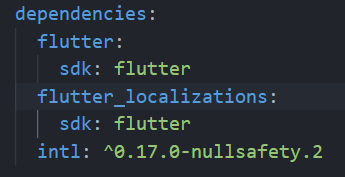
Add the following code to the flutter section of pubspec.yaml:
generate: true
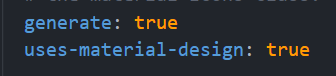
To get all the dependencies, click on the pub get.
2. Now, in the project's root directory, create a new yaml file (as l10n.yaml) with the following content:
arb-dir: lib/l10n

template-arb-file: app_en.arb

output-localization-file: app_localizations.dart
3. In the lib directory, create a directory called l10n and add the language files. We will be uploading statistics for two languages, English and Hindi, in this section.
a. Create a file with the name app_en.arb and paste the following code
{
  "helloNinja": "Coding Ninjas",

  "displayText":"Hello Ninja",

  "@helloNinja": {

      "description": "Hello Ninja"
  }
}
b. Create another file with the name app_hi.arb and paste the following code.
{
  "helloNinja": "कोडिंग निन्जास ",

  "displayText":"नमस्ते निंजा"
}
4. Now restart the app to produce the app localizations.dart file in the following directory:
<project_dir>.dart_tools/flutter_get/genl10n
5. Now we must write the following lines of code to internationalise the app -
- localizationsDelegates property: It defines all of the application's localised resources.
- onGeneratedTitle property: It is called when the widget has been configured, indicating that localization is enabled.
- supportedLocales property: It displays a list of the languages that the programme supports.




 40+ registered

