Do you think IIT Guwahati certified course can help you in your career?
Introduction
C is a general-purpose programming language closely associated with UNIX. After mastering flow control statements like if-else and for-loops, it's time to explore the goto statement in C. In this article, we will cover everything about goto statements, including examples, syntax, types, usage styles, effective applications, as well as their advantages and disadvantages.
What is a goto Statement in C?
The goto statement in C provides a way to transfer control to another part of the program. It is often used to exit from deeply nested loops or to handle errors by jumping to a specific label within the same function. Although goto can simplify certain coding scenarios, its use is generally discouraged due to potential issues with readability and maintainability of the code. Modern programming practices favor structured control flow constructs like loops and conditionals over goto statements.
In the above program, after initialising integer variables, the user is asked to input two numbers for the calculation of factorial. The variable ‘curr’ is set to the same value as the variable ‘start’. Then, a label called ‘print_line’ is defined.
If the value of ‘curr’ is greater than or equal to the value of ‘end’, the code enters the loop; and if the value is less than ‘end’, the value of ‘curr’ increments by 1 and the goto statement jumps back to the label.
Example 2- Calculating the factorial of a number
Let’s see a program for calculating the factorial of a number using a goto statement.
 #include<stdio.h>
 int main()
 {
   int num;
   long fact = 1;
   printf("Enter any number: ");
   scanf("%d",&num);

   if(num<0) goto end;
   for(int i=1; i<=num; i++)
   fact = fact * i;
   printf("Factorial of %d is = %ld", num, fact);
   end:

   return 0;
 }
In the above program, In the above code we used for loop and goto statement for calculating the factorial of the number 4.
Here, i = 1 and is incremented in every iteration till it reaches ‘num’. ‘Fact’ is multiplied by ‘i’ and then stored in ‘fact’, during each iteration.
Note: In cases where the input is large, there may be possibilities of integer overflow. This is due to the limitations of ‘int’. This overflow results in false or negative results. To overcome this problem, one should use a larger data type.
Let us take another example of the output.
Output
Enter any number: 22
Factorial of 22 is = -1250660718674968576
The `goto` statement in C allows jumping to labeled statements, disrupting the normal flow. It's discouraged due to complex, unreadable code. Favor structured constructs like loops and conditionals for better code organization and maintainability.
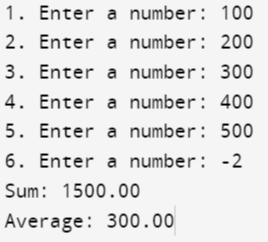
In this example, we will implement a goto statement where the program to calculate the sum and average of positive numbers will be created, and if the user enters a negative number, then the goto statement will be executed, and the sum and average are displayed.
#include <stdio.h>
int main() {
  int maxInput = 6, i;
  double number, average, sum = 0.0;

  for(i = 1; i <= maxInput; ++i) {
     printf("%d. Enter a number: ", i);
     scanf("%lf", &number);

   //  goto statement is added if the value is -ve number.
     if (number < 0.0)
        goto jump;

     sum += number;
  }
jump:
  average = sum / (i - 1);
  printf("Sum: %.2f\n", sum);
  printf("Average: %.2f", average);
  return 0;
}
The use of the goto statement is preferable when there is a need to break multiple loops using one single statement at the same time. It can also be used to transfer to any place within the program where the goto statement is called upon.
Should One Use goto?
If using a goto statement makes your code easier and simplifies your problem, then you're good to go ninja!
But there exists a considerable amount of debate about goto statements. Since goto statements make it harder to trace the control flow of a program, they often need to be fully understood by the programmers and are not that easy to modify. The use of goto makes the program buggy as well. Furthermore, the goto statement is hardly put to use.
Advantages of goto Statement in C
By using the goto statement, jump to a part above the current flow as well as any other part of the current flow.
Using a goto statement removes the need to use for and while loops in the program.
The runtime speed of the code efficiently increases when the goto statement is put in place to skip a particular part of the code after one condition is satisfied.
Using one got statement allows you to break out of all loops, unlike the multiple break statement.
Disadvantages of goto Statement in C
goto Statement makes the program hard to read and follow.
Further, it adds to the complexity of the code.
It makes the code buggy.
Multiple goto statements alter the program's flow and confuse the readers.
Frequently Asked Questions
What is the problem with the goto statement in C?
The goto statement is used to jump to and from places within a function. When there is a need to jump from one statement to another, jump from one block to another.
What is the purpose of the goto statement in C?
The purpose of the goto statement is that there is a need to break multiple loops using one single statement at the same time. It can also be used to transfer to any place within the program where the goto statement is called upon.
Can goto be used between functions?
Yes, a goto statement can be used between the functions in C, which can be used while skipping a few lines in the program, where a goto statement is used.
Why is goto not used in C
The goto statement is avoided in C because it can make code harder to read, understand, and maintain, leading to "spaghetti code."
How to avoid goto in C?
Avoid goto in C by using structured programming constructs like loops, conditionals, and functions to manage control flow and enhance code clarity.
Is goto a valid jump statement?
Yes, goto is a valid jump statement in C++. It transfers control to a labeled statement within the same function. However, it is rarely used as it can make code harder to read and maintain.
Conclusion
This article covered all the possible elements of goto Statements in c. We hope this article has helped you in your journey of learning. Here are some recommendations for you to visit our articles on different topics of C, such as









 1+ registered

