Do you think IIT Guwahati certified course can help you in your career?
Introduction
Widget allows us to interact with the user by using widgets. The placement of user interface elements on the page is managed by panels. By using widgets and panels, you may avoid writing special code for every browser because they function the same way on all of them.
The three following factors are considered by every user interface:
UI elements - The main visual elements that the user finally sees and interacts with are UI elements. We will go through a huge variety of widely used and common GWT elements, ranging from basic to complicated.
Layouts - They specify how UI elements should be arranged on the screen and give the GUI(Graphical User Interface) its final look and feel.
Behaviour - When a user interacts with UI elements, certain events actually occur.
Elements of GWT UI
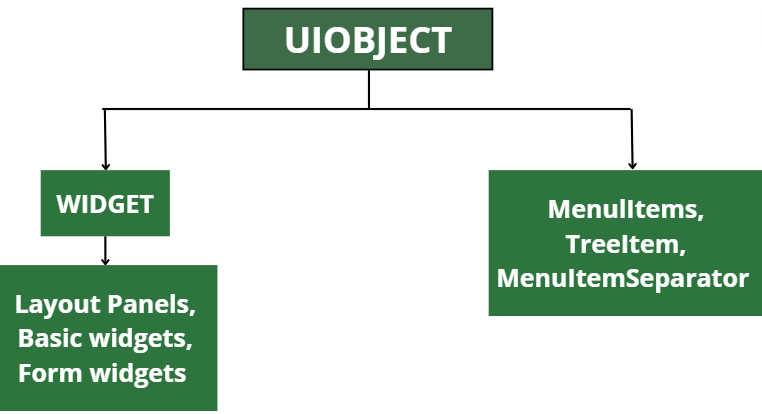
To create complex web-based user interfaces, the GWT library provides classes in a well-defined class structure. As illustrated below, every class in this component hierarchy is derived from the UIObject base class.
Each and every Basic UI widget inherits properties from the Widget class, which in turn inherits properties from UIObject.
Widget And Description
1
GWT UIOBJECT CLASS :
This widget has text in it that is not interpreted as HTML by the <div>element, resulting in block layout display.
2
GWT WIDGET CLASS :
This widget allows for the inclusion of HTML text, which is then displayed using a <div> element and displayed in block layout.
Basic Widgets
Here are a few significant Basic Widgets.
Widget And Description
1
Label :
This widget has text in it that is not interpreted as HTML by using <div>element, resulting in block layout presentation.
2
HTML :
This widget allows for the inclusion of HTML text, which is then displayed using a <div> element and presented in block layout.
3
Image :
At the given URL, this widget displays an image.
4
Anchor :
Simple <a> element is what this widget represents.
GWT - Form Widgets
Form widgets allow users to input data and provide them interaction capability with the application. Every Form widget inherits properties from the Widget class which in turn inherits properties from UIObject and Widget classes.
Following are some important Form Widgets −
Widget And Description
1
Button
It represents a standard push button.
2
PushButton
A normal push button with a unique style is what it represents.
3
ToggleButton
The toggle between the up and down states using this widget, which is a stylish stateful button.
4
CheckBox
This widget is a representation of the standard check box widget. Additionally, RadioButton uses this class as its base class.
5
RadioButton
This radio button widget is a representation of a mutually exclusive selection.
6
ListBox
This widget shows the user a list of options as either a list box or a drop-down list.
7
SuggestBox
The text box or text area represented by this widget displays a pre-configured list of options that match to the user's input. One SuggestOracle is connected to each SuggestBox. Given a specified query string, the SuggestOracle is used to suggest a set of options.
8
TextBox
This widget is representing a text box with one line of text.
9
PasswordTextBox
This widget represents a text box that visually masks its input to prevent the eavesdropping.
10
TextArea
This widget represents a text box that allows multiple lines of text to be entered.
11
RichTextArea
This widget is a robust text editor with sophisticated styling and formatting options.
12
FileUpload
The HTML input type='file'> element is wrapped by this widget.
13
Hidden
An HTML form's hidden field is represented using this widget.
GWT - Complex Widgets
"Complex widgets" give users more advanced application interaction capabilities. Each Complex widget has properties inherited from the Widget class, which itself has properties inherited from UIObject.
Following are some important Complex Widgets −
Widget And Description
1
Tree
A typical hierarchical tree widget is represented by this widget. The user can open, close, and select TreeItems from a hierarchy within the tree.
2
MenuBar
A typical menu bar widget is represented by this widget. Any number of menu items that can either fire a Command or open a cascaded menu bar can be found in a menu bar.
3
DatePicker
A standard GWT date picker is represented by this widget.
4
CellTree
This widget represents a tree's view. This widget only works in standards mode, which necessitates an explicit<!DOCTYPE> declaration on the HTML page on which it is run.
5
CellList
This widget displays a list of cells in a single column.
6
CellTable
This widget depicts a tabular view with columns and paging support.
7
CellBrowser
Only one node per level of the tree represented by this widget may be open at one time. This widget only works in standards mode, which requires an explicit<!DOCTYPE> declaration on the HTML page on which it is run.
I hope you are now clear about the above comparison table between GWT Widget Class.
Frequently Asked Questions
What in GWT is a widget?
You can communicate with the user by using widgets. The placement of user interface elements on the page is controlled via panels. By utilising widgets and panels, you may avoid writing unique code for every browser because they work the same way on all of them.
What is flutter in a widget class?
The central class hierarchy in the Flutter framework consists of widgets. A widget is an immutable description of a part of a user interface. It is possible to inflate widgets into elements that manage the underlying render tree. There is no mutable state for widgets themselves.
In Flutter, how do you create a widget class?
Choose Flutter Package as the project type when starting a new Flutter project in Android Studio. Put the lib folder where your custom widget is in. Include an example folder in the project root. Include a Flutter app that shows how to use your widget there.
What distinguishes an app from a widget?
The apps that come pre-installed on phones itself are more like extensions of widgets. Widgets are also programming applications, but they run continually without needing you to click on them to start the program, unlike apps, which must be downloaded before use.
What exactly is a GWT application?
An open-source set of tools known as the Google Web Toolkit (GWT /ˈɡwɪt/) allows web developers to create and manage JavaScript front-end applications. It has an Apache License 2.0 licensing.
Conclusion
This blog gave a brief introduction to GWT Widget and its important features. Hey Geek! I guess you want to dive deeper in these frameworks? You must refer to our blogs on Web technologies, apart from that, you may also refer to the Full Stack Web Development course on Coding Ninjas. We hope that this article has helped you enhance your knowledge.








 21+ registered

