Do you think IIT Guwahati certified course can help you in your career?
Introduction
The fundamental purpose of MS SQL, a relational database management system (RDBMS), is to store and retrieve data as needed by other applications. It can run on a single computer or multiple computers connected by a network. It is a highly scalable product utilised on various platforms, ranging from a single laptop to a network of powerful cloud servers.
This article examines various methods for backing up SQL Server, ranging from conventional to novel and situational.
But before that, a few theory-related words.
Backup Types
SQL Server supports the following backup types:
Physical- Data in the backup are stored in the same format as the database's disc storage. Because it is simply copying data without any modifications, such backups are typically created and restored much more quickly, but you won't be able to make any changes before restoring.
Logical- Openly accessible data, such as SQL scripts used to create new database objects and populate them with data. Although they take longer, you can view and alter such backups before restoring.
Partial- Only the specified schema or table, not the entire database, is included in the backup. If the database contains a lot of data that doesn't need to be backed up, it can be helpful (temporary data, logs).
Incremental backup- only the data that has changed since the last Full or incremental backup is included in incremental backups. As a result, the backup's size is drastically reduced.
Hot- The database is not stopped to perform a backup. Incredibly helpful in a production setting.
Let's look more closely at the tools available in SQL Server for creating such backups.
Backup Method
Following are some techniques that could be used to create a full database backup:
Transact-SQL
SQL Server Management Studio
Transact SQL
SQL Server supports three fundamental types of Microsoft SQL Server backup:
Join the database engine.
Start a new query.
1. FULL BACKUP
Full backups include data from the database in question, including file sets, file groups, and logs to guarantee data recovery. These backups produce a complete backup of your database and a portion of the transaction log, allowing you to recover the database.
The use of full backups is HIGHLY advised.
Backup database <Your database name> to disk = '<Backup file location + file name>'
2. DIFFERENTIAL BACKUP
A differential database backup only keeps track of the information that has changed since the previous backup. To cut down on backup times, it is advised to perform frequent differential backups. Data loss is less likely when backups are performed frequently.
Differential backups enable the database to be filled with the data they contain. Database recovery to a specific time point is impossible using differential backups.
The time it takes to roll forward transaction log backups when restoring a database is reduced by the availability of a differential backup.
Backup database <Your database name> to
disk = '<Backup file location + file name>' with differential
3. TRANSACTION LOG BACKUP
The transaction log is a sequential record of every operation made on the database since the transaction log's last backup. The database can be restored to a specific time or the point of failure using transaction log backups.
Microsoft SQL Server carries forward all changes recorded in the transaction log when restoring a transaction log backup. The database has been recreated precisely as it was at the time of the backup operation when Microsoft SQL Server reached the end of the transaction log.
If the database can be recovered, Microsoft SQL Server then undoes all pending transactions when the backup operation begins.
When compared to database backups, transaction log backups typically consume fewer resources.
You can therefore make them more frequently than database backups. Regular backups reduce the likelihood of data loss. Creating transaction log backups more regularly for Online Transaction Processing (OLTP) environments with high volume is preferable. Only the Full and bulk-logged recovery models can use transaction log backups.
A full and differential database backup cannot include the transaction log. But even as a file backup runs, the transaction log can still be backed up.
Because the transaction log contains the modifications made to the database since the last backup, it should never be backed up before a database backup is made.
Never manually truncate the transaction log, as this would destroy the backup chain. Create a full database backup to begin a new backup chain if a transaction log has been truncated.
Backup log <Your database name> to disk = '<Backup file location + file name>'
Example :
Create a database backup on a disc drive.
USE NinjaDB;
GO
BACKUP DATABASE NinjaDB
TO DISK = 'D:\Backup\NinjaDB.bak'
WITH FORMAT,
MEDIANAME = 'NinjaDBBackup',
NAME = 'Full Backup of NinjaDB';
GO
SQL Server Management Studio
Installing SQL Server Management Studio Express is necessary for backups. Recent releases of SQL Server Express include this as a free download. From the exact location where you downloaded the main program, choose it.
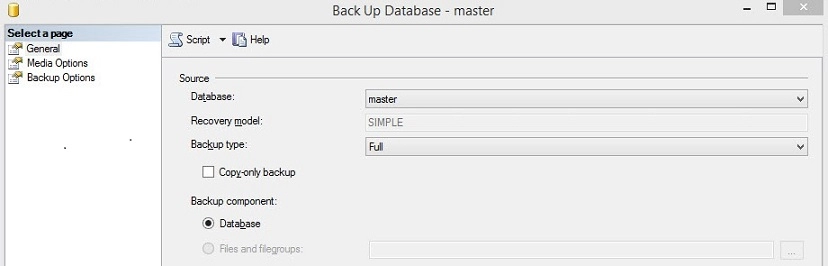
Through the SSMS user interface, Export Data-Tier Application can be executed most easily.
1. Open the Server Objects => New Backup Device branch in the tree view
6. Check the destination folder to ensure the backup file is present if you want to verify the backup output independently. The database backup is contained in the a.bak file.
The backup job's setup is now finished. For each database you want to backup, repeat these steps.
Frequently Asked Questions
How do backups work in SQL Server?
A database, or a few files or filegroups, can be the level at which a backup of SQL Server data is created. Backups at the table level cannot be made. The full recovery model necessitates backing up the transaction log and the data.
Which backup strategy works the best?
Three copies of your data, two local (on various devices) and one off-site, are advised by experts as the best backup strategy. This typically entails having your computer's original data, a backup on an external hard drive, and a copy in the cloud.
In SQL Server, how do I create a backup job?
Activate SQL Server Management Studio. Jobs and SQL Server Agent should both be expanded. To create a backup script for a job, choose Script Job from the context menu when right-clicking the job. Choose New Query Editor Window, File, or Clipboard as the script's final destination by selecting CREATE To or DROP To.
What three types of backups are there?
The three types of backups that are most frequently used are full, incremental, and differential. Synthetic full backups and mirroring are additional backup formats.
Conclusion
This blog has extensively discussed how database backups are essential for recovery from any type of disaster. Plan a good backup strategy, verify the restoration strategy by the criticality, and you are good to go.
We hope this blog has helped you enhance your knowledge regarding How to Create Backups of Databases on Microsoft SQL Server. If you want to learn more about the database, check out the excellent content on the Coding Ninjas:








 9+ registered

