




Introduction
Let's ensure we understand the foundational concepts before delving further into the subjects. Here is a brief introduction if you are unfamiliar with Katalon Studio.

Katalon Studio is a tool that is developed by KM technology. It will also help you automate Web Based Applications, Mobile Applications, and API Testing. It increases the speed of delivery and time to market. Our organization has become better.
This product's recording feature is helpful for our testing needs. User-friendliness and AI smart healing capabilities are two of Its most valuable features.
This article explains how to group elements into a unique block with katalon studio.
Without further ado, let's get started.
Web Element Locators - How to group elements into a unique block
A web page frequently has multiple components with the same formats and styling. To identify distinct elements, developers may have to use multiple locators, which makes this more challenging.
Here's an example:
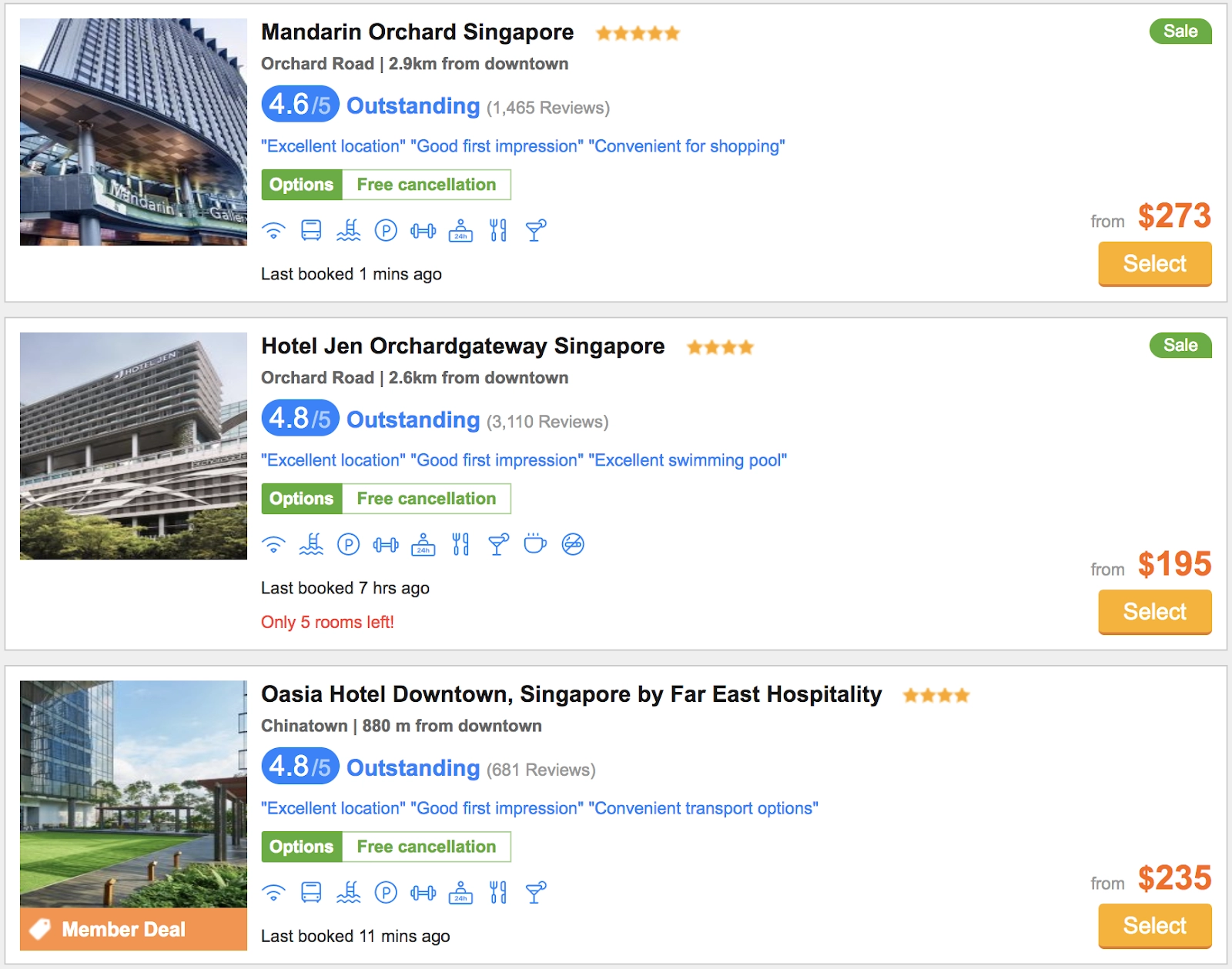
Three "Select" buttons, three "Outstanding" hyperlinks, and additional items with the same labels or icons are shown in the above sample. There are at least three elements found when the "Select" button is used as the locator. To accurately find elements, it is, therefore, a problem to deal with such circumstances.
Absolute XPath
Using Absolute XPath is the first choice you might think about:
//*[@id='searchResult']/ul/li[2]/div/div[4]/div[2]/aIt's a good option. Users will likely press the incorrect "Select" button since the tool cannot tell which "Select" button to look for or if the list's order has changed.
Relative XPath for groups of elements
Check out the page once more. You can see three grouped elements (three blocks) on the list. Each item's structure appears to be identical to that of the others. Although these products are similar, there are three "Select" buttons and three "Outstanding" links. Based on the hotel's name, users choose which "Select" button and "Outstanding" link to click. The names of the hotels are distinctive characteristics that make them potential locators.
Here is the HTML code.
<li class='hotel-link hotel-link-l clearfix' data-hotelid='995079'>
        <div class='hotel-info map-info'>
<h3 class='hotel-name'>
                <strong>
                    <a href='/mandarin-orchard-singapore' title='Mandarin Orchard Singapore'>
                        Mandarin Orchard Singapore
                    </a>
                </strong>
            </h3>
            <div class='hotel-grade'>
                <div class='c-reviews-box'>
                    <a href='/mandarin-orchard-singapore' target='_blank' class='hotel-review'>
                        <span class='rating'>Outstanding</span>
                        <span class='review-link' data-reviewlab='Reviews'>(1,465 Reviews)</span>
                    </a>
                    <span class='reviews-box-temp'></span>
                </div>
            </div>
            <div class='price-box'>
                <div class='select-btn'>
                    <a data-index='1' href='/mandarin-orchard-singapore' target='_blank' >Select</a>
                </div>
            </div>
        </div>
    </li>
You might need to locate the element that encloses the group of elements to establish the group's border. In this instance, the <li> element serves as the boundary and contains all constituents.
After that, you must choose a locator for this boundary. As a result, it is simpler to find the inner components as they are now specific to each boundary.
//li[.//a[contains(., 'Mandarin Orchard Singapore')]]
The locator of the 'Outstanding' link.
//li[.//a[contains(., 'Mandarin Orchard Singapore')]]//a[contains(., 'Outstanding')]
The locator of the 'Select’ button.
//li[.//a[contains(., 'Mandarin Orchard Singapore')]]//a[contains(., 'Select')]
Now, swap out the name of the hotel for the one you wish to access if you want to find components in a different hotel. The locators continue to function correctly even if the order of the hotels in the list is modified because no index is used. As a result, our locators are easier to maintain and more stable.
More examples
In Web UI testing, creating a unique block out of a collection of items is a crucial effort. These sets of elements can be found throughout Web applications with various displays. For instance:
🎯 Issue list in JIRA
Block that is distinct: Each row in the table is a distinct block. A decent option for a unique identifier is key.

Image source
🎯 Reused controls

Image source
🎯 Unique block:
☑️ The control has distinct blocks for each of its instances.
☑️ The label for Control is a strong choice for a unique identifier.
A locator must be distinctive, readable, and maintained. This is a crucial point to make while choosing locators. During the maintenance phase, issues will develop since it will be impossible to determine which locator must be modified if it does not accurately represent the target element.
Check out this problem - Smallest Distinct Window.


 1+ registered

