Get a skill gap analysis, personalised roadmap, and AI-powered resume optimisation.
Introduction
Have you ever considered how to handle software packages written in Python efficiently? Here, the term PIP comes into the picture. PIP is the short form of "preferred installer program" or "Pip Installs Packages," which enables you to install and manage software packages developed in Python. PIP manages installations from the Python Package Index (PyPI) in Python through command-line instructions.
This article will guide you through installing PIP steps on a Windows system, verifying its version, upgrading it, and configuring it as required.
What is PIP?
PIP is the short form for Python Package Installer, and is a fundamental tool in the Python programming ecosystem. The package management system allows developers to efficiently install, handle, and distribute Python packages and libraries. Users can install, uninstall, and manage software packages (libraries and tools) written in Python using PIP.
A package management system comprises tools that simplify installing, updating, configuring, and uninstalling software on a computer. Examples can be APT for Debian systems and npm for Node.js. These systems efficiently handle software dependencies and make software taking easier for both regular users and system admins.
PIP can recover packages from the Python Package Index (PyPI) and can manage versioning, resolve package dependencies, and offer additional functionalities. Developers use PIP to easily access a vast repository of open-source libraries and tools, streamlining the expansion of Python's capabilities and functionality.
How to install PIP in Windows
By setting up PIP, you can access powerful tools that simplify the installation and maintenance of various software components, enhancing your Python development experience.
Here's a step-by-step guide to help you installPIP on your Windows system.
Step 1: Open cmd and verify
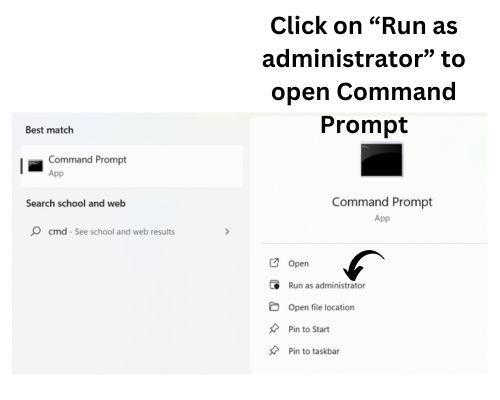
Open the "cmd" prompt.
Choose the "Run as administrator" present on the right side for better access.
Pass the "pip help" command in the prompt and press "Enter."
If the command prompt shows an error like below stating that it can not recognize the PIP command, batch file, or operable problem, it indicates that PIP is not installed correctly in your system. Another possible cause could be an incorrect variable path.
Step 2: Download and install Python
Click Here to download the latest version of Python.
Execute the downloaded setup file.
Click on the "Customize installation" option.
Check the box adjacent to the "PIP" option to ensure it gets installed.
Click the "Next" button at the lower right corner.
Step 3: Set up the environment variable.
A PIP setup is only the first step; there's still more ahead. You might wish to access PIP from any spot on your machine for flexibility. Yet, launching it from particular areas can lead to issues. For a smooth experience, integrate the PIP manager's path into your Environment Variables. For some cases default paths have been already set depending on the system.
Write "Environment Variables" in the search section and press "Enter."
The System Properties tab pops up.
Click the "Environment Variables" button.
Select "New" and add the installed location of the PIP directory and manager as the new entry.
Click "OK" to save the changes.
Run the following command to check if PIP is working correctly or not.
pip --version
From the above output, we can conclude that Pip has successfully installed the system.
Alternatives to PIP
There are some alternatives to PIP like conda, Pipenv and Poetry:
Conda
Conda is an open-source package manager. It quickly locates and installs Python packages along with their dependencies. Anaconda also includes the conda package. Conda is a cross-platform package manager and also manages environments. While PIP is specific to Python packages, Conda handles packages from any language.
Pipenv
Pipenv seeks to offer the best elements of all packaging approaches to Python. It combines virtual environment and package management into one tool. Pipenv combines both packaging and managing environments. Whereas PIP focuses on installing Python packages, Pipenv shows separate domains for each project to avoid dependency clashes.
Poetry
Poetry makes package version management even more uncomplicated. With Poetry, you can declare, manage, and install Python project dependencies. It supports Python 3.6 and newer versions. Poetry manages project dependencies and packaging, while PIP primarily handles package installation.
Use Cases of PIP
There are many use cases of PIP such as:
Developers use PIP in Flask Development. It is one of the most popular Python web frameworks. Developers use PIP to install Flask into their applications.
Data analysts use PIP for data analysis. They use it to import essential libraries like Pandas and Numpy.
People use PIP for web scraping. They use it to import libraries such as Beautiful Soup and Scrapy to extract information from websites.
In game development, developers use PIP to install a Pygame library for Python-based game creation.
Frequently Asked Questions
Does PIP allow the simultaneous installation of numerous packages?
Yes, PIP allows for the simultaneous installation of numerous packages. With the Pip install command, specify the package names separated by spaces.
How can I upgrade a package using PIP?
Using PIP, you can upgrade a package using the command pip install --upgrade package_name. This method can upgrade the package to the most recent variant.
What are the features of PIP?
PIP is Python's package installer. It effortlessly install, updates, and removes packages. PIP resolves dependencies, supports PyPI, manages versioning, and works with virtual environments.
What's the difference between PIP and Conda?
Both PIP and Conda serve as package managers. However, developers designed Conda specifically for the Anaconda distribution, and it can manage non-Python packages and environments. Meanwhile, PIP acts as the default package manager for the broader Python ecosystem.
What is the difference between PIP and PyPI?
PIP installs Python packages, while developers host and share those packages on PyPI. Consider PIP the installer and PyPI the store.
Conclusion
In this article, we discuss some essential steps to install PIP. In this, we first verified whether our system had pre-installed PIP. If not, then we move forward with the steps. Then, the next step is to install Python along with Pip. We have explained every step in detail to do so.
Do check out the link to learn more about such a topic













 7+ registered

