Do you think IIT Guwahati certified course can help you in your career?
Introduction
Have you ever seen unnecessary spaces before or after a string or a character? Or have you ever come across some problems in coding where you are asked to remove or trim unwanted whitespace in Java? In this blog, we will learn about Whitespace in Java. We will see how these spaces get created in Java and how we can remove these whitespaces from the strings in Java.
Java is a commonly asked object-oriented programming language and a software platform that runs on billions of devices, including notebook computers, mobile devices, gaming consoles, medical devices, and many others. According to interview aspects, it is one of the most asked programming languages. So let's understand more about strings and whitespace in Java.
Before getting deeper into Whitespace in Java, let's first understand the term whitespace.
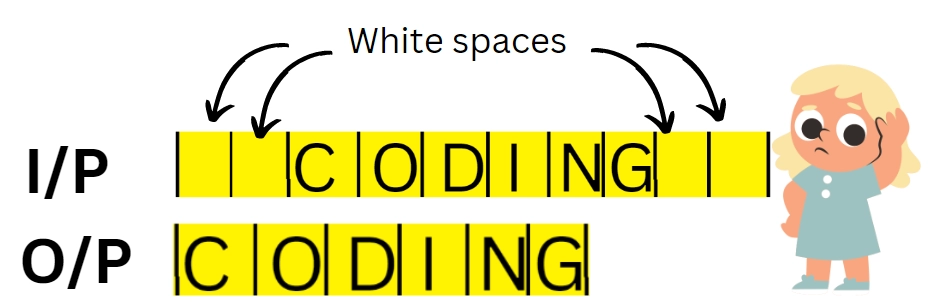
Whitespace is any character or sequence in computer programming that represents horizontal or vertical space in typography. It creates an empty space around the string or a character. A character is called a whitespace character in Java if and only if Character.isWhitespace(char) method returns true. Now let's explore the concept of Whitespace in Java.
Let's say you have to display a list of strings, but you accidentally inserted some spaces at the end of each string. This must be eliminated before being displayed. Likewise, the strings may also contain spaces at the beginning or between them.
When working with strings in Java, removing a Whitespace from a given String is one of the common needs.
Java has a variety of built-in ways to remove these whitespaces. We will look at some Java programs to perform this task using these methods-
replaceAll() method
trim() method
strip() method
stripLeading() method and stripTrailing() method
deleteWhitespace() method
Problem🤔
Replace the consecutive whitespaces with a single space.
To understand the problem, let's first see an example of a string having whitespaces:
Input
String str = "There is nothing impossible for those who will try. ";
Expected Output
There is nothing impossible for those who will try.
Explanation
The example above demonstrate that the str variable contains multiple whitespace characters in the middle. To get the correct output, we have to perform these two steps-
Remove all whitespace characters from the input string. "Thereisnothingimpossibleforthosewhowilltry."
Replace all the consecutive whitespace characters with a single space and remove all leading and trailing whitespace characters -> "There is nothing impossible for those who will try."
Implementation in Java
Using replaceAll() method
This method replaces all the matched substrings with a new string. Here are few steps to follow to remove all the Whitespace from a string.
Algorithm
First, we will declare a string with the variable name str.
Then, we will initialize the string with some value.
Use the replaceAll to remove the regular expression \\s that finds all white space characters (tabs, spaces, newline characters, etc.) in the string with ""(empty space literal).
Use the pattern \s+ instead of \s to replace two or more consecutive Whitespace with a single space.
Finally, we will print the string with the correct spaces.
The implementation of the above algorithm is given below.
class Main {
  public static void main(String[] args) {
    String str = "There is nothing impossible to they who will try. ";

    // Here the expression \\s finds all white space characters in a string.
    str = str.replaceAll("\\s+", " ");
    //Replace consecutive whitespaces with a single space and print string.
    System.out.println(str);
  }
}
Output
Using trim() method
It removes all the whitespaces present at the beginning and end of the string. The trim() method trows an exception for null value.
Algorithm
First, we will declare the two strings with the variable name str1 and str2.
Then, we will initialize the string with some value.
Use the trim() method to remove the trailing and leading spaces in the string.
Finally, we will print the string.
The implementation of the above algorithm is given below.
class Main {
  public static void main(String args[]) {

    //String with single trailing and leading spaces
    String str1 = " There is nothing impossible for those who will try.  ";
    System.out.println(str1.trim());
    System.out.println();
    //String with multiple trailing and leading spaces
    String str2 = " There    is   nothing impossible    for    those who    will try. ";
    System.out.println(str2.trim());
  }
}
Output
Using strip() method
This method also returns the string with no spaces at the end and beginning. This method also throws exception if the if the string on which method is called is null. But there is slight difference between trim() and strip method.
The trim() removes space characters with ASCII values less than or equal to 32. Whereas strip() removes all the space characters as per the Unicode standards having ASCII value greater than 32 as well.
Algorithm
First, we will declare the two strings with the variable name str1 and str2.
Then, we will initialize the string with some value.
Use the strip() method to remove the trailing and leading spaces in the string.
Finally, we will print the string with no trailing and leading spaces.
The implementation of the above algorithm is given below.
public class Main {
  public static void main(String[] args) {
    // String with whitespace characters as per unicode values
    String str1 = " There is nothing impossible for those who will try.  ";
    System.out.println(str1.strip());
    System.out.println();
    //String with multiple trailing and leading spaces
    String str2 = " There    is   nothing impossible    for    those who    will try. ";
    System.out.println(str2.strip());

  }
}
This method replaces all the matched substrings with a new string. Here are few steps to follow to remove all the Whitespace from a string.
Algorithm
First, we will declare a string with the variable name str.
Then, we will initialize the string with some value.
Use the stripleading() and striptrailing() methods to remove the trailing and leading spaces in the string.
Finally, we will print the string with the correct spaces.
This strip() method is further classified into two categories-
stripleading() method removes the spaces present at the beginning of the string.
striptrailing() method removes the spaces present at the end of the string.
Let’s discuss both the methods through an example-
public class Main {
  public static void main(String[] args) {
    // String with whitespace characters as per unicode values
    String str1 = "++ There is nothing impossible for those who will try.  ++";
    System.out.println(str1.stripTrailing());
    System.out.println(str1.stripLeading());
    System.out.println();
    //String with multiple trailing and leading spaces
    String str2 = "++ There    is   nothing impossible    for    those who    will try. ++";

    System.out.println(str2.stripTrailing());
    System.out.println(str2.stripLeading());
  }
}
Output
Using deleteWhitespace() method
Apart from these methods, there is one more predefined method that you can use to remove whitespace in Java. We can use the StringUtils utility class from Apache commons-lang, which provides the deleteWhitespace() method that deletes all whitespaces from a string, as defined by Character.isWhitespace(char).
Algorithm
First, we will declare a string with the variable name str.
Then, we will initialize the string with some value.
Use the stripleading() and striptrailing() method to remove the trailing and leading spaces in the string.
Finally, we will print the string with the correct spaces.
The implementation of the above algorithm is given below. But to run this code you need to install a Jar file from Apache Commons Lang.
import org.apache.commons.lang.StringUtils;
public class Main {
  public static void main(String[] args) {
    // String with whitespace characters as per Unicode values
    String str = " There is nothing impossible for those who will try.  ";
    // Deleting all the whitespaces from a string
    str = StringUtils.deleteWhitespace(str);
    System.out.println(str);
  }
}
Output
Now it’s time for some frequently asked questions.
The main method in java is basically the point of entry in the java program.
What language is sensitive to Whitespace?
Whitespace enforces the structure of code in Python. Whereas in C, it's only a convention, so you can "lie" with it.
What is the meaning of \\ s in Java?
\\s means single whitespace character whereas \\s+ matches the sequence of one or more whitespace characters.
How do you add white space in Java?
Using string format codes is one method for doing this. For example, if you want to pad a string to a certain length with spaces, use something like this: String padded = String. format("%-20s", str);
What are the three types of errors in java?
The three types of errors in Java are runtime errors, logical errors, and compile errors.
Conclusion
In this article, we've learned how to remove whitespace characters from a string in Java. We started with understanding what whitespace in Java is. We further discussed different methods to get rid of the whitespace in Java. Then we finally addressed each and every method in java along with the coded examples. For enhancement of knowledge, you can also refer to other articles in Java as well.












 1+ registered

