Do you think IIT Guwahati certified course can help you in your career?
Introduction
In today’s world, vast amounts of data are transmitted from one end to another. This data must be transmitted smoothly, and a robust methodology is required. For this, Kafka is used to mainly transfers messages with robust queues and fast as well as scalable functionalities. It helps in data integration, analytics, etc. Also, we use Spring Boot to make Spring-based applications run directly, that too fastly and with fewer configurations.
So, in this article, we will learn How to Use Kafka with Spring Boot.
What is Kafka and Spring Boot?
Spring Boot helps us make Spring-based applications that can just be run immediately. Spring Boot sets, manages, and runs web applications faster and easier. It has a lot of database management features and has a lower cost.
Kafka is an open-source and distributed platform originally developed by LinkedIn. Now, it is under Apache. It is mainly used to publish and receive messages on the fault-tolerant messaging system. Its main advantages are that it is fast, scalable, and distributed. It helps work high-performance data pipelines, data integration, mission-critical applications, and streaming analytics. In a nutshell, it enables you to pass messages between two ends smoothly, even if there is a large volume of data with a robust queue.
Thus, understanding how to use Kafka with Spring Boot helps us realize how to transfer messages between two endpoints in large volumes smoothly.
Also, there is a Zookeeper in Kafka. It is used to manage the metadata. Like, which brokers are parts of which clusters, what topics are there, etc.
Concepts of Apache Kafka
Now, let us see some core concepts of Apache Kafka.
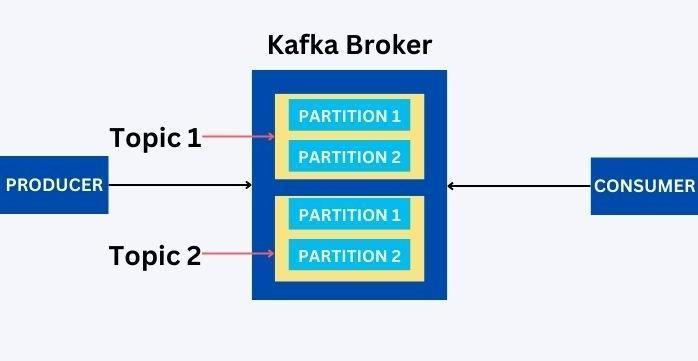
Broker: The Kafka Broker is the server. The producer and the consumer do not interact directly with each other, but they do it through the broker.
Cluster: Being a distributed system, it consists of many brokers. Thus, it acts as a cluster of brokers.
Producer: This is the application that sends the message to the server(The Kafka Broker) with the intention of it being transmitted to the consumer. Also, it gets the broker ID from the Zookeeper.
Consumer: This is the application that receives the message sent. A consumer requests data from the broker, provided they have permission to read it. Also, the Zookeeper updates the offset value for the consumer.
Topic: This is the identification of the data being transmitted. A name identifies it, and there can be numerous topics.
Partitions: The Kafka topics are segmented into different partitions which follow permanent sequences. Since the data in a topic can be enormous, it may be partitioned into a series and stored in other partitions in a specific order.
Offsets: Offsets are sequences of ids given to messages arriving at partitions. An offset assigned never changes to maintain the order of the data.
How to use Kafka with Spring Boot
Let us see the implementation of Kafka with Spring Boot with the following steps.
Step 1: Download Kafka
To answer the question, “How to use Kafka with Spring Boot, ” first, we must install the required software in our system.
To install Kafka in your system, download its zipped file from the website ‘https://kafka.apache.org/downloads’. Next, go to the webpage “QuickStart” from the “Get Started” tab. Next, click on the “Download” hyperlink from Step 1.
Then, you will be directed to another web page and download the file from the suggested link.
Furthermore, extract the file from the downloaded zip file.
Step 2: Making a Spring Boot Project
For this, go to the ‘https://start.spring.io/’ webpage and create a Spring Boot project with a ‘Maven’ project, language as ‘Java,’ and ‘Jar’ packaging. Next, add two main dependencies for Kafka in Spring Boot: Spring Web and Spring for Apache Kafka.
Step 3: Setting up Packages and Classes
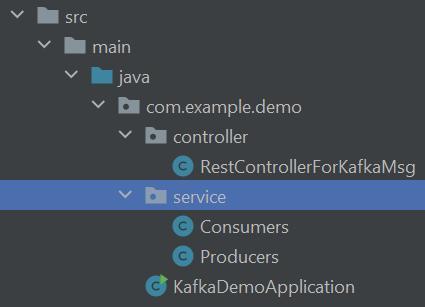
Then, we must make two packages, Controller and service, in the Java folder. Next, we must make two files: Consumers and Producers, in the service folder. Next, we make a RestControllerForKafkaMsg filein the Controller package to define the controller code.
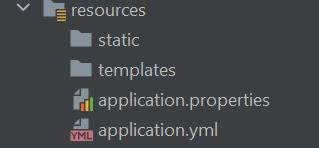
Next, we must make a file ‘application.yml’ in the resources folder. We create this file to write the additional application properties in it.
Step 4: Setting Up The Files
Now, finally, we have to write our code in the files created for our Kafka with Spring Boot project.
KafkaDemoApplication
Let us see the code of the KafkaDemoApplication.java file.
package com.example.demo;

import org.springframework.boot.SpringApplication;
import org.springframework.boot.autoconfigure.SpringBootApplication;

@SpringBootApplication
public class KafkaDemoApplication {

	public static void main(String[] args) {SpringApplication.run(KafkaDemoApplication.class, args);}

}
Here, we have imported SpringBootApplication for using it in our project. Next, we have written the code to run our KafkaDemoApplication class.
Producers
Let us see the code for the Producers.java file.
package com.example.demo.service;

import org.springframework.beans.factory.annotation.Autowired;
import org.springframework.kafka.core.KafkaTemplate;
import org.springframework.stereotype.Service;

@Service
public class Producers {
	@Autowired
	KafkaTemplate<String, String> kafkaTemplate;

	public void sendMsgToTopic(String message){
		kafkaTemplate.send("codingninjas_topic", message);
	}
}
Here, we have imported the Autowired and Service frameworks to inject the object dependency and to make the class a service provider, respectively. Next, we send the message to the Consumers file using the KafkaTemplate to interact with the Kafka Cluster.
Consumers
Now, let us see the code of the Consumers.java file.
package com.example.demo.service;

import org.springframework.kafka.annotation.KafkaListener;
import org.springframework.stereotype.Service;

@Service
public class Consumers {
	@KafkaListener(topics = "codingninjas_topic", groupId = "codingninjas_group")
	public void listenToTopic(String recmessage){System.out.println("The Message is: " + recmessage);}
}
Here, we listen to the message being received using the KafkaListenere framework. Next, we get the message with a specific topic and groupID. We then finally print the message received in the console.
RestControllerForKafkaMsg
Now, let us see the code of the RestControllerForKafkaMsg.java file.
Here, we have written the program to integrate the code of the Programs and Consumers file with our webpage. We get the message from the client and send it to the Producers file, which further sends the message to the Consumers file to print it on the console.
Application
Now, let us see the code of the application.yml file.
Here, we mainly use the StringSerializer to serialize the message that is being received.
Step 5: Starting the Kafka and Zookeeper Servers
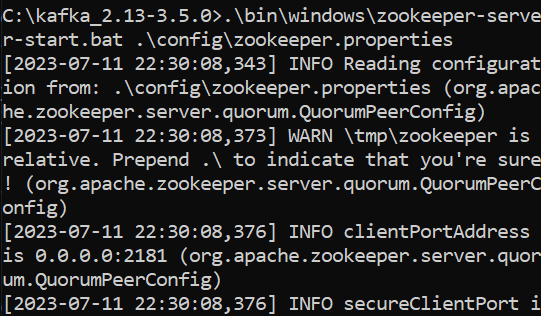
Next, we have to start the Kafka and Zookeeper start-server files using the command prompt or the terminal. If you are using MacOS or Linux, run the shell scripts. Run the batch files in the bin folder if you are a Windows user.
Kafka Server Use the following command to start the Kafka server.
Finally, after setting up all the files we run the KafkaDemoApplication.java file and go to the webpage “http://localhost:8080/rest/api/” after appending a message in the URL. Like, we do the following for our project.
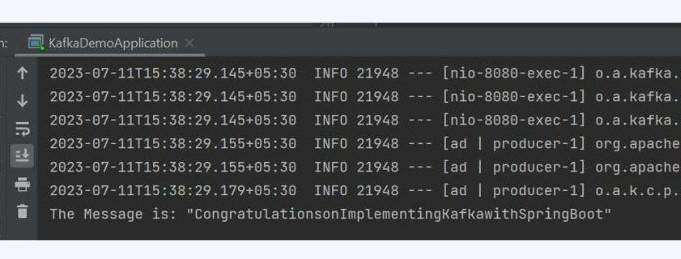
After this, we see the following output in our console.
Thus, we can see our passed message in our console.
Frequently Asked Questions
What is Kafka?
Kafka is an open-source and distributed platform originally developed by LinkedIn. Now, it is under Apache. It is mainly used to publish and receive messages on the fault-tolerant messaging system. Its main advantages are that it is fast, scalable, and distributed.
What are the main concepts of Kafka?
The main concepts in Kafka are Kafka Broker, Kafka Cluster, Kafka Producer, Kafka Consumer, Kafka Topic, Kafka Partitions, Kafka Offsets, and Kafka Consumer Groups. Also, there is the Zookeeper which contains the metadata of the Kafka environment.
What is a Kafka Broker?
The Kafka Broker is the server. The producer and the consumer do not interact directly with each other, but they do it through the broker. It contains data on different topics divided into different partitions.
What is Kafka Partitions?
The Kafka topics are segmented into different partitions which follow permanent sequences. Since the data in a topic can be enormous, it may be partitioned into a sequence and stored in other partitions in a specific order.
Conclusion
Spring Boot helps us create applications fastly that are not tied to some specific platforms. It makes applications with minimal configurations. At the same time, Kafka is an open-source platform for ingesting, integrating, and passing data. And, in today’s world, ingesting and managing vast amounts of data online faster and more smoothly is essential. Hence, we studied ‘How to Use Kafka with Spring Boot’.
If you want to learn more related to this topic, you can read the following articles:











 1+ registered

