

Table of contents
1.
Introduction
2.
Definition and Usage  
2.1.
Why Use `vlink`?  
3.
Syntax
4.
Attribute Values
5.
Example
6.
Supported Browsers
6.1.
Browser Compatibility
7.
Frequently Asked Questions
7.1.
Is vlink still used in modern HTML?
7.2.
How can I change the color of visited links in HTML5?
7.3.
Can I use vlink with other link attributes like alink and link?
8.
Conclusion
Last Updated: Mar 3, 2025
Medium

HTML <body> vlink Attribute

Author Sinki Kumari
0 upvote
Career growth poll
Do you think IIT Guwahati certified course can help you in your career?

Introduction

The <body> vlink attribute in HTML was used to define the color of visited links on a webpage. It helped in customizing link appearance to enhance user experience. However, this attribute is now deprecated in HTML5, and CSS is recommended for styling links. 

HTML <body> vlink Attribute

In this article, you will learn about the vlink attribute, its syntax, usage, and the modern alternatives for styling visited links in HTML.

Definition and Usage  

Visited links are the ones that a user has already clicked on. By default, browsers use a purple color for visited links, but with `vlink`, you can customize this color to match your website’s design.  

The `vlink` attribute is used inside the `<body>` tag of an HTML document. It works alongside other link-related attributes like `link` (for unvisited links) & `alink` (for active links). Let’s see how you can use it:  

<!DOCTYPE html>
<html>
<head>
    <title>vlink Example</title>
</head>
<body vlink="green">
    <h1>Welcome to My Website</h1>
    <p>Here are some links:</p>
    <a href="https://example.com">Example Link 1</a><br>
    <a href="https://example.org">Example Link 2</a><br>
    <a href="https://example.net">Example Link 3</a>
</body>
</html>


Output
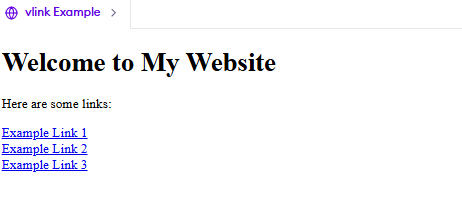
Output

In this example, the `vlink` attribute is set to "green". This means that once a user clicks on any of the links, the color of those links will change to green.  

Why Use `vlink`?  

1. User Experience: It helps users keep track of the links they’ve already visited, making navigation easier.  
 

2. Customization: It allows you to align the link colors with your website’s theme.  
 

3. Consistency: It ensures that visited links look consistent across different browsers.  
 

Important Notes:  
  • The `vlink` attribute is part of HTML4 & is not supported in HTML5. In modern web development, CSS is used instead to style visited links.  
     
  • If you’re working on a new project, it’s recommended to use CSS for styling links.  

Syntax

The vlink attribute is used within the <body> tag in HTML. The general syntax is as follows:

<body vlink="color">


Here, color is the value assigned to the vlink attribute, which determines the color of visited links.

Example

<body vlink="purple">

This sets the color of visited links to purple.

Attribute Values

The vlink attribute accepts various values to specify the color of visited links. These values can be defined in the following ways:

  1. Named Colors: Predefined color names like red, blue, green, purple, etc.
     
  2. Hexadecimal Values: Color codes like #FF0000 (red), #00FF00 (green), etc.
     
  3. RGB Values: Defines colors using rgb(red, green, blue), e.g., rgb(255,0,0) for red.
     
  4. HSL Values: Uses hsl(hue, saturation, lightness), e.g., hsl(0, 100%, 50%) for red.
     

Example of Different Attribute Values:

<body vlink="#FF0000"> <!-- Visited links will be red -->
<body vlink="rgb(0, 255, 0)"> <!-- Visited links will be green -->
<body vlink="hsl(240, 100%, 50%)"> <!-- Visited links will be blue -->

Example

Let’s look at a complete example of how the vlink attribute works in an HTML document:

<!DOCTYPE html>
<html>
<head>
    <title>Vlink Example</title>
</head>
<body vlink="purple">
    <h2>Visit These Websites</h2>
    <a href="https://www.google.com">Google</a><br>
    <a href="https://www.youtube.com">YouTube</a><br>
    <a href="https://www.codingninjas.com">Coding Ninjas</a>
</body>
</html>


Output

Output

Explanation:

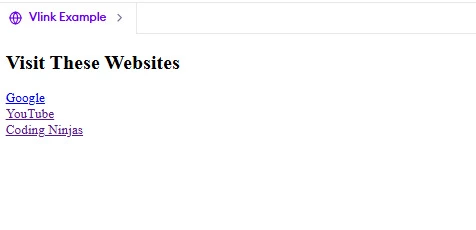
  • This HTML document sets the color of visited links to purple using vlink="purple".
     
  • If a user clicks on any of the links and then returns to the page, the color of that link will change to purple, indicating that it has been visited.

Supported Browsers

The vlink attribute was widely used in older HTML versions but is now deprecated in HTML5. Modern websites use CSS to style visited links. However, for historical knowledge, it is good to understand vlink.

Browser Compatibility

BrowserSupport
ChromeNot Supported
FirefoxNot Supported
EdgeNot Supported
SafariNot Supported
OperaNot Supported

Frequently Asked Questions

Is vlink still used in modern HTML?

No, vlink is deprecated in HTML5. It is recommended to use CSS for styling visited links.

How can I change the color of visited links in HTML5?

In HTML5, the vlink attribute is no longer supported. Instead, CSS is used to style visited links. The a:visited selector in CSS allows developers to define the color of visited links, providing better control and flexibility.

Can I use vlink with other link attributes like alink and link?

Yes, vlink was historically used along with alink (active link color) and link (unvisited link color), but all these are now replaced by CSS properties.

Conclusion

In this article, we explored the vlink attribute in the <body> tag in HTML which defines the color of visited links on a webpage. Although it was used in older HTML versions, modern web development relies on CSS (:visited pseudo-class) for styling visited links. Understanding the vlink attribute helps in learning HTML's  evolution and best practices.

Live masterclass


