Do you think IIT Guwahati certified course can help you in your career?
🥎Introduction
Ready API allows us to develop and run load or performance tests. It is done to ensure that our APIs can handle many visitors. Load tests can be done locally or distributed across several computers, including cloud machines. This article will be Introducing Performance Tests in the Ready API. You will learn how to use Ready API to create, amend, and run load tests.
🥎Load Testing in Ready API
Ready API can be used for load testing. Ready API simulates a high load on a tested website or web service using available test cases. It lets us see how our server performs under load and estimate its limits.
Ready API employs virtual users for load simulation. When doing load testing on our local PC, users can only utilize very few virtual users. The most significant number of virtual users we can simulate at the same time is determined by our license. We can do distributed load testing and cloud tests if we need to affect many users simultaneously.
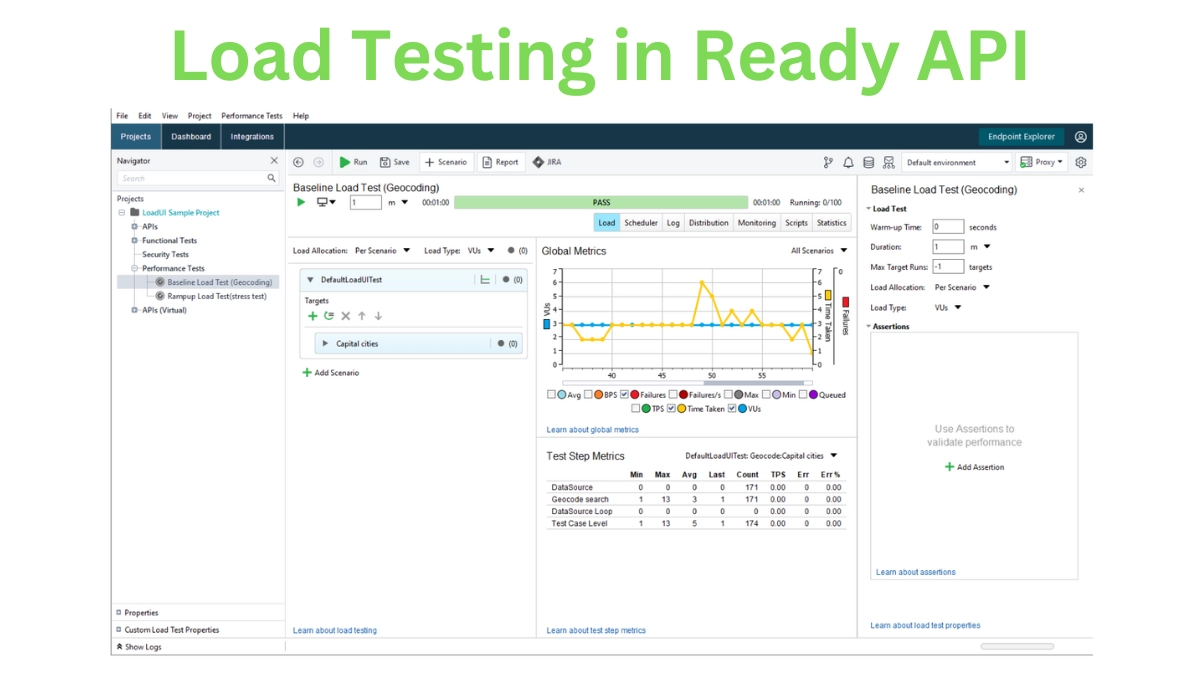
Here's an example of a load test in “Introducing Performance Tests in the Ready API”:
🏀See how it works.
🥎About Load Simulation
🏀What Are Virtual Users
In Ready API, a virtual user is a thread that runs functional test cases. The Max number of internal threads option determines the amount of a thread pool available to Ready API. Furthermore, we cannot simulate more users than our license allows.
The simulated test scenario is referred to as a Target. A single user can work on numerous targets at the same time. Target loops can also be used to establish additional execution rules.
When the load test is finished, Ready API simulates virtual users until they finish their tests. Thus it may take some time to process the remaining users. If this occurs, Ready API provides the option to discard ongoing tests and halt the simulation.
🏀Load Simulation Types
Introducing Performance Tests in the Ready API may simulate load in two different ways:
VUs load simulation simulates an endless number of users interacting with the service.
Ready API constantly monitors the number of simulated users during the test session. After they have completed the test, Ready API waits until the Wait Time given in the load profile settings has passed. Then it determines how many users are required by the current load profile. If more users are needed, the user is restarted.
The simulation of rate load simulates users arriving at the server. Ready API does not track whether earlier user executions were completed. Instead, Ready API adds new ones as the load profile dictates.
The Load Type subject may find more information about how Ready API handles different load types.
🏀Queued and Discarded Virtual Users
Each request requires a certain quantity of processing power. The precise cost is determined by various factors, including the size of the request and the claims used. Suppose Ready API runs out of resources or needs to construct more users than the maximum number of threads available. In that case, it will begin queueing the virtual users until they can be executed.
🥎About Load Testing
Load testing is executing many functional tests in parallel or series. It is done to mimic a load on a server and observe how it responds to this load. Ready API employs a virtual user to conduct each functional test. The number of virtual users to be simulated is not always considered. It is determined by the tested server's "anticipated load" and the test approach visitors select.
A good load test does not flood a server with random requests. It instead mimics user behavior. A website, for example, may offer API. We want to submit API requests to it and then see if it responds correctly and soon enough.
Good load tests also assert performance to highlight the causes of delayed server responses. Due to how servers work, there are numerous probable causes of test slowdowns or unexpected spikes in lousy performance. See About Assertions for more information on asserting performance in Introducing Performance Tests in the Ready API.
Sometimes the problem happens on the server. A decent load testing tool should be able to access and display all server-side metrics. It should display to the tester throughout the test run and store the results.
🥎System Requirements for Large-Scale Load Tests
Ready API sends requests to the service during a load test and analyses the results. This is a complex undertaking, especially when dealing with many virtual users. Large-scale load tests involving 1000 or more virtual users. Necessitate more powerful hardware than the typical Ready API installation.
The load simulation becomes unstable if our load test encounters a hardware bottleneck. Thus the test results become unreliable. Depending upon the resources on our computer that Ready API can use, it may fail to simulate the required number of users. For the test or prohibit the system from responding until the test is completed.
🥎Ready API Performance Licenses
Load testing is available to all product users. Any Ready API license holder can utilize the base load testing capabilities for free (for instance, base load testing features are available for the Ready API Test users).
Ready API Performance licenses provide access to all of Ready API's load testing features.
🏀Licensing Virtual Users
The number of simultaneous virtual users (VUs) that our load tests can simulate is determined by the Ready API Performance license:
LICENSE
VUs
Base
10
Pro Trial
25
Pro Commercial License
100 (for the bundle license), 250, 1000, and more
If we add more concurrent virtual users to our test than our license allows, Ready API queues the "excess" virtual users and simulates them only if the license allows it. If we see this behavior, try changing our license to one that allows for a more significant number of concurrent virtual users.
🏀Limitations of Ready API Performance Trial License
Performance of Ready API Trial licenses includes full Pro license features.
A load test can last not more than 5 minutes.
A load test can only have 25 simulated VUs.
Only 20% of the statistics gathered can be exported.
🥎Migrating From SoapUI Load Tests
Load testing in Ready API is built on the Load UI engine from previous Ready API versions, which were built on the open-source version of SoapUI. We can use Ready API to run load tests after converting existing load projects to the new layout.
🏀Converting LoadUI Projects
When we launch a LoadUI project in Ready API, it changes it to a new format automatically.
When the conversion is complete, the project and associated tests will be visible in the workspace Navigator panel.
Frequently Asked Questions
What exactly is API testing in the context of performance testing?
Any test that evaluates how well APIs function under particular circumstances falls under API performance testing.
What is the distinction between API and performance testing?
Most API tests are also considered performance tests because they aim to measure a system's overall performance under specified conditions.
Why is API testing required?
API testing is critical for ensuring that our API functions as intended when subjected to a wide range of expected and unexpected requests.
What is API testing?
API testing is a type of testing for APIs to examine the performance of the applications under harsh conditions and inputs. This eliminates vulnerabilities and protects the application from malicious code and brokenness.
Conclusion
In the article "Introducing Performance Tests in the Ready API," we have started our discussion with the fundamental aspects of Performance Tests. Furthermore, we have seen the Load Simulation and System Requirements for Large-Scale Load Tests.







 1+ registered

