Do you think IIT Guwahati certified course can help you in your career?
Introduction
Bean refers to a component. Components are items that can be reused. A reusable component is referred to as a JavaBean in JSP. A Java Bean is a standard Java class with attributes, setters, and getters to represent a specific user form on the server. A JavaBean in JSP is a Java class that follows a set of guidelines. The following rules apply:
The class must be public, not final, and abstract.
It is strongly suggested that serializable be implemented.
A direct/indirect param constructor is required.
Non-static and private member variables should be used.
Every bean property should have one setter and getter method with the public modifier.
The setter method adds data to a bean property, whereas the getter method reads data from it.
A JavaBean in JSP can mix many simple data into an object and send it from one resource to another or from one layer to another. For example, we may use a java bean to keep form data in a single object.
A Java Bean is a specifically designed Java class written in Java and adheres to the Java Beans API definition.
What is a Java Bean in JSP?
A Java Bean in JSP is a reusable, encapsulated Java class that follows specific conventions, including having a no-argument constructor, providing getter and setter methods, and being serializable. It is commonly used to represent data and can be easily accessed and manipulated within JSP pages using JSP tags.
Java Beans Example
Consider a car class with a few characteristics:
package com.myCar;


public class CarsBean implements java.io.Serializable {
   private String carName = null;
   private String brandName = null;
   private int price = 0;


   public CarsBean() {
   }
   public String getCarName(){
   return carName;
   }
   public String getBrandName(){
   return brandName;
   }
   public int getPrice(){
   return price;
   }
   public void setCarName(String carName){
   this.carName = carName;
   }
   public void setBrandName(String brandName){
   this.brandName = brandName;
   }
   public void setPrice(Integer price){
   this.price = price;
   }
}
Why are JavaBeans in JSP required?
It has a no-argument default constructor.
Serializable and capable of implementing the Serializable interface are required.
It may have a variety of read-only or write-only characteristics.
The properties may have several "getter" and "setter" methods.
JavaBeans in JSP: How Do They Work?
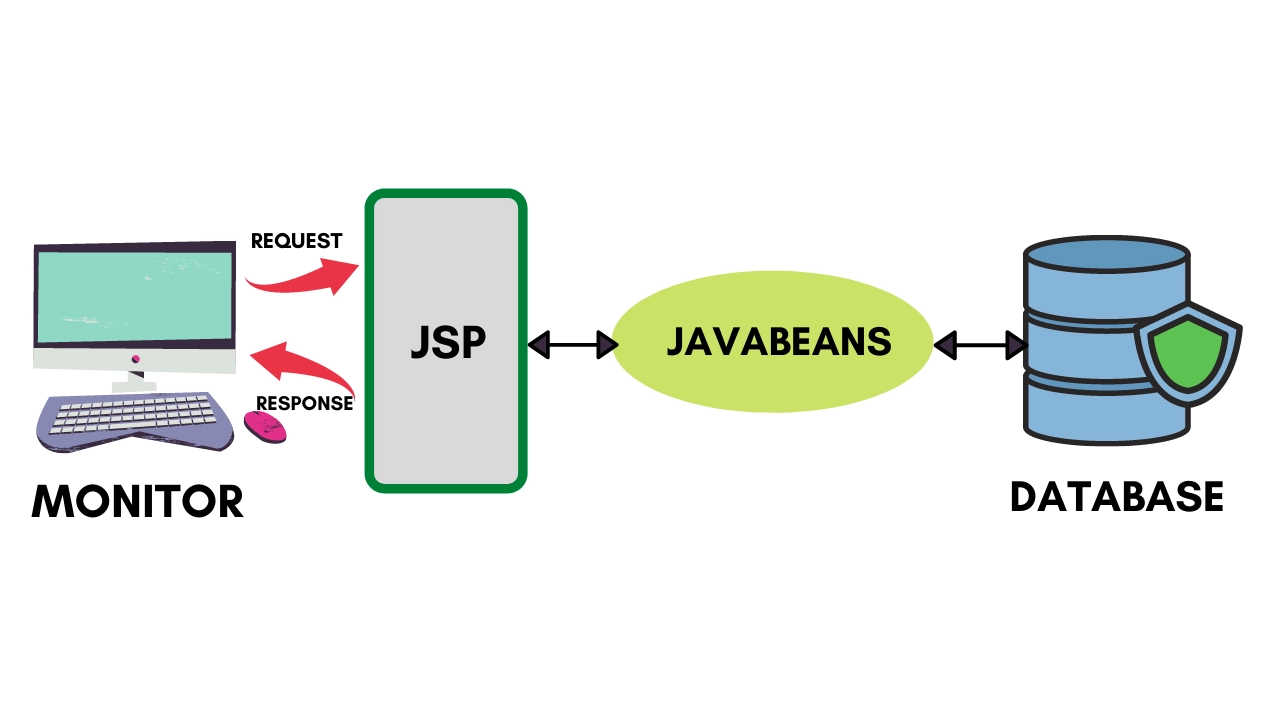
The browser first sends a request to the JSP page. The JSP page then calls the Java Bean and executes the business logic. JavaBean connects to the database and retrieves/saves the data after being invoked. Finally, the answer generated by the JSP is forwarded to the browser.
Properties of Java Bean
A JavaBean property is a named attribute that the object's user can access. Any Java data type, including the classes we define, can be used for the attribute.
A property on a JavaBean can be read, write, read-only, or write-only. The JavaBean's implementation class uses two methods to access JavaBean properties:
S.No.
Method
Description
1
getPropertyName()
To read a property named firstName, for example, your method would be called getFirstName(). An accessor is the name of this technique.
2
setPropertyName()
For example, if the property name is firstName, your method name to write that value would be setFirstName(). Mutator is the name of this procedure.
A read-only property will have only one method, getPropertyName(), and a write-only attribute will have only one method, setPropertyName().
How do we access Java Beans in JSP?
The useBean action creates a JavaBean object that may be used in a JSP. Once declared, the bean becomes a scripting variable, and both scripting elements and other custom tags in the JSP may access it. The useBean tag has the following full syntax:
<jsp:useBean id = "bean's name" scope = "bean's scope" typeSpec/>
Depending on our needs, the scope attribute can be set to a page, request, session, or application. The id attribute's value can be anything as long as it's a distinct name among other useBean declarations in the same JSP.
The useBean action is demonstrated in the example below:
<html>
   <head>
      <title>JavaBeans Sample Example</title>
   </head>

   <body>
      <jsp:useBean id = "date" class = "java.util.Date" />
      <p>The date/time is <%= date %>
   </body>
</html>
We will get the following outcome:
The date/time is Mon Jan 30 09:20:44 GST 2022
Getting to the Properties of JavaBeans
We can utilise the <jsp:getProperty/> action to access the get methods and the <jsp:setProperty/> action to access the set methods in addition to the <jsp:useBean...> action. Here is the complete syntax:
The id of a JavaBean previously introduced to the JSP by the useBean operation is referenced by the name attribute. The name of the get or set methods that should be used is specified in the property attribute.
The following example demonstrates how to use the above syntax to obtain data:
Let's add CarsBean.class to the CLASSPATH variable. The JSP mentioned above can be accessed. The following outcome will be shown:
Car Name: Swift
Brand Name: Maruti Suzuki
Price: 700000
Characteristics of Java Bean
Serializable: A Java Bean must implement the Serializable interface to allow its state to be saved and restored, especially in distributed applications.
No-Argument Constructor: Java Beans must have a public no-argument constructor to enable easy instantiation, particularly by frameworks and JSP containers.
Encapsulation: Java Beans follow the principle of encapsulation by keeping fields private and providing public getter and setter methods to access and modify their properties.
Getter and Setter Methods: Properties in a Java Bean are accessed and modified using standardized getter (getPropertyName) and setter (setPropertyName) methods.
Reusability: Java Beans are designed to be reusable components that can be easily manipulated in JSP, servlets, or other Java applications.
Advantages of JavaBeans
Reusability: JavaBeans are reusable components that can be easily integrated into various applications.
Encapsulation: They promote encapsulation by allowing developers to hide the implementation details and expose only the necessary properties and methods.
Interoperability: JavaBeans can be easily integrated with other Java components and frameworks, enhancing interoperability.
Serialization: JavaBeans support serialization, making it easy to store and retrieve their state from external sources like databases or files.
Tool Support: There are various tools and IDEs available that support JavaBeans development, facilitating rapid application development.
Disadvantages of JavaBeans
Complexity: Building complex JavaBeans with numerous properties and methods can lead to increased complexity and maintenance overhead.
Mutability: JavaBeans are mutable objects, which can sometimes lead to unintended state changes if not properly managed.
Performance Overhead: Serializing and deserializing JavaBeans can introduce performance overhead, especially for large and complex objects.
Limited Control: Developers have limited control over the internal state of JavaBeans, potentially leading to unexpected behavior in certain scenarios.
Boilerplate Code: Creating JavaBeans often requires writing boilerplate code for getters, setters, and other supporting methods, which can be tedious and error-prone.
Frequently Asked Questions
What is the point of JavaBeans?
JavaBeans provide a reusable, encapsulated, and standardized way to manage and transfer data between Java components, especially in JSP and enterprise applications.
When to use JavaBeans?
JavaBeans are used when you need to encapsulate data, share objects between JSP and servlets, or manage component properties in reusable, maintainable ways.
What are the different types of beans in Java?
Java supports Enterprise Beans (EJB), Managed Beans, and JavaBeans, each serving different purposes in enterprise, managed, or simple data applications.
How to set JavaBean value in JSP?
Use jsp:setProperty or EL (Expression Language) to set JavaBean property values directly within the JSP page.
Why do we use JavaBeans?
It is a reusable program component, according to the Java white paper. A bean wraps numerous things into a single object that may be accessed from multiple locations. Furthermore, it is simple to maintain.
Conclusion
In this article, we have discussed the JavaBeans in JSP. A JavaBean is a custom Java class developed in Java and coded to the JavaBeans API requirements. We have discussed its properties, and we have an example based on it. We also have discussed its pros and cons and how we can use it easily.






 1+ registered

