List Rendering in Vue using v-for directive
Vue.js provides the v-for directive to render a list of items based on an array. It requires a syntax in the form of (item, index) in items, where:
- items is the source data array
- item is the array element
- index is the index value of the item being iterated on.
Example:
<template>
 <ul>
   <li v-for="(item, index) in items" v-bind:key="index">
     {{ item }} - Roll no: {{ index + 1 }}
   </li>
 </ul>
</template>

<script>
export default {
 el: "#App",
 data: () => ({
   items: ["Sapna", "Ram", "Shyam", "Geeta"],
 }),
};
</script>

Output
Using v-for directive with Objects
We can also loop over the values in an object from the data in Vue Instance. This is achieved by using the v-for directive in the element that should be repeated.
Example:
<template>
 <ul>
   <li v-for="(item, index) in items" v-bind:key="index">
     {{ item.name }}'s age is {{ item.age }}
   </li>
 </ul>
</template>

<script>
export default {
 el: "#App",
 data: () => ({
   items: [
     { name: "Sapna", age: 20 },
     { name: "Ram", age: 21 },
     { name: "Shyam", age: 22 },
     { name: "Geeta", age: 23 },
   ],
 }),
};
</script>
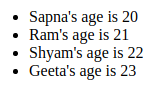
Output
Filtered List Rendering in Vue
If we want to filter items in a list when rendering items from an array, we must use a computed property. It’s the most efficient method as only the filtered results are rendered.
Example:
<template>
 <div>
   <h3>Students above and equal to the age of 21 are:-</h3>
   <ul>
     <li v-for="(item, index) in ageComparison" v-bind:key="index">
       {{ item.name }}
     </li>
   </ul>
 </div>
</template>

<script>
export default {
 el: "#App",
 data: () => ({
   items: [
     { name: "Sapna", age: 20 },
     { name: "Ram", age: 21 },
     { name: "Shyam", age: 22 },
     { name: "Geeta", age: 23 },
   ],
 }),
 computed: {
   ageComparison() {
     return this.items.filter((item) => (item.age >= 21 ? item : ""));
   },
 },
};
</script>
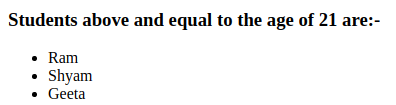
Output
Maintaining State
When Vue updates a list of elements rendered with v-for, it uses an "in-place patch" strategy by default. When the order of the data items changes, instead of moving the DOM (Document Object Model) elements to match the item's order, Vue will patch each element in-place and ensure it reflects what must be rendered at that particular index.
This mode is efficient. However, it is only suitable when the list render output does not rely on temporary DOM state or child component (e.g., form input values).
If we want Vue to track each node's identities and reuse and reorder existing elements, we will have to provide a unique key attribute for each item.
<div v-for="item in items" :key="item.id">
     <!-- content -->
</div>
It is advised to provide a key attribute with v-for directive unless the iterated DOM content is simple or we intentionally rely on the default behavior for performance gains.
Note: We must not use non-primitive values like objects and arrays as v-for keys. Instead, we should use string or numeric values.
Array Mutation
In Vue, we can change arrays with the help of the mutation and non-mutation methods.
Mutation Methods
Mutation methods mutate the original array they are called on. Vue wraps the observed array's mutation methods to trigger view updates. Some of the wrapped mutating methods are:-
- pop()
- push()
- splice()
- sort()
- shift()
- unshift()
- reverse()
Non-mutation Methods
Non-mutation methods do not mutate the original array. Instead, they return a new array. Some of the non-mutating methods are:-
- filter()
- concat()
- slice()
In this case, Vue does not throw away the existing DOM and re-render the entire list. Instead, Vue implements an intelligent process to maximize DOM element reuse. Hence replacing an array with another array containing overlapping objects is efficient.
Caveats
Vue cannot detect the following changes in an array due to some of the limitations in JavaScript:
- When an item is directly set with the index
-
When the length of an array is modified
Example:
var viewModel = new Vue({
   data: {
     items: [1, 2, 3]
   }
 })

// Is not reactive
viewModel.items[1] = 4

// Is not reactive
viewModel.items.length = 5

You can also try this code with Online Javascript Compiler
We can use the following methods to solve the issues mentioned above:-
- The first issue can be solved using the set and splice method.
Code:
// Vue.set
Vue.set(viewModel.items, indexOfItem, newValue)

// Array.prototype.splice
viewModel.items.splice(indexOfItem, 1, newValue)
You can also try this code with Online Javascript Compiler
-
The second issue can be solved using the splice method.
Code:
// Array.prototype.splice
viewModel.items.splice(newLength)
You can also try this code with Online Javascript Compiler
Caveats due to Object Change Detection
Vue also cannot detect any new root-level reactive properties addition or deletion.
Example:
var viewModel = new Vue({
 data: {
   a: 10
 }
})
// viewModel.a is now reactive

viewModel.b = 20
// viewModel.b is not reactive
You can also try this code with Online Javascript Compiler
In Vue, the dynamic addition of new root-level reactive properties to a created instance is not. However, we can add it to a nested object using the set method.
Example:
var viewModel = new Vue({
 data: {
   student: {
     name: 'Sapna'
   }
 }
})

Vue.set(viewModel.userProfile, 'gender','female')
You can also try this code with Online Javascript Compiler
Frequently Asked Questions
1. What is the use of "v-bind:key"?
Ans:- We use the v-bind:key in a v-for directive to differentiate each component rendered when data changes.
2. Why are computed properties preferred to display filtered data?
Ans:- When we iterate over the entire list and check if the expression we set is true, the efficiency of the code decreases. This method is inefficient since every time the loop is rendered, Vue has to iterate through every element and check if the expression is true.
This issue is solved with the help of the computed property. Also, less logic is used in the template, keeping it clean and making maintenance much more manageable.
3. How to render a list of n integers in Vue?
Ans:- We can use v-for to render a list of n integers. For example, the code to render numbers from 1 to 5 is as follows.
<span v-for="n in 5" :key="n">{{ n }} </span>
4. How can we use the v-if and v-for together?
Ans:- It is recommended not to use v-if and v-for together. When these two directives exist on the same node, the v-if directive has a higher priority than the v-for directive. So the v-if condition will not have access to variables from the scope of the v-for.
Key Takeaways
This blog covered the basic concepts of List Rendering in Vue in detail and various examples and frequently asked questions. We discussed the various ways to render the list and concepts like array mutation and maintaining state.
Don't stop here. Check out our Learn Vue free course to learn Vue from scratch. Also, feel free to check out the blog Vue JS Vs. React in 2021.
We hope you found this blog on list rendering in Vue useful. Liked the blog? Then feel free to upvote and share it.








 1+ registered

