Do you think IIT Guwahati certified course can help you in your career?
Introduction 📝
In this blog, we will discuss the Media CDN in the Google cloud project and how to configure media CDN, along with many more things associated with Media CDN. Google Cloud's media delivery method is called Media CDN. The web acceleration tool offered by Google Cloud, Cloud CDN, is complemented by Media CDN. Large file downloads and streaming videos are two examples of high-throughput egress workloads for which Media CDN is designed. Now let's see Media CDN in brief.
Media CDN Overview🎛️
An edge cache is often server infrastructure housed in points of presence (PoPs) or with partner ISPs and stores content closer to end users. Media CDN makes use of Google's extensive edge-caching network to provide your material as close to your users as feasible. You can lessen the stress on the infrastructure at your origin by using Google's infrastructure to deliver content. You can con visit the official documents of the Media CDN Overview for more information.
Configuration guide ⚙️
Media CDN provides content delivery, cache offloading, origin shielding, request authorization, and integration with Google Cloud's HTTP(S) Load Balancing, Logging, and Monitoring platforms.
Several REST API resources are available via Media CDN.
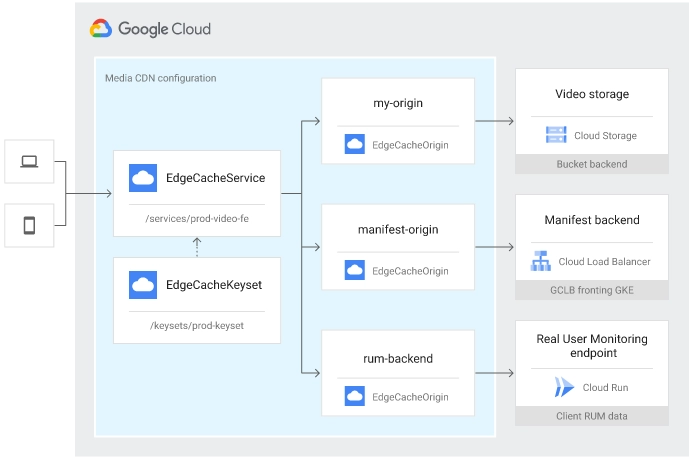
EdgeCacheService, which is in charge of client-side settings (TLS, IP addressing), routing, CDN configuration (cache modes, TTLs, signature), and security policies.
EdgeCacheOrigin is in charge of per-origin setup for any HTTP-based origin and retries circumstances when the material is unavailable or inaccessible. As part of a redundant video packager arrangement, for Example.
EdgeCacheKeyset (Optional) is a collection of public keys used to verify that client requests were signed by your infrastructure / CMS. EdgeCacheKeysets are linked to an EdgeCacheService and can be utilized by numerous services.
These resources are illustrated in the following example, which depicts the EdgeCacheService terminating traffic and routing it to various EdgeCacheOrigins.
🔖Permissions
You must have Identity and Access Management rights to build Media CDN resources. The following IAM roles are predefined for Media CDN:
roles/networkservices.edgeCacheAdmin
roles/networkservices.edgeCacheUser
roles/networkservices.edgeCacheViewer
🔖Enable required services
You must activate both the Network Services API and the Certificate Manager API in your project to configure and deploy Media CDN services.
You can use the following tools to configure Media CDN:
Google Cloud console
Imported YAML or JSON files
The APIs directly
You can con visit the official documents of the Configuration guide for more information.
Configure SSL (TLS) certificates ⚙️
After you've set up a Media CDN service (or services), you can issue and attach SSL (TLS) certificates to enable safe connectivity in browsers and mobile apps.
🔖Issue a managed certificate
To generate a managed certificate and attach it to your Media CDN service, you must first:
Create a challenge token and add a DNS record to demonstrate ownership ("authorization") of the domains for which you want to issue certificates.
Based on such authority, generate an EDGE CACHE certificate with one or more domain names.
That certificate should be attached to one or more Edge Cache services.
To authorize, create, and attach certificates to an Edge Cache service, you must have the necessary Identity and Access Management permissions:
certificatemanager.certs.create
certificatemanager.certs.get
certificatemanager.certs.list
certificatemanager.certs.use
certificatemanager.dnsauthorizations.create
certificatemanager.dnsauthorizations.get
certificatemanager.dnsauthorizations.list
certificatemanager.dnsauthorizations.use
🔖Create a DNS authorization
Before issuing certificates for a domain, you must first generate a DNS authorization to demonstrate ownership. The DNS authorization employs the DNS-01 ACME challenge and allows you to give a certificate before redirecting user-facing traffic to your Edge Cache service.
Set the value of the domain to the domain name for which you want to create a certificate, as shown below:
If you are using Cloud DNS for your domain, follow the steps for adding a new record to your hosted domain. If you are using another DNS service, visit their documentation for adding a CNAME record.
Each HTTP request between the client and the edge is logged to Cloud Logging by Media CDN. Typically, logs are supplied in near real-time. This adds the ability to query Logging and export to Cloud Storage and Pub/Sub.
Log entries include the following categories of data:
Most Google Cloud logs display general information such as severity, project ID, project number, and timestamp.
HttpRequest log fields.
Additional request metadata is contained within the structPayload, including:
Client ASN
Client location data
ID (city) of the caches used to fulfill the response
TLS SNI hostname
TLS version used
🔖Cache-specific fields
A Media CDN log's JSON payload object contains metadata about how Media CDN serves an object, whether it was cached, and any error statuses detected. You can con visit the official documents of the Cache-specific fields for more information.
🔖Example log entry
An illustration of a log entry for a response served from cache is shown below:
Logs can potentially be sampled or filtered as necessary to lower log volume and overall logging costs. For analysis in Google Cloud, you can route logs to Pub/Sub or BigQuery, or you can use the log analysis software you already have. You can con visit the official documents of the Enable logs, Sample logs, and Query logs for more information.
🔖Export logs
Examining the logs exports overview documentation can let you export logs from Logging.
This includes:
Methods for exporting logs to cloud storage or big query.
Exporting to Pub/Sub, which Cloud Functions or other services can then consume.
Combining logs from many projects.
Direct integration between Media CDN and Logging.
Origin connectivity and shielding 🎯
Whether your origin infrastructure is housed in Google Cloud, another cloud, or on-premises, Media CDN makes it simple for you to retrieve content from it.
🔖Origin requirements
An origin must include the following in the response headers for Media CDN to be able to cache origin responses:
An ETag or Last-Modified HTTP response header.
An acceptable HTTP Date header.
A valid Content-Length header.
The Accept-Ranges: bytes response header
when a Range request is made, the Content-Range response header is returned. A valid value in the form of bytes x-y/z must be present in the Content-Range header (where z is the object size).
HTTP/2 is the standard origin protocol. You can specifically set the protocol field for each origin if it only supports HTTP/1.1.
🔖Origin shielding
Media CDN offers a multi-tiered edge infrastructure that is designed to actively reduce cache fill wherever possible.
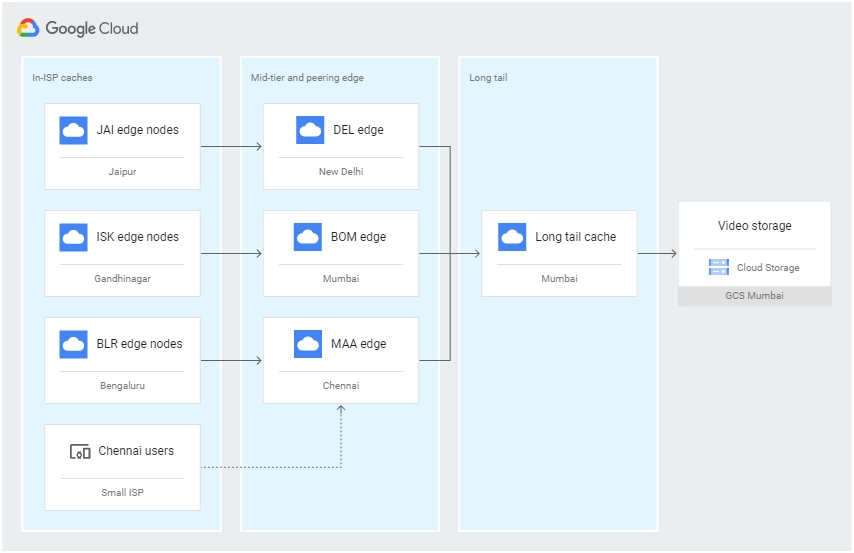
The caching infrastructure is divided into three layers:
Deep edge caches are used to serve the majority of traffic and offload within a service provider's network.
Google's peering edge, which is linked to thousands of ISPs and serves as the mid-tier cache for edge caches and, in the absence of such caches inside a given ISP, the user-facing cache.
"Long Tail" caches exist within Google's network and are filled by other downstream caches prior to the origin. These caches support massive fan-in, have large cache storage capacities, and serve as an origin "shield."
Topology overview
Depending on the design of their cache, user load, workloads (such as live vs. on-demand), user dispersion, and the amount of "long tail" content (total corpus size) they offer to users across regions, customers may see varied offload rates.You can con visit the official documents of the Origin connectivity for more information.
Advanced routing 📝
You can finely map traffic to particular edge configurations and origins using Media CDN's extensive HTTP routing features.
🔖Match requests
A collection of routes can be found in a Media CDN configuration. These routes send traffic to an origin by matching requests based on (at the very least) a host and a path. Each route has the ability to provide its own origin mapping, CORS policy, rewrites, redirects, and CDN setup. Routes may have common roots.
For instance, you can provide a short-lived cache TTL and a negative caching policy, as well as redirect requests for manifests to a certain origin. Using headers and query parameters, requests for segments can be divided to go to a different origin in order to separate off particular manifest types or people.You can con visit the official documents of the Match requests for more information.
🔖Rewrites and redirects
Examples of rewriting requests and setting up redirects are shown in the following sections.
Rewrite request URLs 📍
Host and path rewrites are supported by Media CDN. Rewrites allow you to alter hosts and paths as necessary and change the URL that is sent to the origin. You can specify which individual requests are rebuilt based on any matcher, including path, query parameter, and request header, with host and path rewrites at the route level.You can con visit the official documents of the Rewrite request URLs for more information.
Redirect requests 📍
Three types of redirects are supported by Media CDN:
Host redirection merely alter the host (domain), leaving the query parameters and path alone.
Path redirects replace the path in full Path prefix redirects only replace the prefix that matches the original path.
Redirects can be set up to return different redirect status codes for each route, although by default they return HTTP 301 (Moved Permanently).
You can con visit the official documents of the Redirect requests URLs for more information.
Redirect all requests to HTTPS 📍
You can set up each of your Services to automatically redirect all client requests to HTTPS if you want to use HTTPS instead of HTTP for all requests. A HTTP 301 (Permanent Redirect) response is delivered to clients connected through HTTP, with the Location header set to the same URL but with "https://" in place of "http://".
The command now has requireTls set to true and returns a description of your service.
name: MY_SERVICE
  requireTls: true
🔖Cross-Origin Resource Sharing (CORS)
You can use Cross-Origin Resource Sharing (CORS) rules to set CORS headers like Access-Control-Allow-Origins automatically depending on a per-route policy.
These headers enable cross-origin calls to your Media CDN services, which may be located on a different domain (origin) from the front end of your website, and stop requests from cross-origin sources that you haven't explicitly authorized.
CORS policies can be specified per route and are a component of an EdgeCacheService.
Media CDN distributes material as close to users as feasible by caching content and reducing strain on origin infrastructure via Google's worldwide edge caching architecture.
For each route, you can specify how the material is cached. This allows you to optimize behavior based on content type, client request characteristics, and freshness requirements.
🔖Cacheability
In this section, we will describe what responses Media CDN caches and how to improve cache offload.
Default caching behavior
The following cache-related parameters are applied by default to each Edge Cache service:
CACHE ALL STATIC's default cache mode is:
Respects cache directives from the origin, such as Cache-Control and Expires.
Automatically caches static content types, with a default TTL of 3600s.
HTTP status codes 200 and 206 are cached (negative caching is not enabled).
Responses containing no-cache or no-store directives, or that are otherwise uncacheable, are not cached.
Unless caching is specifically set, responses that are not static content or lack appropriate cache directives are not stored. See the documentation on cache modes to discover how to alter the default behavior.
The following cdnPolicy is equal to the default behavior. Routes that are not explicitly specified with a cdnPolicy operate as though they had the following configuration:
You can con visit the official documents of Cacheability for more information.
🔖Cache keys
Consider what uniquely identifies a request and remove components that frequently vary between requests to limit the number of times Media CDN needs to visit your origin. The collection of request components is sometimes referred to as a 'cache key.'
You can con visit the official documents of the Cache keys for more information.
Cache invalidation 🖥️
Cache invalidation, often known as cache cleaning, is the process of marking cached content as invalid. This removes the entry from the cache and forces it to be reloaded from the origin server the next time the content is requested. Media CDN offers the following methods for selecting material to be invalidated:
URL path and host
Prefix for URLs (wildcard)
Cache tags, including status, origin, and content-type built-in tags
These invalidation options can be used to target specific cached replies while minimizing origin load on future cache fills.
🔖Supported invalidation syntax
The invalidation syntax that is available is as follows:
Type
Syntax
Example
Host invalidation
Invalidate responses that were cached for the given host
A single invalidation request can include up to ten cache tags.
A single invalidation request can include host, path, and tags. They are interpreted as boolean AND.
Multiple cache tags are regarded as a boolean OR when supplied. For example, if you give —tags="status=404,origin=staging-origin," all replies with the cache tag status=404, as well as any responses with the cache tag origin=staging-origin, are invalidated.
You can con visit the official documents of the Cache tags and Permissions for more information.
🔖Limitations
The number of invalidations is restricted. You can only submit 10 invalidations per minute. An invalidation, on the other hand, can be of any size. Invalidating /images/my-image.png, for example, counts as one invalidation. Invalidating /images/* counts as one invalidation as well."
Client connectivity and IP addresses🎫
Media CDN supports current networking protocols from the client to the edge, improving throughput and decreasing total network latency.
🔖IP addressing
Each Edge Cache service that you install has dedicated, anycast IPv4 and IPv6 addresses that are unique to that service and are not shared with other customers.
The IP addresses are assigned and made accessible after creating an Edge Cache service.
For the duration of a specific Edge Cache service, assigned addresses do not change.
When a new Edge Cache service is created, new IP addresses are assigned to that service. Your IP addresses are not shared between your services.
All Media CDN services allow IPv6 connectivity between clients and edge nodes.
Retrieve IP addresses 📍
To get the IP addresses assigned to an Edge Cache service, do the following:
Each service receives one IPv4 and one IPv6 address from Media CDN.
We propose that DNS entries be created for both IP addresses (as A and AAAA records).
Set up your services to allow traffic for any domain names (hostnames) that you use. When Media CDN receives traffic for hosts that do not have a.routing.hostRules[].hosts item, the traffic is rejected with an HTTP 404 error.
Depending on your customers' locations, you may notice more traffic to one protocol than another, owing to user devices and ISP support in certain areas.
🔖Network protocol support
Client connections to Media CDN are supported by HTTP/3, HTTP/2, and HTTP/1.1. For advertising protocol support, Media CDN supports both ALPN (Application Layer Protocol Negotiation) and the Alt-Svc (alternative service) HTTP response header.
Protocol
Supported
SSL (TLS) Required
HTTP/3 (IETF QUIC)
Yes
Yes
HTTP/2
Yes
Yes
HTTPS (HTTP/1.1 over TLS)
Yes
Yes
HTTP/1.1
Yes
No
Notes:
HTTP/2 (h2) is the default protocol.
Please contact your account team directly to activate HTTP/3 (QUIC).
HTTPS, HTTP/2, and HTTP/3 all require that your service has a valid SSL (TLS) certificate.
Clients that do not support HTTP/2 or later connect using HTTP/1.1.
A CDN is also known as a content distribution network, which is a network of servers that are geographically spread and interconnected.
What is Media CDN?
Google Cloud's media delivery method is called Media CDN. The web acceleration tool offered by Google Cloud, Cloud CDN, is complemented by Media CDN.
What are the benefits of using Google Media CDN?
Media CDN makes use of Google's extensive edge-caching network to provide your material as close to your users as feasible. You can lessen the stress on the infrastructure at your origin by using Google's infrastructure to provide content.
What is a CDN used for?
CDNs are used because they offer cached internet material from a network point nearest to the user.
Who uses CDN?
A CDN can assist anyone who has a website or mobile application that is likely to be requested by more than one user at the same time.
Conclusion ✉️
In this article, we have extensively discussed the Media CDN in the Google cloud project and how to configure media CDN, along with many more things which are associated with Media CDN. If you would like to learn more, check out our articles on










 7+ registered

