Routing endpoints
An event hub-compatible built-in endpoint (messages/events) comes included with an IoT hub. By connecting additional services in your subscription to the IoT Hub, you can define unique endpoints to which messages can be sent.
Each message is forwarded to all endpoints that it matches in its routing queries. To put it another way, a message can be forwarded to other endpoints. Think about employing the Microsoft trusted first-party exception if your customized endpoint has firewall configurations.
These endpoints are presently supported by IoT Hub:
- Built-in endpoint
- Azure Storage
- Service Bus Queues and Service Bus Topics
- Event Hub
Built-in endpoint as a routing endpoint
The built-in endpoint (messages/events) can be used with standard Event Hubs integration and SDKs to receive device-to-cloud messages. Data no longer flows to the built-in endpoint when a Route is defined unless a Route is constructed to that endpoint. A fallback route must be enabled to route messages to the built-in endpoint even if no routes are created. If you construct your hub through the portal or the CLI, the fallback is automatically enabled.
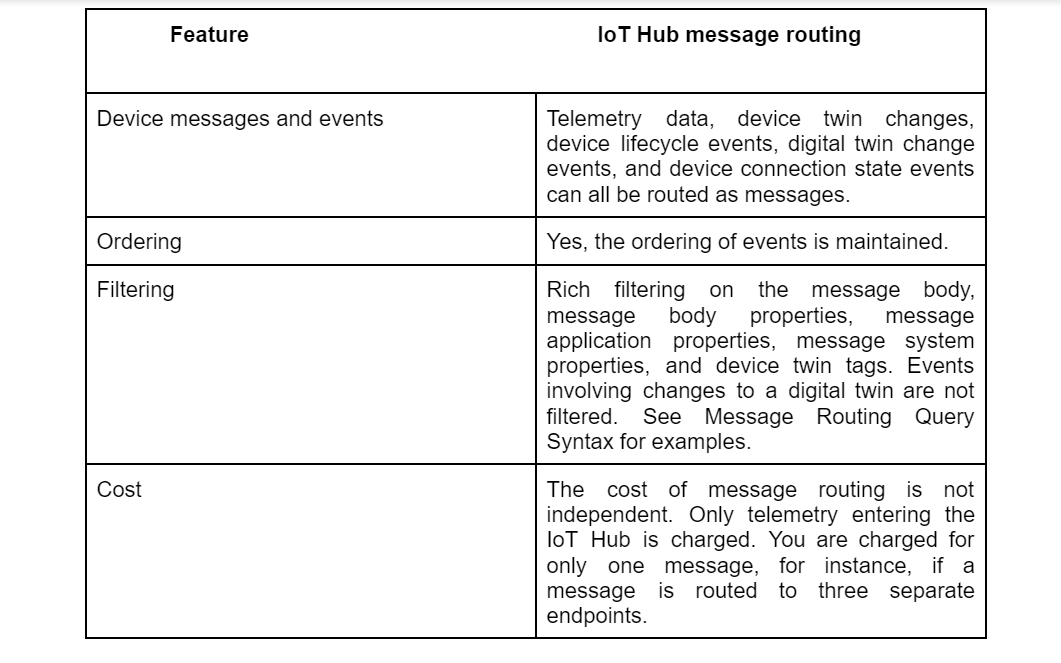
Message Routing Features in IoT Hub
The table below given displays some message routing features in the IoT hub.
Message routing query based on message properties
For protocol interoperability, the IoT Hub defines a standard format for all device-to-cloud transmission. The following JSON representation of the message is presumptive for IoT Hub messages. All users now have access to system properties that specify the message's content. Users can add specific application attributes to a message as they see fit. Given that IoT Hub device-to-cloud transmission is not case-sensitive, we advise creating distinctive property names. IoT Hub will only deliver one property, for instance, if you have numerous properties with the same name.
{
  "message": {
    "systemProperties": {
      "contentType": "application/json",
      "contentEncoding": "UTF-8",
      "iothub-message-source": "deviceMessages",
      "iothub-enqueuedtime": "2017-05-08T18:55:31.8514657Z"
    },
    "appProperties": {
      "processingPath": "{cold | warm | hot}",
      "verbose": "{true, false}",
      "severity": 1-5,
      "testDevice": "{true | false}"
    },
    "body": "{\"Weather\":{\"Temperature\":50}}"
  }
}
Routing Query Properties
Hub IoT Message Users can route device-to-cloud messages to endpoints that are service-facing by using routing. Prior to routing data to endpoints, querying provides the opportunity to filter the data. You can configure the following properties for each routing query:

Endpoints and routing
A default built-in endpoint exists in an IoT hub. By connecting additional services in the subscriptions you own to the hub, you can build unique endpoints to which communications can be routed. IoT Hub now supports Service Bus queues, Service Bus topics, Azure Storage containers, and Event Hubs as custom endpoints.
Messages are delivered to the built-in endpoint when you utilize routing and custom endpoints, and they don't match any queries. To deliver messages to both the built-in endpoint and a custom endpoint, add a route that sends messages to the built-in events endpoint.
Non-telemetry events
Message routing permits sending device twin change events, device lifecycle events, digital twin change events, and device connection state events in addition to device telemetry. IoT Hub provides messages to the endpoint that contain the change in the device twin, for instance, if a route is formed and the data source is configured to device twin change events. IoT Hub also delivers a message indicating if a device or module was created or destroyed or if a route is created with a data source set to devise lifecycle events. See Device and module lifecycle alerts for further details on device lifecycle events. The IoT Hub delivers notifications anytime a digital twin property is set or altered, a digital twin is replaced, or when a change event occurs for the underlying device twin when utilizing Azure IoT Plug & Play. Finally, IoT Hub delivers a message indicating whether the device was connected or unplugged if a route is defined with a data source set to device connection state events.
In order to facilitate real-time integrations and the automation of workflows based on these events, IoT Hub also interfaces with Azure Event Grid to publish device events. To find out which option is appropriate for your situation, compare the main differences between message routing and Event Grid.
Frequently Asked Questions
How can I transmit telemetry information to the Azure IoT hub?
Select View devices in this hub from your IoT hub in IoT Explorer, then pick your device from the list. Choose Telemetry from your device's left menu. Select Start after making sure that Use built-in event hub is set to Yes. As the device transmits data to the cloud, observe the telemetry.
What three elements make up an Azure IoT Hub message?
Three essential components that make up a message enrichment are the endpoints it applies to, the key name for the enrichment, and the key value.
What is telemetry data?
Telemetry is used to describe the remote gathering and transmission of data in the form of measured values. There are several sources of telemetry data collection, including distant or difficult-to-reach locations.
What is a telemetry example?
For instance, telemetry is used to communicate meteorological data from weather balloons to weather stations and to track the movements of wild animals that have been fitted with radio transmitters.
Conclusion
In this article, we have discussed Message Routing Concept in Azure IoT Hub. We hope this article helps you to learn something new. And if you're interested in learning more, see our posts on JSP, Internet of Things(IoT), Android in Home Automation, IoT and Home Automation, Microsoft Azure.
Visit our practice platform Coding Ninjas Studio to practice top problems, attempt mock tests, read interview experiences, and much more! Feel free to upvote and share this article if it has been useful for you.






 1+ registered

