Table of contents
1.
Introduction
2.
Azure subscriptions
2.1.
Free subscriptions
2.2.
Pay-as-you-go subscriptions
2.3.
Member subscriptions
3.
Azure Management groups
3.1.
Features of a management group
4.
Azure Resource Groups
5.
FAQs
5.1.
Where are Azure subscriptions?
5.2.
How many Azure subscriptions are there?
5.3.
What is a management group in Azure?
5.4.
What is a resource group in Azure?
5.5.
What is the difference between the resource group and management group in Azure?
6.
Conclusion
Last Updated: Mar 27, 2024

Overview of Azure subscriptions, management groups, and resources

Career growth poll
Do you think IIT Guwahati certified course can help you in your career?

Introduction

Azure is a cloud platform developed by Microsoft to help developers build applications. Azure provides us with scalable, responsive, reliable, and dynamic applications. It has features like application hosting, cloud services, modern architectures, etc. The azure services depend upon the subscription you choose. Let’s discuss the azure subscriptions, management groups, and resources in this article.

Azure subscriptions

A subscription is an arrangement or agreement to pay for something you receive or use. The Azure subscription is an agreement between you and Microsoft to use the cloud services offered by Microsoft. There are three types of Azure subscriptions provided by Microsoft; free, pay-as-you-go, and member subscriptions.

Free subscriptions

Microsoft provides free services for the first 12 months you choose Azure, with a credit of $200 as a bonus. The services offered by free subscription for 12 months are Azure Virtual Machines—Linux, Azure Virtual Machines—Windows, Azure Managed Disks, Azure Database for PostgreSQL, Azure Load Balancer, Azure Cosmos DB, etc. The services that are always free without any trial period are Azure Functions, Azure App Service, Azure Cosmos DB, Azure Bot Service, Azure Kubernetes Service (AKS), and Azure DevOps, Azure Data Factory, etc.

Pay-as-you-go subscriptions

We can Azure services by creating an account and purchasing the cloud services at pay-as-you-go pricing. It gives you 25+ services every month, and you only need to pay for what you use other than free services. You can also opt out of your subscription anytime. It provides one-year and three-year services on any operating system like Linux or Windows virtual machines.

Member subscriptions

Azure also provides cloud services for students. If you are a student, you can use your University or school email to access the Azure services and renew them yearly. You should be on the list of universities or schools provided by Microsoft to avail of this offer. This subscription provides you with a credit of $100 and free services. It helps you build applications, explore and learn Artificial Intelligence, and work with big data sets. You can use this subscription until you are not a student of that university anymore.     
Azure Management groups

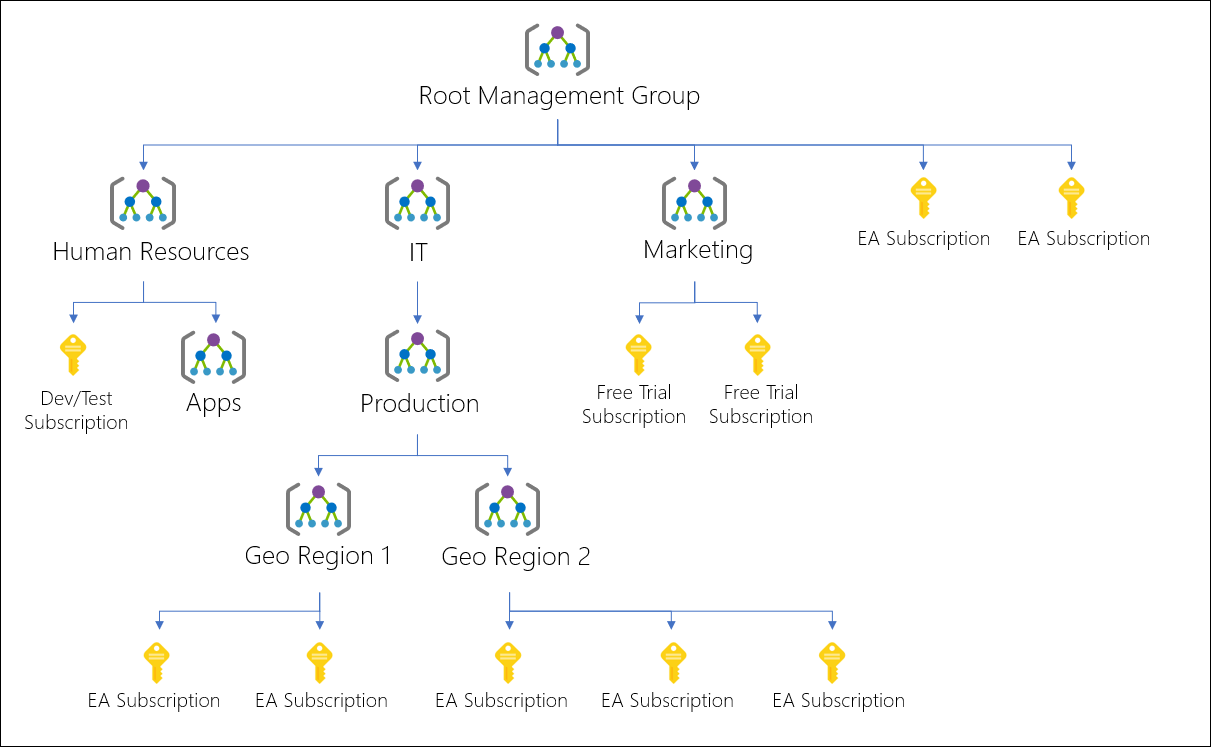
Azure management groups are used in organizations with a lot of Azure subscriptions. When there are a lot of subscriptions, it might not be easy to manage access, policies, and the prising of subscriptions. To manage these, they use management groups. The management groups can manage the subscriptions and policies at any scale and for any subscription. To ensure efficient management, all subscriptions within a management group must trust the same Azure Active Directory (Azure AD) tenant. You can customize or create an architecture or hierarchy of the management group according to your organizations and subscriptions. The image below shows the hierarchy structure of a management group.

Source

Features of a management group

  • Almost 10,000 management groups can be supported in a single directory.
  • A single management group tree can support up to six levels of depth.
  • Every management group and subscription can only support one parent.
  • Every management group can have many children.
  • All the subscriptions and management groups are within a single hierarchy in each directory.

Azure Resource Groups

A resource group in Azure stores all the resources that are necessary for a group. You can allocate the resources and resource groups to manage those resources based on your organization and the services you use. Adding resources that share the same life cycle within the same resource groups in Azure can help us easily deploy, modify and delete the resources or groups. Once you create an Azure template, you can use the Azure portal to deploy the Azure resources. You can also move the resources from one group to another or change your subscriptions.

Resources groups provide us with a feature of locking the resource groups. Once you lock a resource group, the other users in the organization cannot modify or delete the resources, subscriptions, or resource groups unless they have special permissions given for the groups.

FAQs

Where are Azure subscriptions?

Microsoft provides Azure subscriptions to use the Azure cloud services according to your requirements. You can use the free services or pay for what you use according to your subscription type.

How many Azure subscriptions are there?

There are three types of Azure subscriptions provided by Microsoft; free, pay-as-you-go, and member subscriptions. The free subscription lets you use services for free, and the pay-as-you-go, member subscriptions charge the amount based on the services you use.

What is a management group in Azure?

Azure management groups are used in organizations with a lot of Azure subscriptions. The management groups manage the subscriptions and policies at any scale and for any type of subscription. The Azure administrators manage these management groups.

What is a resource group in Azure?

A resource group in Azure stores all the resources that are necessary for a group. You can allocate the resources and resource groups to manage those resources based on your organization and the services you use. 

What is the difference between the resource group and management group in Azure?

Management groups contain a few subscriptions, and subscriptions contain resource groups. A resource group belongs to only one subscription to manage the services and resources inside it.

Conclusion

We have discussed the concept of the Azure and its subscriptions, management groups, and resource groups in this article. 

Hey Ninjas! We hope this blog helped you better to understand the Azure concept. Please check out Coding Ninjas for more unique courses and guided paths. Also, try Coding Ninjas Studio for more exciting articles, interview experiences, and fantastic Data Structures and Algorithms problems. Please upvote our blog to help the other ninjas grow.

Happy Coding!

Live masterclass