




Introduction to Katalon
Katalon is an automating testing software, that lets the users test web, mobile or desktop applications and APIs without coding, to deliver efficient and robust software to the consumers. The software is built over the Selenium and Appium automation frameworks, and makes testing convenient and code-free.
Pass desired capabilities at runtime for WebUI Testing
Insert the given code before the test script to override the desired capabilities predefined the in the project settings and instead apply the desired capabilities at runtime
import com.kms.katalon.core.configuration.RunConfiguration
RunConfiguration.setWebDriverPreferencesProperty(<key>, <value>)
Example to Open Firefox Browser in Private Mode
The following is a sample demonstration of how to configure the desired capabilities at runtime so as to open a test case on Firefox in private mode.
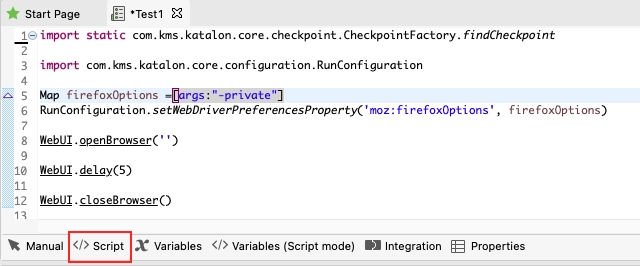
- Open the script of the test case
- Pass the -private argument to the sample code. Then place the given code before the test script, as directed above, to implement the passing.
import com.kms.katalon.core.configuration.RunConfiguration
Map firefoxOptions =[args:"-private"]
RunConfiguration.setWebDriverPreferencesProperty('moz:firefoxOptions', firefoxOptions)
- Complete writing the script or autocomplete it using Web Spy/Record Utility.
2. Finally, run the test with firefox.

NOTE: make sure the browser is updated. Go to Tools > Update WebDrivers > Choose browser to update the browser.
The test run is successful, and a private webpage opens on Firefox.





 5+ registered

