Get a skill gap analysis, personalised roadmap, and AI-powered resume optimisation.
Introduction
This article will explain optimizing round-trip times by batching Redis commands. Redis pipelining is a performance-enhancing approach that involves delivering numerous instructions at once without waiting for each one to respond. The majority of Redis clients support pipelining. The purpose of pipelining is to solve a problem, and this page explains how pipelining works in Redis. You may check out the problem section by clicking here.
RTT
Redis is a client-server TCP service that uses the request/response protocol. This implies that, in most cases, a command issued by a Redis client is separated into the four processes listed below.
Send command
Command queue
Command execution
Return result
The client makes a query request to the server and then waits for the server to answer by listening to the socket return, generally in blocking mode. The server processes the commands, and the results are returned to the client. The client and server are linked over the internet. This connection can be quick or sluggish. Data packets from the client can always reach the server, regardless of how the network is delayed, and the server delivers the data to the client.
For example, the two stages of sending commands and returning results are referred to as RTT (Round Trip Time). When a client needs to make many requests in a row, it's obvious to observe how this impacts performance (for example, adding multiple elements to the same list). Even though the server can handle 100k requests per second, we can only process four requests per second if the RTT time is 250 milliseconds (when the network connection is very sluggish). The RTT is substantially less if you use a local loopback interface, but this is also a significant burden if you need to conduct multiple writes in a row.
Redis Pipelining
The Pipeline can help us fix this problem. Pipelines are not a novel technology or process; several have been employed in the past. In various network conditions, RTT will be varied. For example, the same computer room and computer room will be faster, whereas other computer rooms and areas will be slower. Redis has long supported Pipeline technology, so you can use it to manage Redis no matter what version you're using.
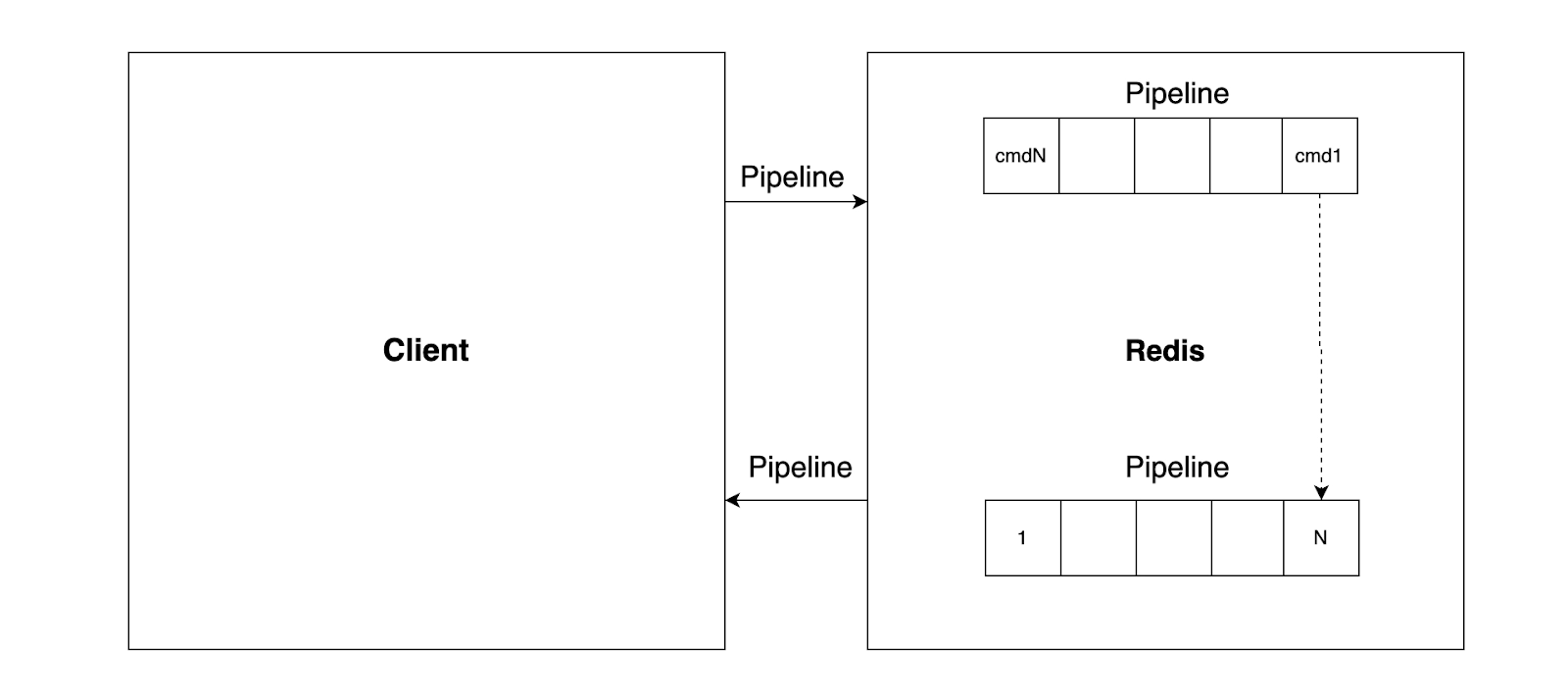
The pipeline may build a collection of Redis instructions, send them to Redis over RTT, and then execute the commands in the correct sequence and provide the results to the client. A pipeline was not used to execute N instructions in the preceding diagram; thus, the entire operation necessitates N RTTs. The following diagram illustrates how Pipeline may be used to execute N instructions with only one RTT:
Pipelining has been supported by Redis since its inception. Thus you may use it with any version of the database. Here's an example of how to use the raw Netcat utility:
We don't pay the RTT fee for each call this time, but only once for the three orders.
To be clear, the order of actions in our first example with pipelining will be as follows:
Client: INCR X
Client: INCR X
Client: INCR X
Client: INCR X
Server: 1
Server: 2
Server: 3
Server: 4
Code
In the following benchmark, we'll utilize the Redis Ruby client, which supports pipelining, to see if pipelining improves performance:
require 'rubygems' //importing rubygems.
require 'redis'    //importing redis.
def bench(descr)
  start = Time.now
  yield
  puts "#{descr} #{Time.now - start} seconds"
end

def without_pipelining  //Iterating loop without the pipelining.
  r = Redis.new
  10_000.times do
    r.ping
  end
end

def with_pipelining     //Iterating loop the pipelining.
  r = Redis.new
  r.pipelined do
    10_000.times do
      r.ping
    end
  end
end

bench('without pipelining') do  //print time without the pipeline.
  without_pipelining
end
bench('with pipelining') do     //print time with the pipeline.
  with_pipelining
end
Output
without pipelining 1.185238 seconds
with pipelining 0.250783 seconds
Point to remember
When sending commands with Pipeline, the number of commands assembled by Pipeline at any given moment cannot be arbitrary. Otherwise, the amount of command data gathered at once will be excessive. On the one hand, it will lengthen the client's wait time. Operational database systems are aimed toward real-time, transactional processes, whereas traditional databases rely on batch processing.
Comparison
Consider the following distinctions between batch commands and Pipeline:
The pipeline is non-atomic, whereas native batch instructions are atomic.
Pipeline enables multiple batch commands, one command corresponding to several keys.
The Redis server supports native batch commands, whereas Pipeline needs the server and client to be implemented together.
Frequently Asked Questions
In Redis pipelining, how many instructions may be transmitted to a server? In most circumstances, keeping the pipeline size between 100 and 1000 operations yields the greatest performance. However, you may conduct some benchmark studies using common queries that you submit.
What is Redis pipelining, and how does it work? Redis pipelining is a performance-enhancing approach that involves delivering numerous instructions at once without waiting for each one to respond.
How quickly is Redis created? Redis is 10 to 30% quicker when the data set fits into the working memory of a single computer.
Is there anything quicker than Redis? The database MongoDB is schemaless, which implies it doesn't have a set data structure. This means that when the size of the data in the database grows, MongoDB can run significantly quicker than Redis.
Is Redis a database or a cache? Although Redis was originally designed as a caching database, it has subsequently developed into the main database. Many modern apps utilize Redis as their primary database. Most Redis service providers, on the other hand, only support Redis as a cache, not as a primary database.
Conclusion
We studied how to optimize round-trip times by batching the Redis commands and strategy for increasing performance by giving numerous instructions at the same time without waiting for each one to respond. You can explore data types in Redis by clicking here.








 7+ registered

