Do you think IIT Guwahati certified course can help you in your career?
Introduction
The HTML <pre> tag is used to display preformatted text, preserving both whitespace and line breaks exactly as they appear in the HTML code. This tag is ideal for presenting code snippets, poetry, or any text where formatting is crucial. Unlike other text elements, <pre> maintains the original spacing and alignment, ensuring that the text is displayed with the same formatting as written, enhancing readability and presentation.
In this blog, we will learn about Pre Tag in HTML, its Attributes, along with its advantages and disadvantages.
What is the Pre Tag in HTML?
Pre Tag stands for preformatted text. It displays the text exactly as it was written in HTML code. All the text in Pre tag is displayed in a fixed-width font, and both spaces and line width are preserved in the text. This tag is commonly used for displaying code snippets or any text where spacing and line breaks are crucial. It is denoted by <pre> tag.
Tag
Description
<samp>
Represents sample output from a computer program. It's typically used to display output examples, such as the result of a code execution or a program's response.
<var>
Represents a variable in programming or mathematics. It's used to denote placeholders for values that may change in different contexts.
<code>
Encloses a block of code within HTML documents. It's often used to display code snippets, programming instructions, or any text that should be presented in a monospaced font for clarity.
<kbd>
Indicates text that represents user input from a keyboard. It's commonly used to highlight keyboard shortcuts, commands, or any text that users are expected to type into their devices.
Syntax of HTML Pre Tag
Syntax of Pre tag starts with <pre> and ends with </pre>.
<pre>
<!-- Text inside Pre Tag-->
</pre>
Example of the HTML <pre> tag
<!DOCTYPE html>
<html>
	<head>
		<title>Example of Pre Tag</title>
	</head>
	<body>

		<h1>Example of Pre Tag</h1>

		<p>Here's an example of some preformatted text using the Pre tag:</p>

		<pre>
			This is some preformatted text
			It preserves white space and line breaks
			Like this!
		</pre>

	</body>
</html>
Output
Explanation
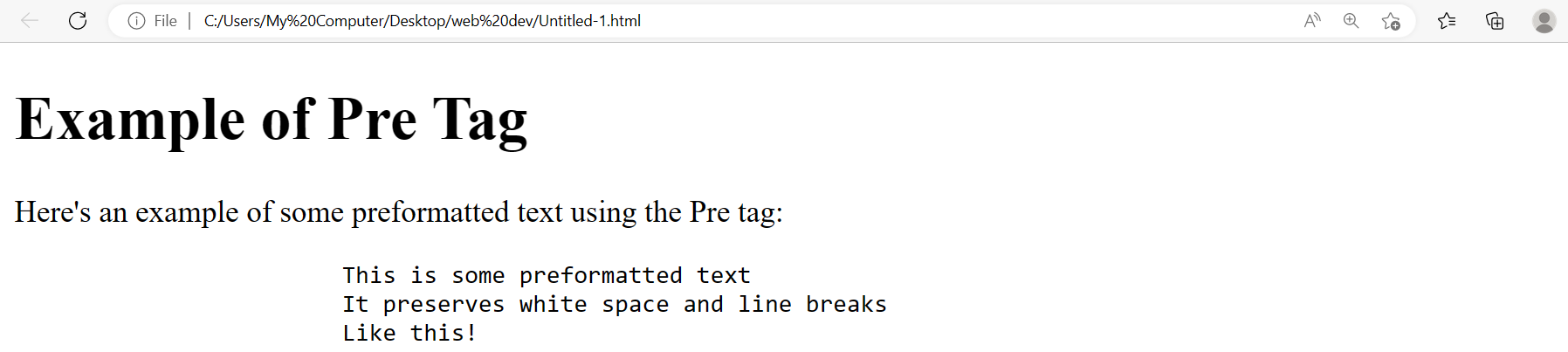
Here, in this example, we have used the Pre tag to preserve the paragraph's white spaces and line breaks.
Pre Tag in HTML Attributes
The Pre tag in HTML have some attributes that can be used to change how our text is displayed.
1. Width
This attribute sets the maximum width of our text block. By default, the width of the text is set to the width of our browser window, But for a neat and clean look, we use the width attribute.
Example
Here is an example of how to use the width attribute effectively in Pre tag.
<!DOCTYPE html>
<html>
	<head>
		<title>Example of Pre Tag Width Attribute</title>
	</head>
	<body>

		<h1>Example of Pre Tag Width Attribute</h1>

		<p>Here's an example of some preformatted text with a width of 400 pixels:</p>

		<pre width="400">
			This is some preformatted text with a width of 400 pixels.
		</pre>

	</body>
</html>
Output
Explanation
Here, in this example, we have used the Pre tag's width attribute to fix the preformatted text's width to 400 pixels.
2. Wrap
This attribute is used to wrap the text area in HTML. If a text in a line is longer than the specified wrap limit, it will automatically shift to the next line.
Example
Here is an example of how to use the Wrap attribute in the Pre tag.
<!DOCTYPE html>
<html>
	<head>
		<title>Example of Wrap Attribute</title>
	</head>
	<body>

		<h1>Example of Wrap Attribute</h1>

		<p>Let us see how the wrap attribute is used in HTML:</p>


		<pre style="white-space: pre-wrap;">
			This long line of text will wrap to the next line if it exceeds the width of the screen size.
		</pre>

	</body>
</html>
Output
Explanation
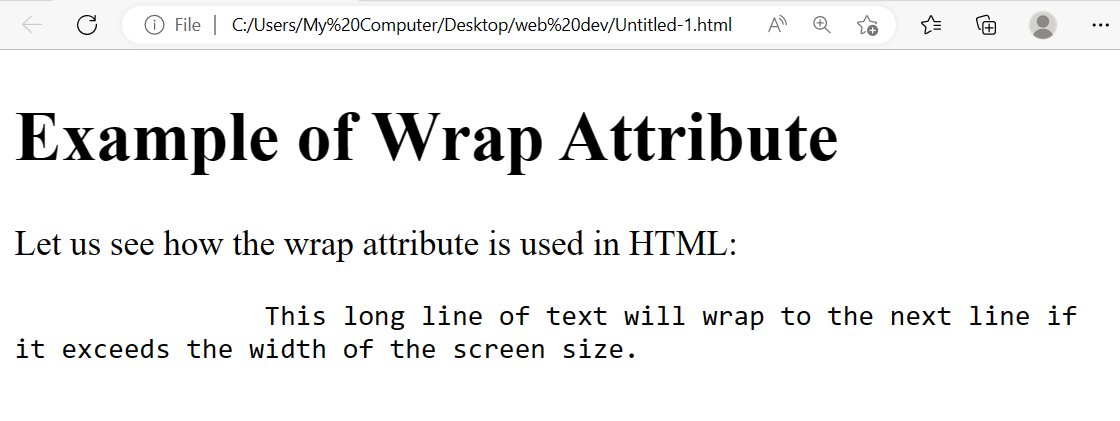
Here, in this example, we have used the wrap attribute of the Pre tag. The text in a line is longer than the screen width, so it automatically shifts to the next line.
3. Class
These attributes are used to customise the CSS styles in our preformatted text. We use the class attribute of the Pre tag to use CSS styles in the Preformatted text. We can change font, color, and background or add borders, among other possibilities, using class attributes.
Example
<!DOCTYPE html>
<html>
	<head>
		<title>Example of Class Attribute</title>
		<style>
			.my-class {
				font-family: Arial;
				font-size: 16px;
				color: blue;
				background-color: #F0F0F0;
				padding: 10px;
				border: 1px solid black;
			}
		</style>
	</head>
	<body>

		<h1>Example of Pre Tag Attributes</h1>

		<p>Here's an example of some preformatted text with class attributes:</p>

		<pre class="my-class">
			This is some preformatted text with class attributes.
		</pre>

	</body>
</html>
Output
Explanation
Here, in this example, we have used the class attribute of the Pre tag to use CSS styles in the Preformatted text.
Advantages of the pre Tag in HTML
The Pre tag in HTML has several advantages.
It preserves whitespaces in our text, including space, tabs and line breaks.
The Pre tag increases the readability of our text which makes the text easier to read.
The Pre tag can also be customized using the attributes available in Pre tag.
Disadvantages of the pre Tag in HTML
While the Pre Tag has many advantages, it also has some disadvantages.
By default, Pre tag has a fixed width, which cannot be changed dynamically. This makes our text harder to read.
As the Pre tag has a fixed width, it is not advisable to use it for smaller screens or mobile phones.
It does not allow advanced formatting options such as color or images.
To center a <pre> tag in HTML, enclose it within a <div> element with the style attribute set to "text-align: center". This aligns the content of the <pre> tag to the center of the enclosing <div>.
What is pre vs P tag in HTML?
The <pre> tag in HTML preserves spaces and line breaks, displaying text exactly as written in the code. In contrast, the <p> tag is for regular paragraphs, where spaces and line breaks are rendered as a single space.
What are the pre and code tags?
The <pre> tag is for preformatted text, maintaining spacing and line breaks. The <code> tag is used to define a piece of code, with optional styling for syntax highlighting.
How to do with pre HTML?
To use the <pre> tag, enclose the text within <pre> and </pre>. This maintains the formatting specified in the code, making it ideal for displaying code snippets.
How do you style pre tags?
Preformatted text can be styled using CSS. Use properties like font-family and white-space to control the appearance of <pre> tags. For syntax highlighting, combine with <code> and CSS classes.
What is HTML pre tag span?
The HTML <pre> tag displays preformatted text with preserved whitespace and line breaks. The <span> tag, however, is an inline element used to apply styles or scripting to a portion of text within other elements. Combining them allows for styled preformatted text while maintaining its original formatting.
Conclusion
This article discusses the topic of Pre tag. In this blog, we have discussed Pre Tag in HTML, its Attributes, and its advantages and disadvantages. We hope this blog has helped you enhance your knowledge of the Pre Tag. If you want to learn more, then check out our articles.








 1+ registered

