Do you think IIT Guwahati certified course can help you in your career?
Introduction
Have you ever wondered how to effectively display and interpret the output of your code in R?
For this, we have a simple print function() in R.
We will explore various techniques to format and customize the printed results, which will enable you to present your data in a more meaningful and insightful way.
This article will help you understand the print function in R. The different techniques of using the print function in R with the help of some examples, and lastly, you will get to know some of the areas where R programming language can be used.
R Programming Language
R is a statistical computing and graphics language and environment. It is a GNU project established by John Chambers and colleagues at Bell Laboratories (previously AT&T, now Lucent Technologies).
R provides a rich set of statistics-related libraries as well as a suitable environment for statistical computing and design. In addition, while it is great for data importing and cleaning, many quantitative analysts utilize the R Programming Language as a programming tool.
What is the Print Function?
The print function in R helps you display information, variables, and outcomes whenever you run your code. It allows you to see and understand what your code is doing.
Assume you've developed some code in R to do computations. When you run that code, you want to view the values of particular variables or the output of your computations. This is when the print function comes into play. Using the print function, you may make R display the required information.
Working of Print Function
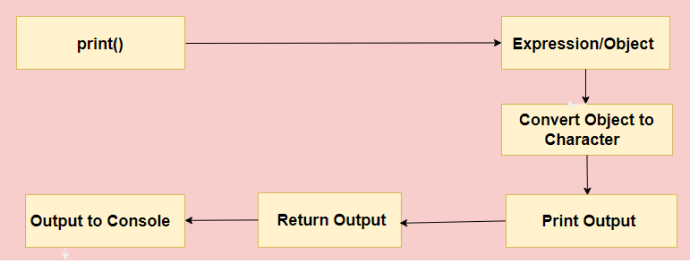
Let us look at the working of the print function with the pictorial representation.
As an argument, the print() function accepts an expression or an object. The print() function receives the expression/object.
Internally, the print() function turns an object into its character representation. The object can now be shown as a string.
The formatted output is then sent to the printing mechanism, which may result in the output being written to the console, a file, or another output destination.
The output is displayed on the console or the output destination chosen.
Finally, the print() function returns the output, which can be given to a variable or used in subsequent calculations.
Syntax of Print Function in R
Here is the syntax of the print function in R:
print(data, digits, na.print)
Here,
print:It is the function used to print in R.
data:It indicates the argument that will be displayed.
digits:It indicates the argument that will be displayed.
na.print:It indicates the output format for NA values.
Alright!! Let us look at the examples of print function in R.
Examples of Print Function in R
Here are some examples of print functions in R.
Using print function
In this example, we will use the print function to print the values as well as variables.
Code:
# printing the  values inside the print function
print("Hey Ninjas")

# printing the variables inside the print function
a <- "Hey Ninjas!! Welcome to Coding Ninjas"
print(a)
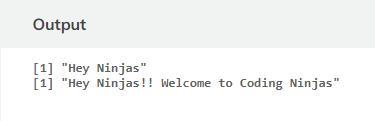
Output:
Explanation:
In the example above, we used the print() function to output a string and a variable. When we use a variable inside print(), the value stored inside the variable is printed.
Using the specific number of digits
In this example, we are using displaying a numeric value with a specific number of digits as in this particular example. We have used the pi.
Code:
# Numeric value with the custom digits
pi_value <- 3.14159265359
print(pi_value, digits = 6)
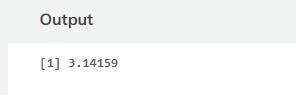
Output:
Explanation:
Using the digits argument, the pi_value is written with a precise value of six digits. The final result is 3.14159.
Using na.print function
In this example, we are customizing NA representation in R programming and printing after changing the display of missing values.
Code:
# Customizing representation of a string in r programming
articles <- c("DSA", "Networking", "Operating System", NA)
print(articles, na.print = "Not available")
Output:
Explanation:
The articles vector in this example has a missing NA value. We define that NA values should be shown as "Not available" instead of using the na.print argument. As a result, the custom string "Not available" replaces the NA value in the third element in the output.
Using paste function
We use the paste() function inside the print() function to print the output.
Code:
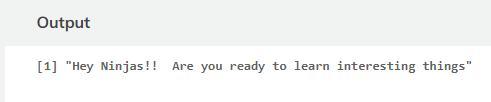
greet <- "Hey Ninjas!! "
print(paste(greet, "Are you ready to learn interesting things"))
Output:
Explanation:
Here the variable greet is assigned a value "Hey Ninjas!!" and is concatenated with the string "Are you ready to learn interesting things" using the paste() function. Using the print() function, we get the string to the console.
Using sprintf() Function
R's sprintf() function is used to format and manipulate strings. It allows you to define placeholders for values and format them using various format specifiers such as decimals, strings, and dates. It outputs the formatted string.
Code:
#define value
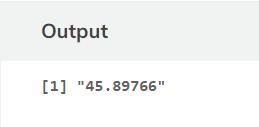
x <- 45.89765748

#only display 5 digits after decimal place
sprintf("%.5f", x)
Output:
Explanation:
The variable x is given the value 45.89765748 by the code. The sprintf()method is then used to format x, displaying only 5 digits after the decimal place by specifying"%.5f" as the format specifier.
Application of R Programming Language
Here are some of the applications of the R programming language:
IT Sector: R is used by IT companies to provide data analysis and machine learning solutions to businesses. R helps them in the development of tools for statistical computing, data processing, and data modification. It is frequently used by businesses of all sizes to extract information and successfully manage data.
Finance: E-commerce organizations utilize R to improve customer experience, marketing, and financing. They employ R to boost cross-selling. Analytics is important in banking and retail for risk assessment and marketing strategy development. E-commerce goes further than in its use of data science.
Social Media:R is mostly used by social media businesses such as Facebook for behavior and analysis of feelings. They can change and improve their recommendations to users depending on the user's history, mood, and tone of their recent postings and viewed material. R is also used to analyze traffic, user sessions, and content in order to improve the overall user experience.
Banking:R is used by banks for credit risk modeling and other types of risk analytics. Banks frequently use R together with other proprietary software such as SAS. It's also used for fraud detection, mortgage haircut modeling, statistical modeling, volatility modeling, loan stress test simulation, and client evaluation.
Manufacturing: R language in manufacturing helps analyze and interpret data from production processes. It enables identifying patterns, predicting failures, optimizing quality, and improving efficiency. With its statistical and data analysis capabilities, R aids decision-making and process optimization in manufacturing industries.
Frequently Asked Question
What is the difference between print () and cat ()?
The "cat()" function concatenates and shows the values of one or more R objects as a single string, whereas the "print()" function displays the values of one or more objects with separators and formatting.
What are the argument and parameters of a function in R?
In R, an argument is the information provided in a function. An argument is a value that is passed to a function when it is called. Whereas when a function is created, the parameter is the value enclosed in parentheses.
What is the functionality of print () in R?
The print() function prints the provided message to the screen or another standard output device. The message can be a string or any other object, but the object will be converted to a string before being written to the screen.
Conclusion
In this article, you have learned about the print function in R, about R programming language, the syntax of the print function in R, different examples of print function in R, and lastly, some applications of R language.
We hope this article briefly helped you learn about the print function in R.
If you want to learn more, refer to these articles:









 6+ registered

