Get a skill gap analysis, personalised roadmap, and AI-powered resume optimisation.
Introduction
Calculating the distance between two points is a common mathematical problem that can be solved using Python. The distance is typically measured using the Euclidean formula, which considers the horizontal and vertical differences between the points. Python provides various methods to compute this, including mathematical operations and built-in libraries.
In this article, we will discuss different approaches to calculate the distance between two points in Python, along with examples..
Calculate the Distance Between Two Points
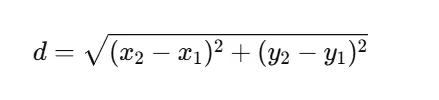
In a 2D plane, the distance between two points (x1,y1) and (x2,y2) is calculated using the Euclidean distance formula:
Python provides multiple ways to compute this distance:
What is the best way to calculate the distance between two points in Python?
The best way depends on the context. For 2D points we can use math.dist() (Python 3.8+) or numPy.linalg.norm(). For 3D points: Use math.sqrt() with the extended formula.
Why use NumPy instead of the math module?
numPy is optimized for large-scale numerical computations, making it faster and more efficient, especially when working with multiple distance calculations in arrays.
How can I calculate distances in a dataset?
For datasets with multiple points, consider using scipy’s distance functions or pandas with numPy to apply distance calculations efficiently.
Conclusion
In this article, we discussed on how to calculate the distance between two points in Python using a simple mathematical approach. We used the math module to perform the calculations efficiently. This program is useful in geometry, mapping applications, and real-world distance measurements.











 7+ registered

