Do you think IIT Guwahati certified course can help you in your career?
Introduction
The 'puts' method plays an essential role in Ruby programming for displaying output to the console. Understanding how to use 'puts' correctly can significantly improve the readability and user engagement of your code, regardless of whether you are a beginner or experienced in Ruby programming.
In this blog, we will discuss various techniques and examples to understand the working of puts in Ruby programming language.
Ruby Puts Method
The 'puts' is a built-in Ruby method for displaying output to the console. It stands for "put string" and is mainly used to output strings and objects as readable text. Using their 'to_s' method, it automatically converts objects to strings.
In the Ruby programming, "puts" is frequently used to print data followed by newline characters, show user prompts, and debug code. It accepts multiple arguments and prints on a new line.
A puts method in Ruby can handle multiple data types such as array, boolean, and numbers. It converts these values into strings before displaying them.
The basic syntax of the puts method in Ruby is:-
puts object
You can also try this code with Online Ruby Compiler
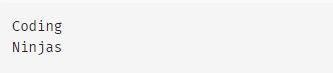
In this example, puts method print the Coding Ninjas after concatenating with the '+' operator.
Interpolation using puts
Ruby's string interpolation technique provides a simple way to create dynamic strings by allowing you to embed expressions, variables, or method directly calls within a string. It is denoted by ‘#[]’.
Users can insert values using string interpolation and print them using puts methods.
Example
company = "Ninjas"
puts "Coding, #{company}!"
You can also try this code with Online Ruby Compiler
In this example, Ninjas is printing three times without any separators.
Redirecting Output to a File
In Ruby, User can easily redirect the output of the “puts” method to the file instead of redirecting to the console. To redirect the output to the file, open a file in write mode and print the argument using the “puts” method.
Example
file = File.open("output.txt", "w")
$stdout = file
print "Writing inside the file"
puts "Coding, Ninjas!"
puts "I am an expert in Ruby Programmer."
print "Writing Done"
file.close
You can also try this code with Online Ruby Compiler
In this example, the “puts” method will save the output inside the “output.txt” file.
Difference between Puts and Print
Let's see some differences between the puts and print methods in Ruby.
puts
print
It is used to print output with a newline character at the end.
It is used to print output without a newline character at the end.
It is used to print each value on separate lines.
It is used to print each value on the same line.
It returns nil on the new line.
It returns nil on the same line.
It accepts multiple arguments and print output on a separate line.
It accepts multiple arguments and print output on the same line without any separators.
A puts method appends a new line automatically.
A print method does not append a new line automatically.
Example:
puts "Coding"
puts "Ninjas"
Output:
Coding
Ninjas
Example:
print "Coding"
print "Ninjas"
Output:
CodingNinjas
Frequently Asked Questions
What happens when an object is passed to the puts method?
In Ruby, the to_s function of any object passed to puts is automatically invoked to transform the object into a string representation. To enable puts to print the object as output, the to_s method converts the object to a string.
Does puts method in Ruby return any value?
Yes, after printing the output, puts returns nil. The return value of nil indicates that puts has no valuable output to return and is just used for the console reporting.
Can puts output to a file redirect instead of printing it to the console?
Yes, you can reroute the output by directly specifying the file to write to or by using the command-line file redirection operator (>).
What happens nil value is passed to puts?
Puts will produce an empty line if nil is input; nil is transformed into an empty string when represented as a string. Therefore, puts will output a blank line if nil is passed to it.
Conclusion
The "puts" method in Ruby is one of Ruby's most essential tools for printing output. Its function is used to output strings and objects as readable text. It offers simplicity and flexibility in printing arguments on new lines.
We hope this blog has helped you enhance your knowledge of puts in Ruby. Do not stop learning! We recommend you read some of our articles related to puts in Ruby:
But suppose you have just started your learning process and are looking for questions from tech giants like Amazon, Microsoft, Uber, etc. For placement preparations, you must look at the problems, interview experiences, and interview bundles.
We wish you Good Luck!
Happy Learning!
Live masterclass
Ace Data Analyst Interviews with Amazon SQL Case Studies
by Prerita Agarwal
23 Oct, 2026
11:30 AM
One Prompt, Three AI Agents: Build a Portfolio Project for 25L+ GenAI Roles
by Saurav Prateek
19 Oct, 2026
11:30 AM
AI vs You: Crack a Data Analyst Interview Case with Claude + Excel
by Abhishek Soni
21 Oct, 2026
11:30 AM
Build Your Own Perplexity-Style App: Stand Out in GenAI Job Interviews
by Sumit Shukla
22 Oct, 2026
11:30 AM
Ace Data Analyst Interviews with Amazon SQL Case Studies
by Prerita Agarwal
23 Oct, 2026
11:30 AM
One Prompt, Three AI Agents: Build a Portfolio Project for 25L+ GenAI Roles












 1+ registered

