Do you think IIT Guwahati certified course can help you in your career?
Introduction
The Python glob module can find files matching a specified pattern. You can find files in directories or subdirectories based on their name, size, etc. It will allow you to do more complex searches using Python glob with other modules.
This article will describe the concepts of the Python glob. We will discuss different examples. We will learn how to use Python glob. Knowing the basics of the Python glob will help you work with files in Python. So let’s start learning things.
What is Glob Module in Python?
You can use the glob module to search for file paths using specified patterns. You can search in both directories and sub directories. It will return you a list of all matched file paths. You can also use glob with other Python modules for file operations. It is present in the Python standard library. You can also substitute or format a string using the glob module. There are some limitations to glob. It cannot search for hidden files. Overall it's a powerful tool for searching and manipulating files in Python.
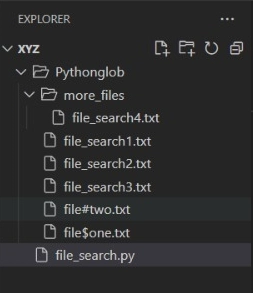
As you can see, we have many files scattered in various folders. So let’s perform different operations using Python glob.
Patterns for Matching File Names
Using the Python glob module, you can use different patterns to match file names or paths. Let’s see what different symbols match.
Symbol
Name
Description
(*)
Asterisk
It will match any sequence of characters.
(?)
Question Mark
It will match any single character.
([ ])
Character Range
It will match any single character within the specified range.
(^)
Negation
It will match any character not in the specified range.
(**)
Double Asterisk
It will represent any number of directories or subdirectories.
( , )
Comma
You can separate multiple patterns with a comma.
( ~ )
Tlide
You can use it to exclude matches.
({ })
Curly Braces
It will represent either of the specified patterns.
Search Files
You can use glob.glob() to find files that match a specific pattern in a directory or subdirectories. You can use it with simple patterns like .txt. It will return you a list of files matching the pattern you mentioned. The list will have the full path of the files those match.
Code implementation
Python
Python
import glob

# First, search all .txt files in your "folder_name" folder
present_files = glob.glob('Pythonglob/*.txt')

# Print the list of file names in your folder.
for file in present_files:
    print(file)
You can also try this code with Online Python Compiler
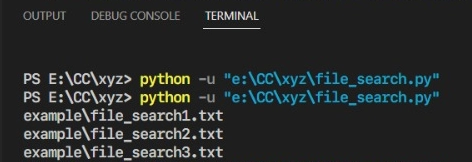
Firstly, we are finding files using ‘glob.glob('Pythonglob/*.txt')’. Then we print all .txt files found.
Recursive File Search
You can use it to find files in a directory and all its subdirectories. It will recursively search through each subdirectory. It will return a list of file paths of the matching files. It's faster than manually going through the directory tree.
Code Implementation
Python
Python
import glob

# Path of your folder.
our_folder = "Pythonglob/"

# Path of the file in another directory.
files_path = f"{our_folder}**/file_search4.txt"
output_files = glob.glob(files_path, recursive=True)

# Print the list of output files.
for file in output_files:
    print(file)
You can also try this code with Online Python Compiler
We are using ‘glob.glob(files_path, recursive=True)’ for recursiving search. We are using ** here to go inside the ‘more_files’ folder inside the ‘Pythonglob’ folder.
Filtering Files
You can use it to filter the search outputs of glob.glob(). You can select specific types of files. You can select files with a particular substring in the filename. It will make your search faster.
Code Implementation
Python
Python
import glob

# Finding the files.
My_files = glob.glob('Pythonglob/*.txt')

# Initialize any keyword.
keyword = "file_search"

# Filtering the files.
filtered_output = [file for file in My_files if keyword in file]

# Sorting the files.
sorted_output = sorted(filtered_output)

for file in sorted_output:
    print(file)
You can also try this code with Online Python Compiler
First, we search our files. Then we filter our files using ‘[file for file in My_files if keyword in file]’. Then we sort our files alphabetically using ‘sorted(filtered_output)’.
Deleting Files
You can use os.remove() to delete all files in the list. But remember to wrap the code for deleting files in a try-except block to handle errors.
Code Implementation
Python
Python
import glob
import os

# Initailise your path.
our_path = "Pythonglob/"

for file in glob.glob(f"{our_path}/*.jpg"):
    try:
        # Deleting all files.
        os.remove(file)
        print(f"{file} is no more.")

        # Throwing an error otherwise.
    except OSError:
        print(f" Unable to delete {file}.")
You can also try this code with Online Python Compiler
We are deleting all the files using ‘os.remove(file)’. If we cannot remove it, it will give an error.
What is glob.iglob()?
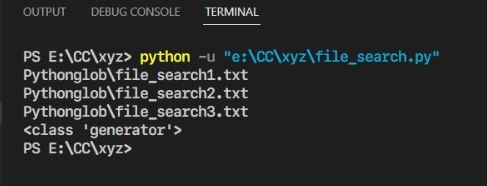
It returns an iterator that will give you the same output as glob.glob(), but only one at a time. It's a lazy function. It will only fetch one match at a time. It's an excellent way to search filenames over an extensive file directory. It takes a string having a pathname and will return you a generator. The iterator will give you filenames in output, not full paths.
Code Implementation
Python
Python
import glob

# Searching all .txt files in your folder.
present_files = glob.iglob('Pythonglob/*.txt')

# Print the list of file names.
for file in present_files:
    print(file)

print(type(present_files)))
You can also try this code with Online Python Compiler
Here we find the files using ‘glob.iglob('Pythonglob/*.txt')’, similar to glob.glob(). Then we also print the return type of glob.iglob().
What is glob.escape()?
You can use it to escape special characters in a given path. It's handy when using a path having special characters with specific meanings in globbing patterns. It will put backslashes on the special characters to make them safe. It takes any string as input. It will output a new stringwith the escaped special characters. You can use it with glob.glob() and glob.iglob().
Code Implementation
Python
Python
import glob

# Initialize file your special characters' files names.
file_names = ["file$one.txt", "file#two.txt"]

# For storing files that match.
My_files = []

for file_name in file_names:
    search_way = f"Pythonglob/{glob.escape(file_name)}"

# Extending My_files with the matching file paths.
    My_files.extend(glob.glob(search_way))

for My_file in My_files:
    print(My_file)
You can also try this code with Online Python Compiler
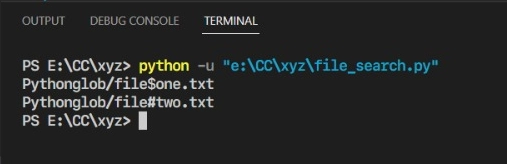
'{glob.escape(file_name)}' will escape any special characters in the file name. It will ensure they are treated as literal characters during the search. 'glob.glob(search_way)' will search the files matching the search path.
What is glob.has_magic()?
You can use it to check if a string has shell wildcards (i.e. magic characters). It will output True if the path contains magic characters; else false. *, ?, and [ are magic characters. You should not use this method outside of the glob module.
Code Implementation
Python
Python
import glob
# String with no magic character. no_magic_str = "file_search1.txt"
# String with magic character. magic_str = "file*search.jpg"
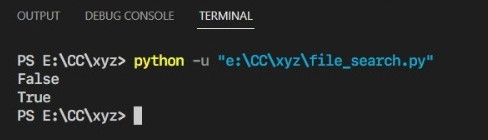
‘glob.has_magic(no_magic_str)’ will return False because the string has no magic character. Whereas ‘glob.has_magic(magic_str)’ will return True.
Other File Search Methods
Here are other file search methods present in Python:
Method
Description
Syntax
os.walk()
It will give file names in a directory tree by walking the directory tree top-down or bottom-up.
for root, dirs, files in os.walk(path, topdown=True, onerror=None, followlinks=False):
os.listdir()
It will return a list of file names in a directory.
os.listdir(path)
os.path.isfile()
It will check if a path points to a regular file.
os.path.isfile(path)
re.search()
It searches for a regular expression pattern in a file.
re.search(pattern, string, flags=0)
set()
It will load file contents into a set for quick searching.
set(iterable)
Applications of glob() in Python
Applications of glob() in Python:
File pattern matching: Find files that match a specified pattern
Directory traversal: Search for files across directories and subdirectories
Batch file processing: Easily process multiple files matching a pattern
File system exploration: Quickly list files and directories with specific criteria
Configuration file lookup: Locate configuration files with wildcard patterns
Log file analysis: Find and process log files with date-based naming conventions
Test file discovery: Automatically find test files in a project structure
Data import/export: Select multiple data files for batch import or export operations
Build systems: Identify source files for compilation or packaging
Cleanup scripts: Find and remove temporary or unnecessary files
Important Functions in the glob Module
Important Functions in the glob Module:
glob.glob(pathname, *, recursive=False):
Returns a list of paths matching the pathname pattern
Can search recursively if recursive=True
glob.iglob(pathname, *, recursive=False):
Returns an iterator of paths matching the pathname pattern
More memory-efficient for large file sets
glob.escape(pathname):
Escapes special characters in a pathname
Useful when working with literal file names containing glob characters
glob.has_magic(s):
Returns True if the string 's' contains any glob-style special characters
How to Use glob() in Python?
In Python, glob() is a function in the glob module that is used to retrieve files or directories based on specific patterns. It matches file paths using Unix shell-style wildcards:
* matches any number of characters (including none).
? matches exactly one character.
[] matches any character within the brackets (e.g., [abc]).
To use it, you must first import the glob module:
import glob
Then, you can use glob() to find files that match a pattern. For example, to find all .txt files in the current directory:
files = glob.glob('*.txt')
This returns a list of file paths that match the given pattern. You can also search in subdirectories by using the ** wildcard with recursive=True:
files = glob.glob('**/*.txt', recursive=True)
This will find all .txt files in the current directory and its subdirectories. The glob() function is useful for file discovery and batch processing tasks, especially when handling many files.
Advantages of glob() Function in Python
Here are a few pros of using Python glob:
It will simplify your file directory searching tasks.
You can find files based on specific criteria.
It saves you time and effort spent on manual file searches.
It includes recursive directory searches. You can search for files in subdirectories also.
It works on all operating systems that have Python.
It can easily integrate with other Python modules for file management.
You can use it for data cleaning, text processing, web scraping etc.
Limitations of Python glob() Function
Here are a few limitations of using glob() Function in Python:
It is unsuitable for searching large directories or files.
It only has simple pattern matching with wildcard characters.
Sometimes, you can get unexpected errors during recursive searches with glob.
You cannot search for files based on metadata or attributes using glob.
Some file searches may need more advanced tools or libraries.
Frequently Asked Questions
What is the difference between glob and re in Python?
glob and re serve different purposes in Python. glob is used for file and path pattern matching using shell-style wildcards, while re (regular expressions) is for general string pattern matching and manipulation with more complex patterns and operations.
Can you do recursive directory searching using glob?
Yes, glob has recursive directory searching in Python. You can search for files in subdirectories using the double asterisk (**). It will give us an easy file search across multiple directory levels.
How will Glob handle errors during file searches?
It will raise an exception if it finds any error or the path given doesn't exist. You wrap the glob statement in a try-except statement that will catch the exception, and it will handle the error.
Is glob platform-dependent or platform-independent?
It is platform-independent. You can use it across different operating and file systems. It will give you a simple way to search for files in Python, regardless of the platform. It is a robust tool for file management tasks.
Conclusion
In this article, we learned about Python glob() Function. This function is a powerful tool for file handling and pattern matching in directories. It allows you to easily retrieve files and directories based on wildcard patterns, making it ideal for automating tasks like file searching, filtering, and batch processing. With support for recursive searches and flexible pattern matching, glob() simplifies working with complex file structures, saving time and effort in coding.










 5+ registered

