Creating components using the render function
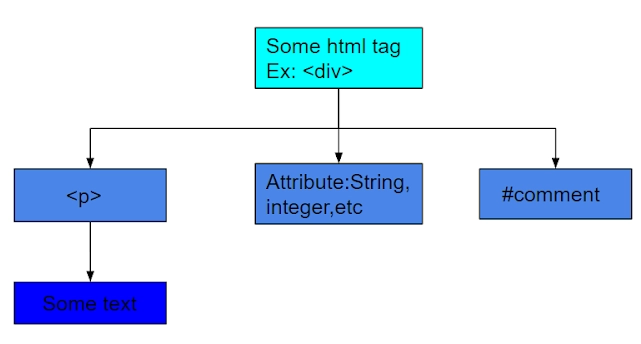
Those components that have Render Functions do not have template tags or properties. Instead, they define a function called render, which receives argument:
<!Doctype html>
<script src=“https://unpkg.com/vue”></script>
<html>
<head>
</head>
<body>
    <Coding_Ninjas id=“app”></Coding_Ninjas>
    <script>
        vue.component('Coding_Ninjas')
        {
            render(createElement) {
                return createElement('tag_name', 'attributes')
                // return createElement('tag_name', '[ createElement]')
                //using this we can create a tree-like structure and can add more tags also.
            }


            data() {
                return {
                    Msg: "let's see render function";
                }
            }
        }
        new Vue({ el: '#app' })
    </script>
</body>
</html>

You can also try this code with Online Javascript Compiler
Replacing Shorthand Directives
Render Functions do not have access to rendered logic and binding features in Vue templates. Instead, they must be implemented in plain Javascript, which is relatively easy for most directives.
v-if and v-for
The Vue.js Render function does not provide an alternative to plain JavaScript whenever it can be easily done in that way. The following example illustrates the use of v-if and v-for:
<ul v-if="elements.length">
    <li v-for="element in elements">
    {{ element.name }}</li>
</ul>
<p v-else>No element found</p>
<!-- We can write this using map() inside render function: -->
props: ['elements'],
render() {
  if (this.elements.length) {
    return h('ul', this.elements.map(element) => {
      return h('li', element.name)
    }))
  } else {
    return h('p', 'No element found.')
  }
}
You can also try this code with Online Javascript Compiler
V-model
props: ['value'],
render: function (createElement) {
    var self = this
    return createElement('input', {
    domProps: {
      value: self.value
    },
    on: {
      input: function (event) {
        self.$emit('input', event.target.value)
      }
    }
  })
}
You can also try this code with Online Javascript Compiler
Event Handling and key modifiers
Event Handling
Handling events involves some calls. There are frequently used calls that are made when handling events. Utilizing modifiers in Vue allows us to implement these more easily.
To prevent the browser from reverting to the default behavior, event.preventDefault() is frequently called.
This can be done much more efficiently using the Vue-on directive, rather than writing them out explicitly in the methods.
The following modifiers are available in Vue.
- stop - Prevents event bubbling up the DOM tree
- prevent - Prevents default behavior
- capture - Capture mode is used for event handling
- self - Only trigger if the target of the event in itself
- once - Run the function at most once
<a href="test" @click.prevent="addTo">Add</a>
It will simply call the "add" method and remove the default behavior of the <a>tag. Using the default href attribute would cause the page to redirect to the path defined there.
Key-modifiers
When handling key-related events such as keyup, we can use key modifiers that allow us to listen to a particular key.
<input v-on:keyup.13="addTo" v-model="addValue">
An example of this is shown in the following code: the addTo method is called when the keyup event is fired with a key code of 13 (the enter key).
The pre-defined key codes make it easier to remember all of the key codes. Here are a few examples: enter, tab, delete, esc, space, and left.
Slots
By passing slots as functions, the child component creates the content for each slot.
To ensure that reactive data is registered as a dependency of the child component and not the parent, it should be accessed within the slot function.
<div>
    <slot>   </slot>
</div>
// This is a child component
This <slot> component takes over and renders the content we're passing from outside (parent component).
<child-component>
    <div>Coding Ninjas</div>
</child-component>
//parent component passes information as clot to another component.
The child component can receive data from outside and render it.
Frequently Asked Questions
Q1. What Is The Difference Between V-If And V-For Directives?
- v-if only renders the component to the DOM in the event that the expression passes, while v-show renders all components to the DOM. After that, the CSS shows properties to show/hide components based on the expression.
- v-if has higher render costs since it includes or removes the DOM each time, whereas v-show has higher initial render costs. i.e., v-show includes an execution advantage in the event that the components are exchanged on and off as often as possible, whereas the v-if has the advantage when it comes to beginning render time.
- v-if supports tab, but v-show doesn't.
Q2. What are Directives in VUE.js? List some of them you used.
In Vue.js directives, new attributes and tags can be added to HTML, allowing you to extend its functionality. Vue.js contains a set of built-in orders that expand the usefulness of your application. You can moreover compose your custom directives in Vue.js. Below is a list of commonly used orders in Vue.js
- v-show
- v-if
- v-model
- v-else
- V-on
Q3. What are Components in Vue.js? How to register a component?
One of the most powerful features in Vue js is its components. In addition to extending HTML elements, Vue components can enable coding reuse. The following is an example of how to register a Vue component inside another component.
export default {
 el: '#your-element'
 components: {
     'your-component'
 }
}
You can also try this code with Online Javascript Compiler
Q4. What is virtual dom in Vue.js?
It minimizes the updating cost of the real DOM since it is computationally expensive. The Virtual DOM represents the Document Object Model (DOM) in Vue. When Virtual DOM is rendered, you can choose when the data should be refreshed. The data will remain in the state you have selected until you re-render the Virtual DOM. MOREOVER, virtual DOM offers the ability to optimize the execution of your web applications by minimizing the number of times the DOM needs to be updated.
Key Takeaways
This blog aims to show how you can use Render Functions as an alternative to template strings to build HTML. To do so, you use the createElement function, which takes three arguments: the tag name, the data object, and the children of the element. We can also create more flexible components than our usual components by using the babel-plugin-transform-Vue-JSX plugin instead of calling createElement. In addition to symbols, attributes, directives, styles, and nested elements, it can also have everything that components usually have, such as event handlers, directives, styles, and attributes.
I hope you have a better understanding of how the Render Functions are used in Vue.js.







 1+ registered

