Getting Started With The Requests Module
First, we need to install the requests module on our computer. To do so, execute the following command in the terminal.
pip install requests

You can also try this code with Online Python Compiler
Now we can successfully import the module using.
import requests
You can also try this code with Online Python Compiler
Making Request
GET request
When making an HTTP request, HTTP methods like GET and POST define the type of action you're trying to do. There are numerous additional popular methods that the request library supports.
The GET method is one of the most often used HTTP methods. The GET method shows that you're attempting to obtain data from a certain site. To invoke GET request, use request. get().
The below example shows how to invoke a get request to GitHub API.
>>>requests.get('https://api.github.com/events')
<Response [200]>
You can also try this code with Online Python Compiler
A Response is a useful object for examining the request's outcomes. Let's repeat the request, but this time save the response value in a variable so you can examine its properties and behaviors more closely.
>>>r = requests.get('https://api.github.com/events')
You can also try this code with Online Python Compiler
We’ve saved the return value of get(), which is an instance of Response, in a variable named rin our example. We may now view a lot of information about the results of your GET request by using response.
Status Code
The status code is the most crucial information we may get from Response. The request's status is indicated by a status code. A 200 OK status, for example, means that your request was successful, but a 404 NOT FOUND status indicates that the resource you requested was not found. There is a slew of different status codes that might help you figure out what went wrong with your request.
We can access the status code by using the following command.
>>> r.status_code
200
You can also try this code with Online Python Compiler
If we try to access an invalid API, we will get a 404 status code.
>>> r = requests.get('https://api.github.com/abc')
>>> r
<Response [404]>
You can also try this code with Online Python Compiler
Content
There is some useful information known as a payload in the message body of a GET request response. You may view the payload in a number of forms by using the properties and methods of Response.
You may use .content: to see the response's content in bytes.
>>> r = requests.get('https://api.github.com/events')
>>> r.content
b'[{"id":"20366790391","type":"CreateEvent","actor":{"i……
You can also try this code with Online Python Compiler
We can also convert it into text form for readability by using .text as shown in the example below.
>>> r.text
You can also try this code with Online Python Compiler
The response is actually serialised JSON content. To get a dictionary, we can simply use the below command.
>>> r.json()
You can also try this code with Online Python Compiler
Because the return value of.json() is a dictionary, you may retrieve the object's values by key.
With status codes and message bodies, you can accomplish a lot. However, if you want further information, such as metadata about the response, you have to examine the response's headers.
Header
The response headers can include important information such as the response payload's content type and a time limit for caching the response. r.headers to see these headers:
>>> r.headers
{'Server': 'GitHub.com', 'Date': 'Mon, 21 Feb 2022 07:04:51 GMT', 'Content-Type': 'application/json; charset=utf-8', 'Cache-Control': 'public, max-age=60, s-maxage=60', 'Vary': 'Accept, Accept-Encoding….
You can also try this code with Online Python Compiler
.headers produces a dictionary-like object with key-value access to header values. You may access Server: to examine the content type of the response payload, for example.
>>> r.headers['Server']
'GitHub.com'
You can also try this code with Online Python Compiler
Other requests
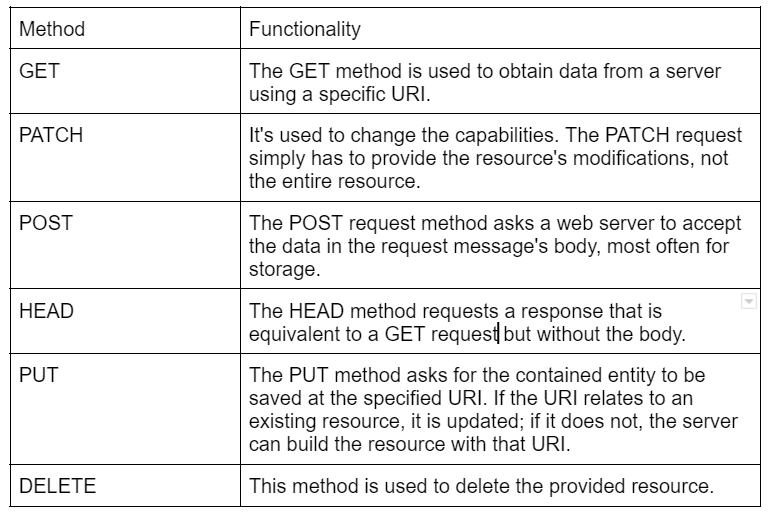
Other prominent HTTP methods include PUT, POST, HEAD, DELETE, PATCH, and OPTIONS, in addition, to GET. For each of these HTTP methods, requests offer a method with a signature comparable to get().
An example of POST request.
>>> requests.post('https://httpbin.org/post', data={'key':'value'})
<Response [200]>
You can also try this code with Online Python Compiler
We can access the headers and content similar to what we learned in the above examples.
>>> r.headers['server']
'gunicorn/19.9.0'

>>> r.json()['url']
'https://httpbin.org/post'
You can also try this code with Online Python Compiler
POST, PUT, and the less popular PATCH requests, according to the HTTP standard, convey data through the message body rather than query string parameters. You'll provide the payload to the data argument of the associated function using requests.
A dictionary, a list of tuples, bytes, or a file-like object can be used as data. You should tailor the data you submit in the body of your request to the needs of the service with which you're engaging.
>>> requests.post('https://httpbin.org/post', data={'key':'value'})
<Response [200]>
You can also try this code with Online Python Compiler
Aside from the above-mentioned methods, there are more methods such as PUT, DELETE, PATCH, OPTIONS ,and HEAD.
>>> requests.options('https://httpbin.org/get')
>>> requests.patch('https://httpbin.org/patch', data={'key':'value'})
>>> requests.put('https://httpbin.org/put', data={'key':'value'})
>>> requests.delete('https://httpbin.org/delete')
>>> requests.head('https://httpbin.org/get')
You can also try this code with Online Python Compiler
You can also practice with the help of Online Python Compiler
FAQs
-
What is the Request library in Python?
In Python, the requests library is the standard for sending HTTP requests. It hides the difficulties of making requests behind a beautiful, straightforward API, allowing you to concentrate on interacting with services and consuming data in your app.
-
Which are the alternatives to the Request library in Python?
Python contains two built-in modules, urllib and urllib2, to handle HTTP-related tasks.
-
What are the advantages of using the Request library?
The Request library is very simple and easy to use. The fetching of information and invoking various types of requests such as GET, PUSH, POST, etc., is straightforward and can be achieved in fewer lines of code.
Key Takeaways
Congratulations on making it this far.
In this blog, we learned about the Request library in Python and learned its basic methods.
If you want to become proficient with Python programming, I suggest you take the Coding Ninjas Python Course, which will teach Python basics with Data Structures and Algorithms.






 6+ registered

