Do you think IIT Guwahati certified course can help you in your career?
Introduction
Ruby on Rails, commonly known as Rails, is a full-stack development framework written in the Ruby programming language. It includes all the tools required to create amazing web apps on both the front and back ends.
Rendering HTML templates, updating databases, sending and receiving emails, maintaining live pages via WebSockets, enqueuing jobs for asynchronous work, storing uploads in the cloud, and providing robust security defences against common attacks Rails can do it all and more.
Its documentation says, "It is here to Compress the complexity of modern web apps."
Database setup is an integral part of every framework. In this article, we'll learn the database setup of Rails. So, let's get started.
What is Database Setup in general?
For every application or website we develop, we need to store some information for further use. For example, user login information. So, a Database setup connects our models or applications to a particular database such as MySQL or PostgreSQL.
This is one of the fundamental aspects of development.
By default, Ruby on Rails uses SQLite as its database. SQLite is a great alternative to traditional databases like MySQL, but it has some limitations, particularly in concurrency and scaling to high loads.
Let’s get started with the database configuration.
Database Configuration
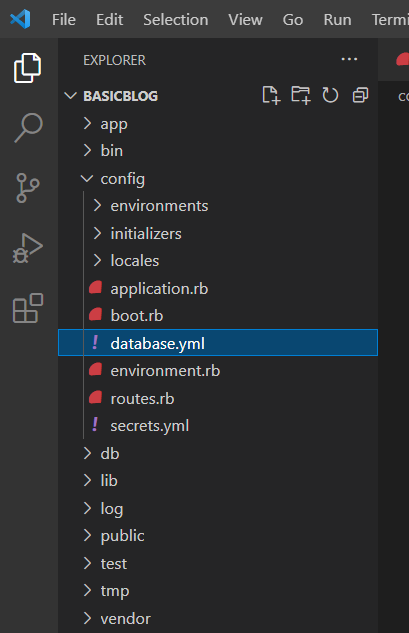
Once we’ve created our project, open that project in your preferred IDE. It’ll look something like this.
Here, we’ve used Visual Studio.
To work with databases in Ruby on Rails, we’ve to configure our database first. All the configuration related files are present in the config directory. Inside that config directory, there is a file named database.yml.
When we open this database.yml file in a new rails application, we’ll see a default database configuration using SQLite.
This file contains sections for three different environments in which Rails can run by default. These three sections are:
Development: This environment is used on our development computer as we manually interact with the application.
Test: This environment is used to run automated tests.
Production: This environment is used when we deploy our application.
All we have to do is create three different databases for these three environments. Next, we should initialize all three and assign them a user and password with full read and write privileges.
Configuring SQLite Database
Ruby on Rails includes SQLite support, a lightweight serverless database application. While SQLite may become overloaded in a busy production environment, it is ideal for development and testing. When you create a new project in Rails, it defaults to using SQLite database, but you can always change it later.
The following code contains the default configuration file containing the SQLite database's connection information.
If you want to change your database, all you have to do is make changes in that database.yml file. This file contains live database configuration sections. Let’s see the configuration of the MySQL database.
Configuring a MySQL Database
For setting up MySQL, we have to install MySQL and check if it is running correctly.
In the next step, we must inform the MySQL database's user name and password that we've set during installation to Ruby on Rails. In this example, we'll be using the root user ID.
So, in the database.yml file, add username and password just like in the configuration snippet given below. Change the username and password lines in each section you use to reflect the permissions on the databases you've created.
A PostgreSQL database will be a more robust and flexible choice for highly complex applications that require more reliable data integrity and programmatic extensibility.
To get your Ruby on Rails setup up and running with PostgreSQL, you'll need to take a few extra steps.
For setting up PostgreSQL, we have to install PostgreSQL and check if it is running correctly. During the installation, PostgreSQL does not provide any user. So, we have to create a superuser.
Below is the command to create a user, substituting the highlighted word with the username.
sudo -u postgres createuser -s vaishnavi -P
You will be prompted to enter a password for your new role because you specified the -P flag. Enter your desired password, making a note of it to use in a configuration file in a later step.
You used createuser to create a user in this command. The -s option granted this user superuser privileges, and sudo -u allowed you to run the command from the postgres account, which is created automatically when you install PostgreSQL.
Now, it's time to make changes to the database.yml file. Add the user and password in the file as given below.
This was all about setting up various databases in Ruby on Rails. Let’s move to some of the frequently asked questions on this topic.
FAQs
Which is the default database of Ruby on Rails? Our application is set up by default to use SQLite as a database in Ruby on Rails.
What are the two essential prerequisites of setting up a database in Rails? The two main prerequisites are: A live running server. Ruby on Rails development environment.
Key Takeaways
This article ran you through the basic Database setup in the Ruby on Rails framework. Understanding how its database works is essential for getting started with a framework.
You can also read blogs on other Ruby on Rails topics such as Views, Controllers and Migrations.
Keep Learning with Coding Ninjas!
Live masterclass
Google SDE Roadmap to land 30L+ CTC
by Saurav Prateek
02 Jun, 2026
03:00 PM
Data Analysis for 20L+ CTC@Flipkart: End-Season Sales dataset
by Sumit Shukla
31 May, 2026
06:30 AM
Top 5 GenAI Projects to Crack 25 LPA+ Roles in 2026
by Shantanu Shubham
31 May, 2026
08:30 AM
Zero to Data Analyst: Amazon Analyst Roadmap for 30L+ CTC
by Abhishek Soni
02 Jun, 2026
01:30 PM
Google SDE Roadmap to land 30L+ CTC
by Saurav Prateek
02 Jun, 2026
03:00 PM
Data Analysis for 20L+ CTC@Flipkart: End-Season Sales dataset







 8+ registered

