Do you think IIT Guwahati certified course can help you in your career?
Introduction
SAP SD stands for System Applications and Products in Data Processing Sales and Distribution. SAP SD is one of the core modules of SAP ERP, i.e., Enterprise resource planning, which is nothing but a software tool that businesses use to manage day-to-day business activities.
In case you don’t know about SAP, it is a well-known software provider that offers cutting-edge enterprise software solutions to companies of all sizes and in all sectors. SAP is best known for its enterprise resource planning (ERP) software, which companies use to organise their operations, control their resources, and get insightful data about how their business processes are working.
In this article, we'll take a look at the SAP SD module.
What is SAP SD?
SAP Sales and Distribution is a functional module in SAP ERP Central Component (ECC) that allows organisations to store and manage product and customer related data. It lets businesses effectively store, organise, and use customer and product-related data. The ordering, shipping, billing, and invoicing of goods and services are all managed through this module, which acts as a central hub. Organisations may maintain their inventory, manage customer connections, track their sales and distribution processes, and eventually boost their revenue by using SAP SD. SAP SD's extensive functionality enables businesses to make wise decisions that keep them one step ahead of the competition by giving them access to real-time analytics.
Features of SAP SD Module
Here are some of the key features of the SAP SD module:SAP SD
Price and Taxation: The SAP SD module provides robust pricing and taxation features that allow businesses to evaluate the cost of goods and services under various conditions, such as discounts and rebates granted to customers. This feature also includes support for tax calculations and compliance with local tax regulations.
Availability Check: With the SAP SD module, businesses can quickly and easily check the availability of products in their warehouses, enabling them to fulfil customer orders more efficiently.
Billing and Invoicing: The SAP SD module streamlines billing and invoicing processes, making it easier for businesses to generate customer bills and invoices. This feature supports multiple billing options, including invoice billing, credit and debit memos, and down payment processing.
Material Determination: The SAP SD module includes a powerful material determination feature that enables businesses to determine material details based on specific conditions. This feature is handy for managing complex product catalogues and pricing structures.
Credit Management: The SAP SD module provides robust credit management capabilities that enable businesses to manage their customers' credit limits effectively. This feature includes support for simple and automatic credit checks, allowing companies to tailor their credit management strategies to meet their needs.
Account Determination: With the SAP SD module, businesses can determine customer details based on specific condition types, allowing them to create more targeted marketing campaigns and personalise their customer interactions.
Key Components of SAP SD
There are several key components in SAP SD, such as:
Master Data
Basic Functions
Sales
Shipping
Transportation
Foreign Trade
Billing
Sales Support
SD Master Data (SD-MD)
For SAP SD processes to operate properly, SD-MD manages and preserves the fundamental data. Data from the sales organisation, product information, client information, and condition master data are all included in this data. The success of the sales and distribution processes depends on accurate and current SD-MD.
SD Basic Functions (SD-BF)
The capabilities offered by SD-BF are crucial for enabling the SAP SD process. It involves crucial tasks, including processing orders and deliveries, setting prices and discounts, billing and invoicing, and managing credit. Customer satisfaction and on-time delivery of goods and services depend on these procedures running well.
SD Sales (SD-SLS)
In addition to managing contracts and agreements with clients, it also entails drafting and managing sales orders, inquiries, and quotes. Forging lasting connections with customers and guaranteeing order fulfilment on time, SD-SLS is crucial.
SD Shipping (SD-SHP)
SD-SHP oversees the delivery of products and services to clients. It entails activities including product packaging, handling, transportation, and delivery. Reduced delivery times, cheaper costs, and higher customer satisfaction can result from accurate and effective shipping process management.
SD Transportation (SD-TBA)
In SAP SD, SD-TBA controls the logistics and transportation processes. It has features like scheduling, tracking, and planning for transportation. Organisations can save money and guarantee prompt delivery of their products by using effective transportation management.
SD Foreign Trade (SD-FTT)
SD-FTT manages customs clearance, compliance management, and document management in international trade. It assists firms in navigating complex international trade restrictions while ensuring compliance with local laws and regulations.
SD Billing (SD-BIL)
The billing and invoicing procedures in SAP SD are managed by SD-BIL. It entails producing invoices, accepting payments, controlling returns and credit notes, and keeping billing records. Effective billing procedures can speed up cash flow, reduce processing times, and increase accuracy.
SD Sales Support (SD-CAS)
The SD-CAS includes features that assist with the sales process, such as managing inquiries, dealing with complaints, and offering customer assistance. Effective sales support may boost an organisation's reputation, increase revenues, and raise customer happiness.
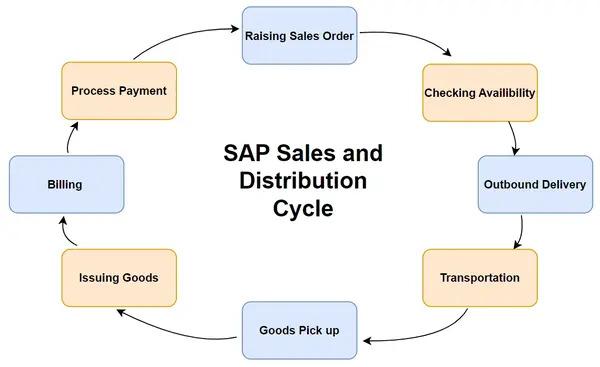
SAP SD Cycle
The SAP Sales and Distribution (SD) module follows a detailed sales cycle with various steps. This cycle begins with creating a sales order and ends with the customer receiving goods or services.
SAP SD Data Types
SAP SD is a critical component of the SAP ECC system, which is based on the concept of master data. The entire sales and distribution process in SAP SD is centred on master data management, which is kept in centralised master data tables. In addition to master data, the ECC system has two more key data types:
Customer data consists of details about the customers themselves, such as their names, addresses, phone numbers, payment policies, and credit limits. The administration of customer orders, pricing, shipping, and invoicing uses this data.
Transactional data consists of details pertaining to the actual sales transactions, including sales orders, delivery, billing information, and payments. In addition to being utilised for financial reporting and analysis, this data is used to trace the flow of commodities and services.
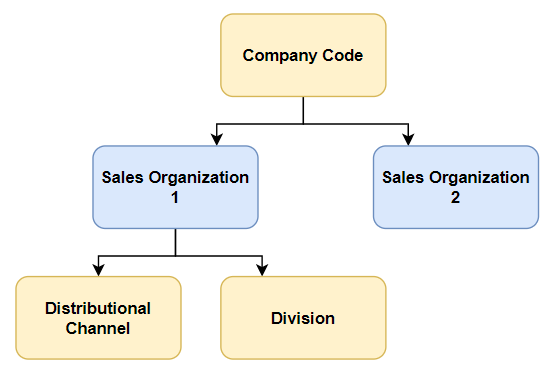
SAP SD Organisational Structure
SAP SD organisational structure includes several components:
Company Code: In the SAP SD module, the company code represents the top level of the organisational hierarchy. It constitutes a separate legal entity with requirements for accounting and financial reporting. Multiple sales organisations may be assigned to one business code.
Sales Organisation: A sales organisation is given a specific company code and is in charge of selling goods or services. It oversees the effectiveness of the sales staff in addition to drafting and handling sales orders. Multiple distribution channels may be designated for each sales organisation.
Distribution Channel: An example of a distribution channel is the sale of goods or services to consumers. Wholesale, retail, and e-commerce are a few types of distribution channels. Multiple sales channels may be designated for each distribution channel.
Division: A division is an organisational entity in charge of a certain line of goods or services. It classifies goods or services according to attributes like industry or clientele.
Advantages of SAP SD Software
Some of the main benefits of using this programme are as follows:
Track sales transactions: The SAP SD software lets companies keep a complete record of the sales process by allowing them to track their sales transactions from beginning to end. This makes it possible to verify that all sales are accurately recorded and that any problems can be found and fixed immediately.
Record pre- and post-sale processes: Companies can record pre- and post-sale activities like lead generation, quotation development, order processing, delivery, and billing using SAP SD software. This offers a thorough perspective of the complete sales process and aids organisations in locating potential improvement areas.
Track sales data and team performance: Companies using SAP SD software can track sales data and team performance in real-time, allowing them to keep track of sales targets, evaluate team performance about KPIs, and see any potential areas where sales teams could need further assistance or training.
Sales and Distribution: SAP SD software provides clearly defined sales and distribution processes, which helps guarantee that all sales are managed consistently and successfully. As a result, there may be an increase in production, efficiency, and customer satisfaction.
Classification of various sales processes: Businesses can classify their sales processes depending on several factors such as product category, customer type, geography, or market segment using SAP SD software. This facilitates the analysis of sales data and the discovery of trends and patterns that may guide the development of future sales strategies.
Effective management of sales documents: It is made possible by SAP SD software, which offers a uniform system for handling quotes, orders, delivery notes, and invoices. This ensures that every document is accurately transcribed and that any differences can be found and fixed immediately.
Frequently Asked Questions
What is SAP Sales and Distribution (SAP SD)?
SAP Sales and Distribution (SAP SD) is a module in the SAP ERP system that manages many parts of the sales and distribution process like processing of orders, pricing, delivery, billing, and customer management.
What are the functions of SD?
SAP SD handles everything from receiving orders to receiving. The functions of SAP (Sales and Distribution SD) mainly include processing of orders, pricing, delivery, billing, taxation, availability check, and customer management.
Is SAP SD in demand?
Yes, SAP SD is quite in demand due to its wide use by businesses all around the world. Since more and more companies shift towards automating their tasks the demands for SAP SD has increased significantly.
Is SAP SD a good career option?
SAP is a good career option for people having interest in sales and technology. Those who have skills of using SAP SD systems can find many opportunities and grow in their careers.
Conclusion
This article covered everything you needed about System Applications and Products Sales and Distribution (SAP SD), including the SAP SD cycle, SAP SD data types, and SAP SD sub-modules.







 7+ registered

