Do you think IIT Guwahati certified course can help you in your career?
Introduction
In Kotlin, scope functions are functions that allow you to execute a block of code within a specific context, such as an object, and provide additional functionality and readability. The scope functions include let, apply, run, with, and also.
Simple code is simple to read, maintain, and grasp. Complex code is difficult to read, difficult to maintain, and requires effort to understand. The more complex the code, the greater the effort required to maintain it.
You're probably wondering why I'm bringing this up. It will become more clear while we discuss our topic today, namely the Scope Function in Kotlin.
Let us start with our discussion now:
What is the scope function in Kotlin?
Almost all Android developers have now switched from Java to Kotlin and are enjoying how simple, clean, and concise Kotlin is in comparison to Java. Kotlin adds a slew of developer-friendly features for less code, resulting in fewer bugs.
One of the essential developer-friendly features introduced by Kotlin is "Scope functions."
So the first question is, what is a scope function?
In a nutshell, the "scope functions" in Kotlin modify the scope or range of a variable. Scope functions are used to make code more readable, clear, and concise.
When it comes to dealing with Scope Functions, developers frequently run into problems.
So, in this article, we will discuss what scope functions are, the different types of scope functions, the differences between those scope functions, and, most importantly, when, where, and how to use them in your application.
Example: Without using scope function
Code:
val numbers = listOf(1, 3, 5, 6, 8)

fun main() {
    val filteredList = mutableListOf<Int>()

    for (number in numbers) {
        if (number % 2 == 0) {
            filteredList.add(number)
        }
    }

    println(filteredList)
}
Output:
[6, 8]
In this example, we are filtering the even number from a set of numbers and storing them in a mutable list. This is done by repeating the numbers from the original list, determining whether they are true, and adding them to the mutable list if they are. Finally, the mutable list elements are printed. This code can be readable and concise by using the scope function such as filter or map.
Example: Using scope function
Code:
val numbers = listOf(1, 3, 5, 6, 8)
fun main() {
   val filteredList = numbers.filter { it % 2 == 0 }
   println(filteredList)
}
Output:
[6, 8]
In this example, we have used the scope function filter for the same above example.
Application of using scope functions
Some the application of using scope functions:
let: This method helps in the execution of code for non-null objects. It has the ability to zero-check and chain numerous method calls.
run: This function assists in running code on an object and returning the outcome. It is capable of creating and initialising things.
with: This procedure allows you to run code on an object without calling any of its methods. It is used to decrease code complexity.
apply: This function is similar to run but gives the object itself rather than a result. It is used to change an object's properties without using intermediate variables.
Types of Scope Function in Kotlin
The scope function in Kotlin is used to execute a block of code within the scope of an object. In general, scope functions can be used to wrap a variable or a set of logic and return an object literal. So, let's get started with the types of Scope Function in Kotlin:
Function
Object Reference
Return Value
with
this
Lambda result
let
it
Lambda result
run
this
Lambda result
apply
this
Context object
also
it
Context object
WITH
The with function has a return type of Lambda result and the context object is this keyword, which refers to the object itself.
Example 1
class Student{
   var name: String = "Ninja"
   var age: Int = 28
}
fun main() {
  val student = Student()
  println(student.name)
  println(student.age)
}
Output
The Student class was created and given the properties name and age. Following that in our main function, we used println to print out the values.
Imagine the Student class contained more than 50 properties, resulting in numerous instances of code duplication.
With the help of the with function and this keyword, we can fix this by passing the student object to the lambda expression.
The context object here refers to the student object on which the operation is performed.
Example 2
class Student {
  var name: String = "Ninja"
  var age: Int = 28
}
fun main() {
  val student = Student()
  with(student) {
    println(this.name)
    println(this.age)
  }
}
Output
In conclusion, the with function utilizes this keyword as the context object and returns a lambda function.
Note: You can even avoid adding this keyword to get the output.
APPLY
Apply function returns the context object itself and the context object is this.
Example 1
class Student {
    var name: String = ""
    var age: Int = 0
}
fun main(){
val student= Student().apply{
        this.name = "Ninja"
        this. age = 28
    }
println("name:${student.name} age:${student.age}" )
}
Output
Again, we can avoid using this keyword as it is internally present. Now moving forward about the second property: return value.
The apply function as discussed above returns the context object itself. Here, we can store the object inside a variable and with use of the WITH function, we can print the properties.
Example 2
class Student {
  var name: String = ""
  var age: Int = 0
}
fun main() {
  val student = Student().apply {
    this.name = "Ninja"
    this.age = 28
  }
  with(student) {
    println(name)
    println(age)
  }
}
Output
ALSO
As the name implies, also function is used to perform some additional operation on a particular object after we have initialised it.
Let us make a list of three numbers - 1,2 and 3.
Example
fun main() {
  val numberList: MutableList < Int > = mutableListOf(1, 2, 3)
  // some other code
  // Operations on the numberList

  var duplicateNumbers = numberList.also {
    println("The number in the list are $numberList")
    // addition into the list

    it.add(4)
    println("The number in the list after addition $it")

    it.remove(2)
    println("The number in the list after removing $it")
  }

  println("Original Numbers $numberList")
  println("Duplicate Numbers $duplicateNumbers")
}
Output
In the above example, we tried altering the list by performing addition and deletion. ALSO, is used to perform some sort of modification to a particular object.
Let us now move to the next scope function, i.e, the LET function.
LET
The let function returns the lambda result and the context object is the itidentifier.
There are many use cases of the let function, but it is often used to avoid NullPointerException.
To prevent NULL pointer exceptions, we often use the LET function, which is a nightmare for the majority of developers worldwide.
Example
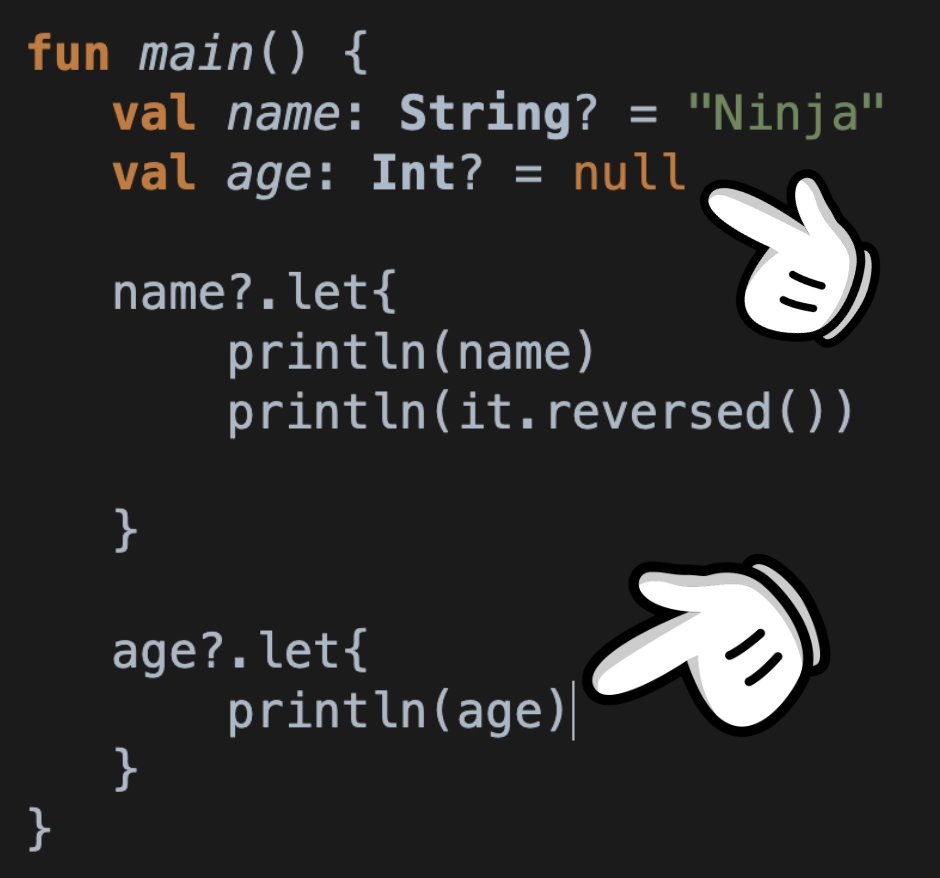
fun main() {
   val name: String? = "Ninja"
   val age: Int? = null
   name?.let{
       println(name)
       println(it.reversed())
   }
   age?.let{
       println(age)
   }
}
Output
Explanation:In the above code snippet, the age variable is null, so only the name is printed, i.e., Ninja.
By applying ?.let to an object, we can be assured that each time we access the object inside the scope function, the object will not be null.
So far we have discussed the four scope functions, WITH, APPLY, ALSO and LET. The last scope function is RUN.
Before moving forward, make sure you are clear with the above functions.
RUN
Run function has a returns lambda result as the return value and the context object is this. There is something special about this function. RUN is basically the combination of WITH and LET function.
Using run function you can leverage the power of both ‘with’ and ‘let’ function. If you want to operate on a nullable object and avoid NullPointerException then use ‘run’.
Let us retake the example of WITH function:
Example 1
class Student {
  var name: String = "Ninja"
  var age: Int = 28
}
fun main() {
  val student = Student()
  with(student) {
    println(name)
    println(age)
  }
}
Now, if we make this object nullable by putting the question mark and instead of the valid Student object, we assign a value of null as shown below.
To implement the run function, all you have to do is:
val student? = null
In this case, we must find a way to prevent NullPointerException. The best feasible solution to this challenge is to make use of the RUN function. So, no output will be printed.
As mentioned above in WITH function, the last lambda statement is the return value of the WITH function, likewise for the RUN function, the return value is the last lambda statement.
Let us see the code below to understand the RUN function better:
Example 2
class Student {
  var name: String = "Ninja"
  var age: Int = 28
}
fun main() {
  val student:Student?= Student()
  val returnResult = student?.run{
       println(name)
       println(age)
       "Hi I am Ninja and I love Coding Ninjas"
  }
  println(returnResult)
}
Output
Object References
This
The this keyword refers to the current object instance within a class or extension function. It can be used to access properties and methods of the current object instance.
The it keyword is used as a default name for a single parameter in a lambda expression. It can be used to access the parameter's value within the lambda.
If we write any expression at the end of the code block, it becomes the scope function's return value. The lambda result is the return value for the 'let', 'run', and 'with' methods.
Code:
fun main() {
   val numbers = listOf(1, 2, 3, 4, 5, 6)
   val sumOfEvens = numbers.filter { number ->
       if (number % 2 == 0) {
           return@filter true // return true if the number is even
       }
       return@filter false // return false if the number is odd
   }.sum()
   println("The sum of even numbers is $sumOfEvens")
}
Output:
The sum of even numbers is 12
In this example, we have done the sum of even numbers, and the lambda expression { number -> } is passed as an argument to the filter function. The lambda expression checks whether each number in the list is even or odd using the modulo operator (%). It returns true if the number is even and false if the number is odd.
Context object
The context object is returned by the 'apply' and 'also' methods. We don't need to specify the return value in this instance. The context object is returned automatically.
Code:
class Person {
var name: String = "Ram"
var Surname: String = " Sharma"
var Interest: String = "Loves to do coding on Coding Ninjas Platform"
}
fun main() {
val cn = Person().apply {
 // any statement(s)
}

print("Ram's Interest : ${cn.Interest}");
}
Output :
Ram's Interest : Loves to do coding on Coding Ninjas Platform
Benefits of using Scope function in Kotlin
Some advantages of using scope functions have become clear from the examples in the section above. Below are some more advantages:
Scope functions in Kotlin are higher-order functions that allow you to perform operations on an object within its context. They include let, apply, run, with, and also. These functions can help simplify code and improve readability.
What is the difference between let and run scope functions in Kotlin?
In Kotlin, let is used to execute a block of code with the context object as an argument, often for null checks or transformations. run, on the other hand, executes a block where the context object is this, useful for initializing objects or chaining operations.
What is extension function scope in Kotlin?
In Kotlin, the ability to specify functions as extensions of existing classes is called extension function scope. These functions can be called on instances of the class as if they were class methods that can extend the functionality of the class.
What are the types of scope function?
There are five types of scope functions in Kotlin, called let, apply, run, with, and also. These functions provide different scoping and return value behaviors and can be used to simplify code and improve readability.
Conclusion
To conclude the discussion, we’ve extensively discussed the scope function in kotlin. We have discussed the types and their workings with examples.
Based on their similar operations, five scope functions share many similarities; however, they differ in whether they return the lambda result or a context object. They also differ in whether you use the this or it keyword to refer to the context object.
We hope that the blog has helped you enhance your knowledge regarding Scope functions in Kotlin. You can refer to our guided paths on the Coding Ninjas Studio platform to learn more about DSA, DBMS, Competitive Programming, Python, Java, JavaScript, etc.









 1+ registered

