




Introduction to Microsoft Dataverse
Microsoft Dataverse is a data storage and management engine serving as a foundation for many business applications like Office 365 and Microsoft's Power Platform. Data within the Dataverse is stored within a set of tables like Excel documents, with each column representing a different data type. Typical cases are covered by a base set of common tables in Microsoft Dataverse, but you can also design custom tables unique to your company and use Power Query to populate them with data. Then, developers can use Power Apps to create sophisticated apps that utilise this data.
In this article, we'll talk about how Microsoft Dataverse manages security, from user authentication to permission that enables users to interact with data and services. The idea behind security in Microsoft Dataverse is to keep the data and services safe while allowing users to do their tasks with the least amount of friction. In Dataverse, security may be done using basic security models with open access or more complicated security models with restricted record and field access for users.
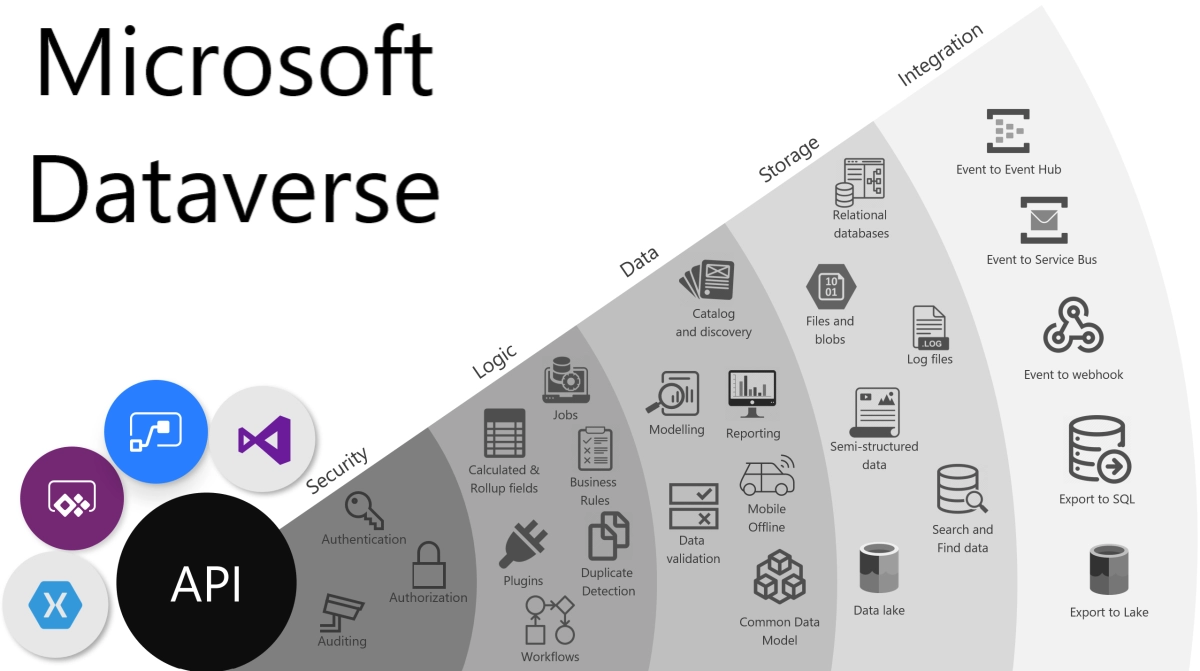
Let’s look at the various security concepts in Microsoft Dataverse, the security protocols Microsoft Dataverse follows and the method by which these protocols work.
Data Security Concepts
Role-based security
Roles are assigned to the group by the project administrator in Microsoft Dataverse. These roles decide what amount of privilege each user has on the project. These security roles can be connected to people directly or to groups and business units inside the Dataverse. Users may then join the team, and as a result, the role will benefit all team members. Understanding that all privilege permits are cumulative, and the one with the most access prevails is a fundamental aspect of Microsoft Dataverse security. You cannot go back and conceal a single record if you grant read access to all contact records at the broadest organisational level.

Business units
Business units are a component of security modelling that assists in controlling people and the data they have access to. Business units define a security perimeter. There is only one root business unit for each Dataverse database. Business units and security roles collaborate to assess a user's actual security level.
To further categorise your users and data, you can build child business units. A business unit will be the home of each user allocated to an environment. Business units might be used to replicate a real organisational hierarchy 1:1, but more frequently, they focus on well-defined security boundaries to meet security model requirements.

Source
Hierarchical data access structure
Customers can employ a hierarchical organisational structure that divides users and data into separate sections.
We may designate a user to belong to one of these three business units when we associate them with this environment, and we can also give them a security role specific to that business unit. When a user makes a record, the business unit with which they are affiliated decides which business unit owns the records. Since we have that association, we may create a security role that permits the user to view records in that business unit.
Matrix data access structure
Customers can employ a hierarchical organisational structure that compartmentalises data into different business units, allowing users to work and access data from any business unit regardless of which business unit they are allocated to.
When we identify them with this environment, we can designate a user to belong to one of these three business units. A security role from each business unit from which a user requires access to data is given to that user. The business unit can be designated as the record's owner when the user creates a record.
Owning Business Unit
The Owning Business Unit field on each record identifies which business unit is the record's owner. When a record is generated, this field defaults to the user's business unit and cannot be altered unless the feature switch is switched ON.
Record ownership
Two forms of record ownership are supported by Microsoft Dataverse. User or team owned and owned by the organisation. This is decision is made when the table is made and cannot be altered. The only access level options for records owned by the organisation are either the user can do the action or they can't for security reasons. Business Unit, Tiered Organization, Business Unit and Child Business Unit or solely the user's own records are the access level options for most rights for the user and team-owned records. This implies that if I set user-owned for the read privilege on a contact, the user would only be able to view their own data.
Teams
Another crucial component of security is teams. A Business Unit is the owner of Teams.
One default team is automatically generated when a business unit is created for each business unit. All individuals connected to the Business Unit are always included in the default team members, which Dataverse manages. The system automatically updates the default team as new users are added to and removed from business units; you cannot manually add or remove members from it.
There can be two kinds of teams in the Dataverse:
- Owning teams that can own records, thereby giving the members direct access to these records.
- Access teams that are made using the Access Team Template can auto-create teams and provide them with access to share records. We will learn more about this in the next section.
Record sharing
One person at a time can share certain records with another. This is a powerful method for dealing with exceptions that don't fit the record ownership or business unit member access paradigm. However, as it is a less effective method of access restriction, it ought to be an exception. Because sharing is not a regularly applied access restriction, it is more difficult to diagnose. Users and teams may both share information. Sharing is more effective when done as a team.
Access Teams is a more sophisticated sharing concept that offers automatic team building and sharing of record access with the team based on an applied Access Team Template (template of permissions). Access teams can be utilised without templates by manually adding and removing team members. Because they are prohibited from possessing records or having security responsibilities assigned to them, access teams are more efficient. Users have access since they are team members, and the record is shared with the team.
Record-level security in Dataverse
Any particular user's record access is the result of their security responsibilities, the business unit they belong to, the teams they are a part of, and the records that have been shared with them. The most important thing to keep in mind is that all access within the context of a Dataverse database environment is cumulative. These privileges are only provided within a single database, and each Dataverse database keeps track of them separately. They must have the proper authorization to access Dataverse in order to do all of this.
Field-level security in Dataverse
Access control at the record level isn't always sufficient for some business situations. Dataverse offers a field-level security capability that enables more precise field-level security control. All custom fields and most system fields can have field-level security enabled. The majority of system fields that include personally identifiable information (PII) may be safeguarded separately. The metadata for each field specifies whether or not it is a choice for the system field.
Field by field, field-level security can be activated. The creation of a Field Security Profile is then used to manage access. The profile includes the access rights allowed by that particular profile as well as any fields with field-level security enabled. Each field may be managed inside the profile for Create, Update, and Read access.
Managing security across multiple environments
Dataverse solutions allow for the packaging and transfer of security roles and field security profiles between environments. Each environment requires the creation and management of Business Units and Teams as well as the assignment of users to the necessary security components.
Configuring user's environment security
It's time to give the users their security configurations after roles, teams, and business units have been formed in an environment. A user is first connected to a business unit when they are created. This is the organization's primary business unit by default. Additionally, they are included in the business unit's default team.
You would also assign any security responsibilities that the users need. Additionally, you would include them in any teams. Keep in mind that teams might have security roles as well, thus the user's actual permissions are the sum of any explicitly allocated security roles and any teams they may be a member of. The user or a team must be linked to one of the Field Securities Profiles you generated if field-level security was enabled.
Check out Microsoft Interview Experience to learn about their hiring process.


 1+ registered

