Server-Side Rendering
It is created by responding to a URL request with JavaScript modules rather than using the browser to generate HTML. Client-side rendering uses the DOM to generate HTML.
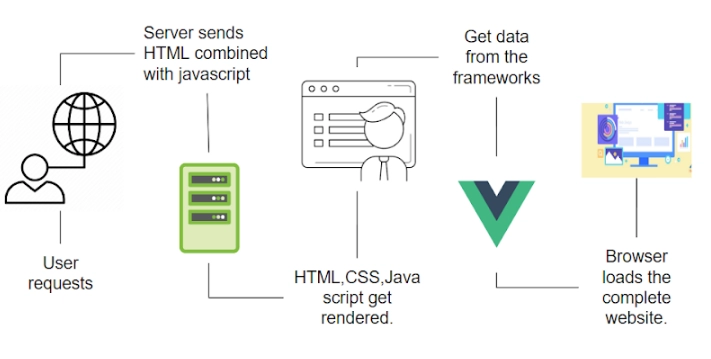
Search engines can index your URLs by creating HTML at runtime when the server receives a browser request.
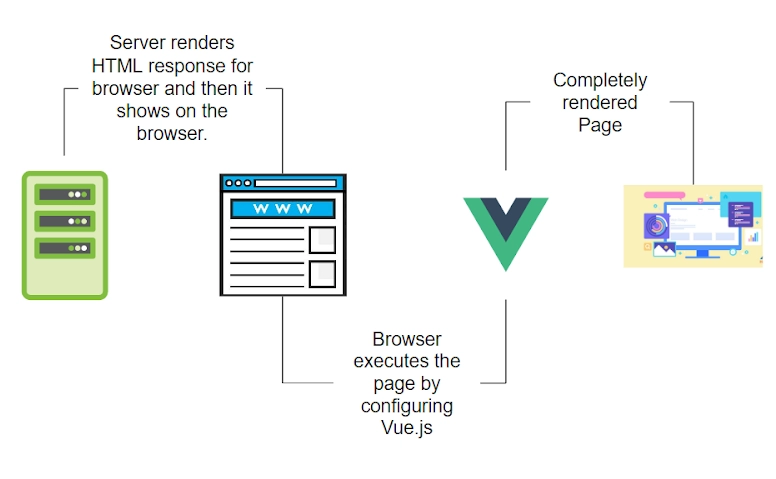
What is the advantage of server-side rendering?
Our goal is to have fast-loading websites, and Server-Side Rendering is a tool that helps make that possible. This blog will walk you through a critical path when you render your website for the first time.
This is a reference to the process of helping the browser render your page by delivering the essential assets quickly. If we can do this successfully, the browser can quickly render the page to the user.
How does Server-Side Rendering Works?
With Firebase Hosting, your website will be delivered quickly and efficiently.
In addition to being HTTP 2-enabled, Firebase Hosting also utilizes a CDN for global delivery. However, the speed at which the browser renders the app depends on how it is built.

A browser will fetch and download other assets, such as images, CSS, and javascript, as soon as it receives an HTML document. In other words, even though the browser has the HTML, it cannot render the website until the corresponding CSS has been parsed. Once the CSS is parsed, the browser renders the website. Thus, with just HTML and CSS, the browser can render the website, and the browser is good at that, so it does it at a high-speed rate.
Our final step is to use javascript, as was previously discussed. As soon as the HTML is parsed, the browser downloads javascript files. Javascript files can take a while to download if they are extensive and slow networks. It is also possible that the first render may be delayed if it relies on javascript.
It will be best to optimize the HTML and CSS to render the website quickly.
Due to Javascript's deferred loading, it works best to complement HTML and CSS. Javascript is, however, used heavily on some sites that have complicated features.
Why use Vue.js for Server-Side Rendering?
Javascript frameworks are used in websites like Angular, React, and Vue.js. However, a problem arises because rendering code is stitched up in javascript, and on slow networks, this can significantly affect the first render.
You can get good performance out of Javascript frameworks when putting the effort in.
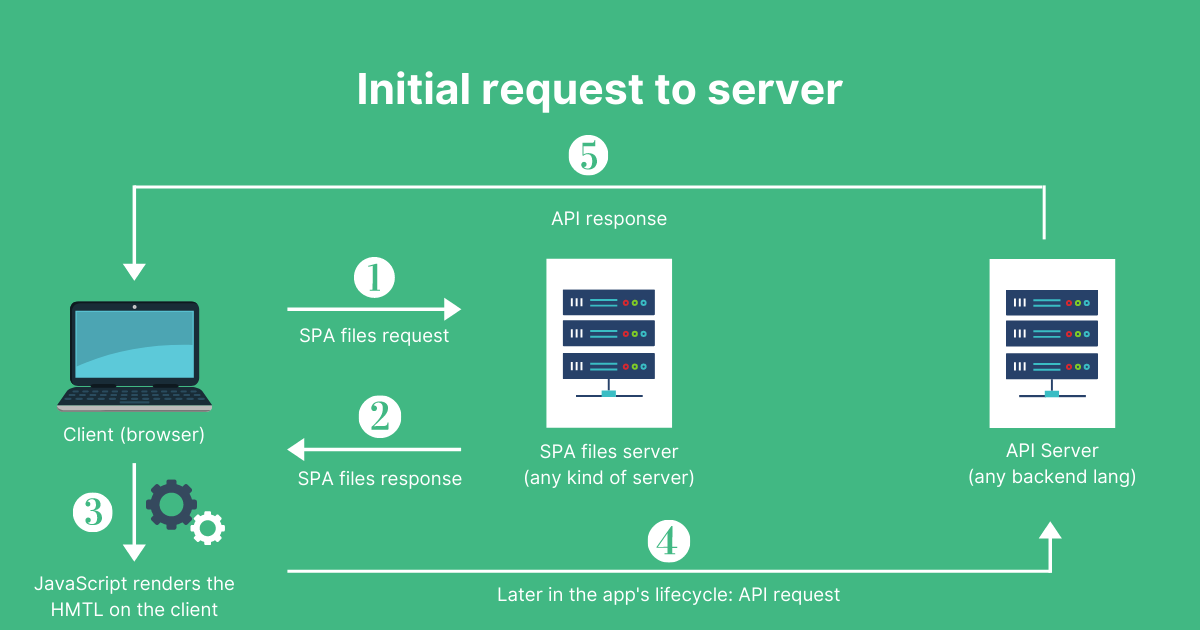
If you are only looking into SSR to improve the SEO of a few marketing pages (e.g.,/, /feedback, /info, etc.), you will probably do better with prerendering. A prerendering process produces static HTML files for specific routes instead of compiling HTML on the fly through a web server. In this way, you can get a much simpler way to set up prerendering, and your front end remains static.
Source: itnext
Creating a Server-Side Render project in Vue.js
We will see a little about Nuxt, a Server-Side Rendering library that comes with vue.js. With Nuxt, you just set up some configurations and have a server-side rendered app. Do not be intimidated! It is not that hard.
Just follow these steps.
Step 1. Install Nuxt for Server-Side Rendering and separate your static assets from your server assets.
Step 2: Open CLI and create a project.
mkdir first_ssr
cd first_ssr
Step 3: Creating a starter template.
vue init nuxt-community/starter-template src
Step4: Create a public folder that will contain static assets and then a functions folder that will contain dynamic server assets.
mkdir public
mkdir functions
Step 5: There are two options to install - npm or yarn
npm install --global yarn
As a result of following the above steps, this will be the result of the file structure.

- Nuxt provides Server-Side Rendering with two very easy functions:
Async Data: The data will be loaded before the page is rendered.
Await: It waits until a promise settles and returns its result.
- Here's how you can use AsyncData()

2. It automatically sets the server and client-side base URLs for @nuxtjs/Axios dependency in your project.
yarn add @nuxtjs/axios
3. In your nuxt.config.js, add it to the modules section:
export default {
  modules: ['@nuxtjs/axios']
}
4.Add in tsconfig.json
{
  "compilerOptions": {
    "types": [
      "@nuxt/types",
      "@nuxtjs/axios"
    ]
  }
}
Frequently Asked Questions
Q1. What are some of the advantages of Server-Side Rendering?
In addition to improving SEO and initial page loading time, SSR enables caching of pages, but it generally means more server requests and reloading of all pages. In addition to supporting SSR, Nuxt also offers in-place DOM updates and rich user interaction through Vue.
Q2. In Vue.js projects, when to use Server-Side Rendering (SSR)?
The content you create needs to be shared on social media. Suppose you experience poor performance and want a better user experience. If there are many users, the server must be maintained. A good caching strategy is also essential.
Q3. In web applications, what is the difference between client-side, server-side, and pre-rendering?
- Client-side: When using the client-side rendering solution, the server will deliver an HTML file with no content (or a loading screen) until you fetch all the JavaScript and let it execute everything before rendering the content.
- Server-side: This method leverages the server's reliable internet connection to fetch and prefill a page with custom content before delivering it to the user. The server's internet connection is better than the user's wi-fi connection, so prefetching and combined data can occur.
- Pre-Rendering: It may be overkill for small applications and a deterrent for some to have a universal app that requires a server. This is why prerendering can be very beneficial.
Key-Takeaways
Throughout the document, we read mainly about Server-Side Rendering, with which all pages of your application are rendered on the server synchronously. The server retrieves the data asynchronously and renders it a flat HTML file when you request it. At this stage of the process, the application is simply a plain HTML page and not responsive to user input and interaction. Only through the "hydration" process, the application's page becomes responsive to user input and behaves more like a traditional client-side single-page application. Hydration allows Virtual DOM to be activated, allowing for all crawled pages to have an appropriate amount of SEO information.Server-Side Rendering improves search engine optimization and site performance.






 8+ registered

