Implementation
Before learning about its properties, operations, and methods. First, learn how to declare a set. Sets are declared using two ways:
Syntax:
var setVariable = <data_type> {};

//OR

Set<data_type> setVariable = {};
Note: If we do not set the type annotation in the first way, then dart's compiler will create a map because the map has that declaration style. Go to this article to learn more about the map in dart.
Code:
void main() {
  //Declaration and initialization of set.
  var setVariable = <int>{100,200,300,100,400};
  //Set have repeated integers.
  print("Set: $setVariable");
}
Output:
Set: {100, 200, 300, 400}
Code:
void main() {
  //Declaration and initialization of set.
  Set<String> setVariable = {"Chandler","Joey","Monica","Rachel","Ross","Joey"};
  //Set have repeated strings.
  print("Set: $setVariable");
}
Output:
Set: {Chandler, Joey, Monica, Rachel, Ross}
Properties
Properties of the dart set are:
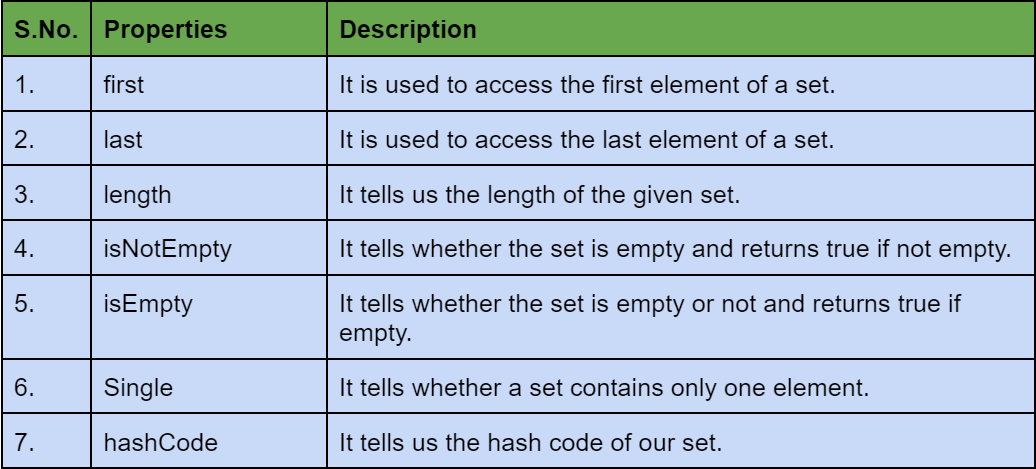
Example: In this example, we are showing all the properties of sets mentioned above.
Code:
void main()
{
  //Declaration and initialization of set.
  Set<String> varSet = {"Chandler","Joey","Monica","Rachel","Ross","Joey"};
  print("Set: $varSet");

  //Printing the length of set.
  print("Length: ${varSet.length}");

  //Printing the first element of set.
  print("First element: ${varSet.first}");

  //Printing the last element of set.
  print("Last element: ${varSet.last}");

  //Implementing isEmpty.
  print("List is empty: ${varSet.isEmpty}");

  //Implementing Hashcode
  print("HashCode: ${varSet.hashCode}");

}
Output:
Set: {Chandler, Joey, Monica, Rachel, Ross}
Length: 5
First element: Chandler
Last element: Ross
List is empty: false
HashCode: 147141237
Methods
Now let us discuss the methods that set in dart offers. Set offers a huge bunch of methods. We are talking about some of the important methods and operations here, the rest you can find on the official documentation of dart.
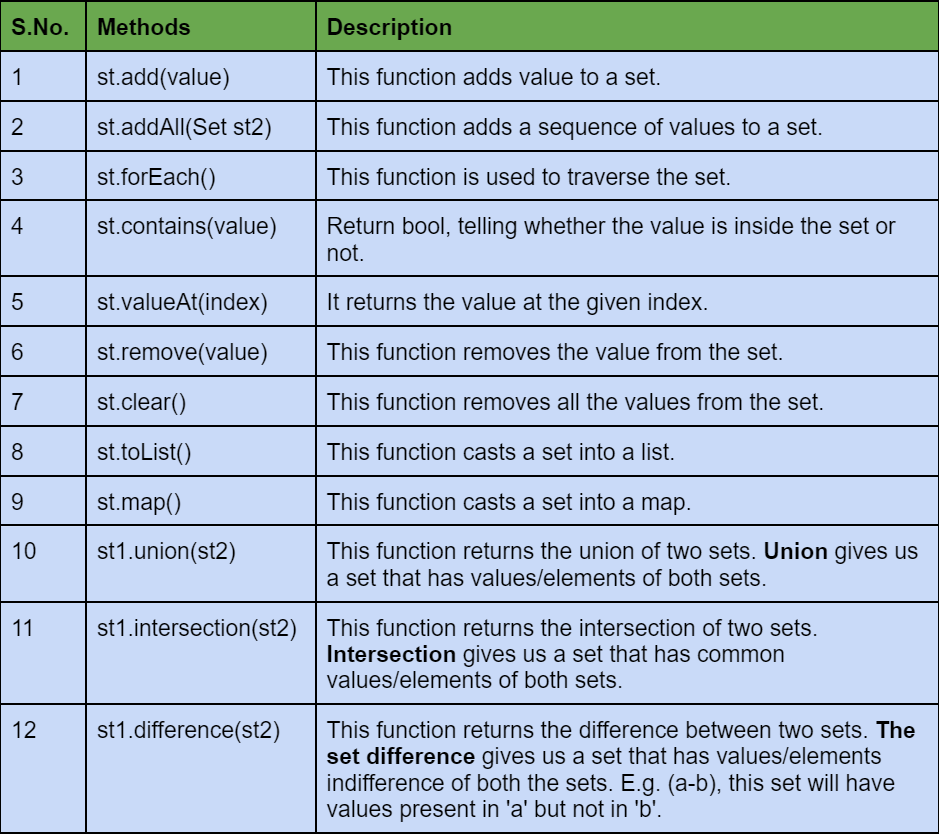
Adding elements
Syntax:
set_var.add(value);
//OR
set_var.addAll({val1, val2, val3,.....valn});
Code:
void main()
{
  Set<String> st = {};

  //Adding single elements.
  st.add("Ninja1");
  st.add("Ninja2");
  st.add("Ninja3");

  //Adding a sequence of elements.
  st.addAll({"Ninja4","Ninja5","Ninja6"});

  print("Set after adding elements: $st");
}
Output:
Set after adding elements: {Ninja1, Ninja2, Ninja3, Ninja4, Ninja5, Ninja6}
Explanation: In this example, we show how to add a single element and how to add multiple elements at once.
Traversing a Set
Syntax:
set_variable.forEach((value) {
        print('$value');
     });
Code:
void main()
{
   //Declaration and initialization of set.
  Set<String> characters = {"Chandler","Joey","Monica","Rachel","Ross"};

  characters.forEach((value) {
        print('Character:  $value');
     });
}
Output:
Character:  Chandler
Character:  Joey
Character:  Monica
Character:  Rachel
Character:  Ross
Finding an element
Syntax:
set_variable.contains(value);
Code:
void main()
{
   //Declaration and initialization of set.
  Set<String> characters = {"Chandler","Joey","Monica","Rachel","Ross"};
  print("Characters Set: $characters");

  //Finding the element.
  if(characters.contains("Janice")){
    print("Janice is present.");
  }
  else{
    print("Janice is not present.");
  }
}
Output:
Characters Set: {Chandler, Joey, Monica, Rachel, Ross}
Janice is not present.
Accessing an Element
Syntax:
set_variable.elementAt(index);
Code:
void main()
{
  print("Access a Subject from the Set.");
  var sub = {"OS","COA","DBMS","Compiler Design"};
  print(sub);

  //Accessing the element using its index.
  var name = sub.elementAt(3);
  print(name);
}
Output:
Access a Subject from the Set.
{OS, COA, DBMS, Compiler Design}
Compiler Design
Remove an element
Syntax:
set_variable.remove(value);
Code:
void main()
{
  print("Removing a Subject from the Set.");
  var sub = {"OS","COA","DBMS","Compiler Design","Computer Networks"};
  print("Before remove: $sub");

  //Removing an element using its value.
  sub.remove("Compiler Design");
  print("After remove: $sub");
}
Output:
Removing a Subject from the Set.
Before remove: {OS, COA, DBMS, Compiler Design, Computer Networks}
After remove: {OS, COA, DBMS, Computer Networks}
Removing all set’s elements
Syntax:
set_variable.clear();
Code:
void main()
{
  //Declaring a set
  var st = {"Ninja1","Ninja2","Ninja3","Ninja4","Ninja5"};
  print("Set: $st");

  //Clearing a whole set.
  st.clear();
  print("After clearing: $st");
}
Output:
Set: {Ninja1, Ninja2, Ninja3, Ninja4, Ninja5}
After clearing: {}
Typecast a set to list
Syntax:
set_variable.toList();
Code:
void main()
{
  //Declaring a set
  var st = {"Ninja1","Ninja2","Ninja3","Ninja4","Ninja5"};
  print("Set: $st");

  print("Typecasting this set to a list.");
  //Type casting this set to list.
  List<String> names = st.toList();
  print("List: $names");
}
Output:
Set: {Ninja1, Ninja2, Ninja3, Ninja4, Ninja5}
Typecasting this set to a list.
List: [Ninja1, Ninja2, Ninja3, Ninja4, Ninja5]
Typecast a set to map
Syntax:
var map_variable = set_variable.map((value) {
    return '$value';
  });
Code:
void main()
{
  //Declaring a set
  var st = {"Ninja1","Ninja2","Ninja3"};
  print("Set: $st");

  print("Typecasting this set to a map.");
  //Type casting this set to map.
  var mp = st.map((value) {
    return 'mapped $value';
  });
  print("Map: $mp");

}
Output:
Set: {Ninja1, Ninja2, Ninja3}
Typecasting this set to a map.
Map: (mapped Ninja1, mapped Ninja2, mapped Ninja3)
Set operations
These are the special operations on set, for which set is well known. Here in dart we have methods to implement these operations and these operations are:
a) Union
Syntax:
setA.union(setB);
b) Intersection
Syntax:
setA.intersection(setB);
c)Difference
Syntax:
setA.difference(setB);
Code:
void main()
{
  var setA = <int>{2,4,5,6,10};
  var setB = <int>{3,7,8,9,10,11};
  var setC = <int>{2,3,12,13};

  //Implementing union.
  print("Union of setA and setB: ${setA.union(setB)}");
  print("Union of setA, setB and setC: ${setA.union(setB).union(setC)}");
  print("");

  //Implmenting intersection.
  print("Intersection of setA and setB: ${setA.intersection(setB)}");
  print("Intersection of setA, setB and setC: ${setA.intersection(setB).intersection(setC)}");
  print("");

  //Implementing difference.
  print("Difference of setA and setB: ${setA.difference(setB)}");
  print("Difference of setA, setB and setC: ${setA.difference(setB).difference(setC)}");
}
Output:
Union of setA and setB: {2, 4, 5, 6, 10, 3, 7, 8, 9, 11}
Union of setA, setB and setC: {2, 4, 5, 6, 10, 3, 7, 8, 9, 11, 12, 13}

Intersection of setA and setB: {10}
Intersection of setA, setB and setC: {}

Difference of setA and setB: {2, 4, 5, 6}
Difference of setA, setB and setC: {4, 5, 6}
Check out this problem - Duplicate Subtree In Binary Tree
Frequently Asked Questions
Does storing duplicate values in a set give an error?
No, storing duplicate values does not show an error message, although it will show a warning. After compiling the program, duplicate values will get discarded. Thus, having unique values.
What are the set operations, and Is it different from set methods?
Set are well known for its operation such as union, intersection, difference, etc. Whereas methods help us to manipulate and deal with the set. But in programming, operations are also given as methods making it easy to implement.
Is it possible to insert a list into a set?
Yes, you can easily add a list to a set using the addAll() function. This function expects a data sequence, and it can be of type list. E.g. st.addAll([val1, val2, val3])
Conclusion
This article thoroughly discussed the Set in dart and the syntax we write to use them. We also looked how different types of variables could be declared and initialized. We also rigorously discussed its properties, methods, and operation.
We hope that this article has helped you enhance your knowledge regarding the Sets in dart. Do check out the awesome content on the Coding Ninjas Website, Android Development, Coding Ninjas Studio Problems, Coding Ninjas Studio Interview Bundle, Coding Ninjas Studio Interview Experiences, Coding Ninjas Courses, Coding Ninjas Studio Contests, and Coding Ninjas Studio Test Series. Do not forget to upvote our blog to help other ninjas grow.
Happy Coding!





 1+ registered

