


Table of contents
1.
Introduction
2.
Steps to create a spiraling star using turtle
2.1.
Python implementation
2.1.1.
 
2.1.2.
Output
3.
FAQs
4.
Key Takeaways
Last Updated: Mar 27, 2024
Easy

Spiraling Star using Turtle

Author Manan Singhal
0 upvote

Introduction

Turtle is a Python module that comes pre-installed. It allows you to draw using a screen (cardboard) and a turtle (pen). We must move the turtle to draw something on the screen (pen). Some functions, such as forward() and reverse(), can be used to move the turtle.

Steps to create a spiraling star using turtle

  • Create a turtle instance by importing a turtle.
  • Use for loop(i=0 to i<n) and repeat below step:
  • turtle.forward(10*i)
  • turtle.right(144)
  • Close the turtle instance.

Python implementation

# importing turtle module to create a spiraling star using turtle
import turtle

# creating instance of turtle
n = 15
pen = turtle.Turtle()

 
# Main code to create a spiraling star using turtle
# loop to draw a side
for i in range(n):
# drawing side of length i*10
pen.forward(i * 10)

# changing direction of pen by 144 degree in clockwise
pen.right(144)

# closing the instance
turtle.done()

 
# You will get spiraling star using turtle as an output


Output
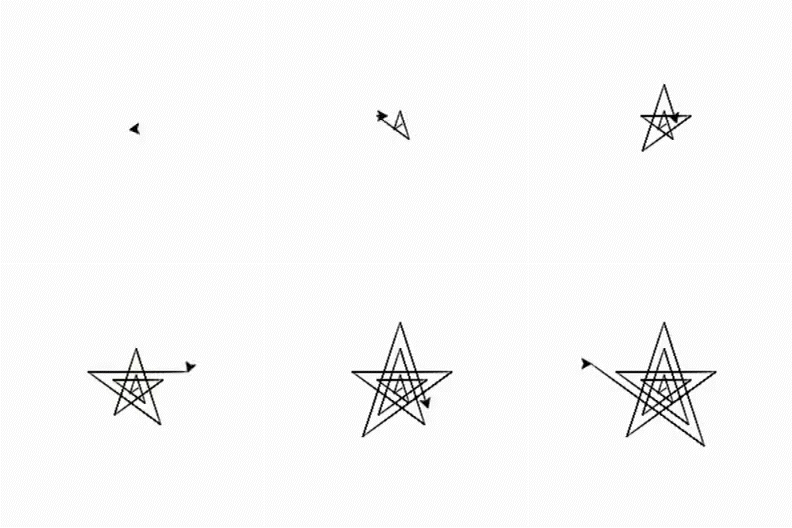
You can practice by yourself with the help of online python compiler for better understanding.

You can also read about Palindrome Number in Python here.

FAQs

  1. Which command is used to reset the pen (turtle)?
    We may reset the pen using the command turtle.reset(). We get a blank page with an arrow on it after running this command.
     
  2. Explain the use of the function turtle.penup()?
    The turtle will be lifted off the "digital canvas" by .penup(), and it will not draw if it is moved while in this state.
     
  3. What is the use of the function turtle.shape()?
    This function is used to change the turtle shape to a named shape or, if no name is specified, to return the current shape's name.
     
  4. Explain the use of the function turtle.towards()?
    The angle between the line from turtle position to the point indicated by x, y, and the turtle's initial orientation is returned by this function.
     
  5. Explain the use of the function turtle.setpos()?
    The turtle is moved to an absolute position using this function. setpos, setposition, and goto are all aliases for this function.

Key Takeaways

In this article, we have drawn a spiraling star using the turtle in python. We hope that this blog is going to help you understand the application of the turtle library, and if you like to learn more about it, check out our other blogs on the turtle.

Attempt our Online Mock Test Series on Coding Ninjas Studio now!

Happy Coding!

Live masterclass


