Maven Dependency
The H2 runtime jar must be added to dependencies in order to use H2 in a Spring boot application. Maven is the most efficient approach to add.
pom.xml
<dependency>
   <groupId>com.h2database</groupId>
   <artifactId>h2</artifactId>
   <scope>runtime</scope>
</dependency>
H2 Configuration Options
In-Memory Database Configuration
Using properties, Spring gives simple configuration choices for connecting to any database. The configuration properties we'll have in the application are listed below. For the most basic H2 setting, we will use the properties file.
application.properties
spring.datasource.url=jdbc:h2:mem:testdb
spring.datasource.driverClassName=org.h2.Driver
spring.datasource.username=codingninjas
spring.datasource.password=
spring.jpa.database-platform=org.hibernate.dialect.H2Dialect
The in-memory database connection is configured by default with the username 'codingninjas' and an empty password. Override the username and password in the above properties parameters if you want to modify them.
Persistent Database Configuration
By default, in-memory databases are volatile, which means that all stored data will be lost if the application is restarted. Data is written in temporary memory in this situation, and data is flushed as soon as the JVM is halted.
We should keep the data in files to have a persistent data store that can store data between program starts and stops. Change the Spring.datasource.url attribute to achieve this.
application.properties
# temporary data storage
spring.datasource.url = jdbc:h2:mem:testdb

# temporary data storage
spring.datasource.url = jdbc:h2:file:/data/sample
spring.datasource.url = jdbc:h2:file:C:/data/sample
The initialization of the H2 Database
Before the application is ready for business use-cases, we may want to initialize the database with a defined schema (DDL) and enter default data (DML) into tables.
We can achieve this by putting SQL files into the resources folder (/src/main/resources/).
-
schema.sql – To initialize the schema to create tables and dependencies.
-
data.sql – To insert the data rows in the table.
schema.sql
DROP TABLE IF EXISTS TBL_EMPLOYEES;

CREATE TABLE TBL_EMPLOYEES (
 id INT AUTO_INCREMENT  PRIMARY KEY,
 first_name VARCHAR(250) NOT NULL,
 last_name VARCHAR(250) NOT NULL,
 email VARCHAR(250) DEFAULT NULL
);
data.sql
INSERT INTO TBL_EMPLOYEES (first_name, last_name, email) VALUES
 ('Lokesh', 'Gupta', 'abc@gmail.com'),
 ('Deja', 'Vu', 'xyz@email.com'),
 ('Caption', 'America', 'cap@marvel.com');
H2 Console
Enabling H2 Console
The H2 database's console view is disabled by default. To view and access it in a browser, we must first activate it. Note that we can customise the URL of the H2 console, which, by default, is '/h2'.
application.properties
# Enabling H2 Console
spring.h2.console.enabled=true

# Custom H2 Console URL
spring.h2.console.path=/h2
Accessing H2 Console
Start the spring boot application and go to http://localhost:8080/h2 to access the console in the browser.
We can see the console like this.
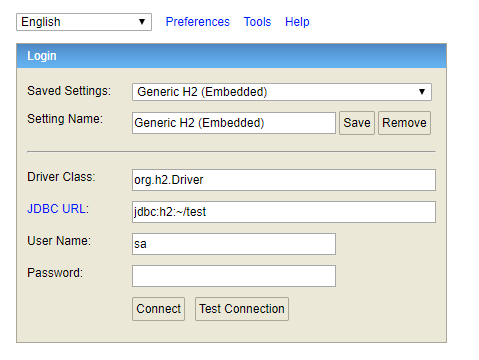
H2 Database Console Login Window
Source: Link
Now type in the username and password that you've set up. We can verify the database structure and default data inserted through SQL files.
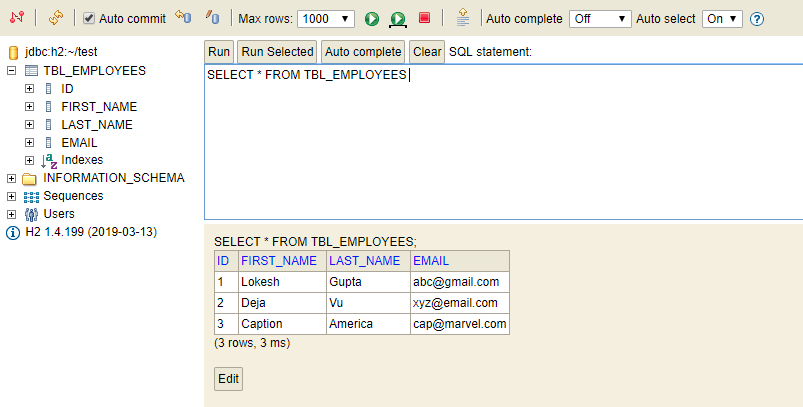
H2 Console View
Other Configuration Options
Spring boot provides two more properties to customise the behaviour of the H2 console further. We can enable/disable the database trace logs, and we can enable/disable the remote access of the H2 console.
By default, both properties are false.
application.properties
# Whether to enable trace output.
spring.h2.console.settings.trace=false

# Whether to enable remote access.
spring.h2.console.settings.web-allow-others=false
Frequently Asked Questions (FAQs)
1.What is Spring?
The Spring framework is one of the most popular application development frameworks of Java. The important feature of the spring framework is dependency injection or the Inversion of Control.
2.What is Spring Boot?
Spring Boot is one of the modules of the Spring Framework. It helps us to build a stand-alone application with very minimal or almost zero configurations.
3.What is Spring Boot H2 Database?
H2 is one of the popular in-memory databases written in Java. H2 can be embedded in Java applications or run in the client-server model.
Key Takeaways
In this article, we learnt about Spring Boot H2 database. We also learned about the dependencies and different configuration options in the Spring boot H2 database. We also learnt about the initialisation of the Spring Boot H2 database and the H2 console.
You can also consider our Spring Boot Course to give your career an edge over others.
Happy Learning!






 18+ registered

