Do you think IIT Guwahati certified course can help you in your career?
The SQL minus operator is one of the set operators that helps remove the duplicate rows in both tables. This operator removes the duplicate rows from the table we write first in the SQL query. Therefore, we always first write the select query of the table from which we want to remove the duplicate rows.
Syntax of MINUS Query in SQL
The syntax for the MINUS query in SQL varies slightly depending on the database system, but a general syntax is as follows:
SELECT column1, column2, ...
FROM table1
MINUS
SELECT column1, column2, ...
FROM table2;
Example of MINUS Query in SQL
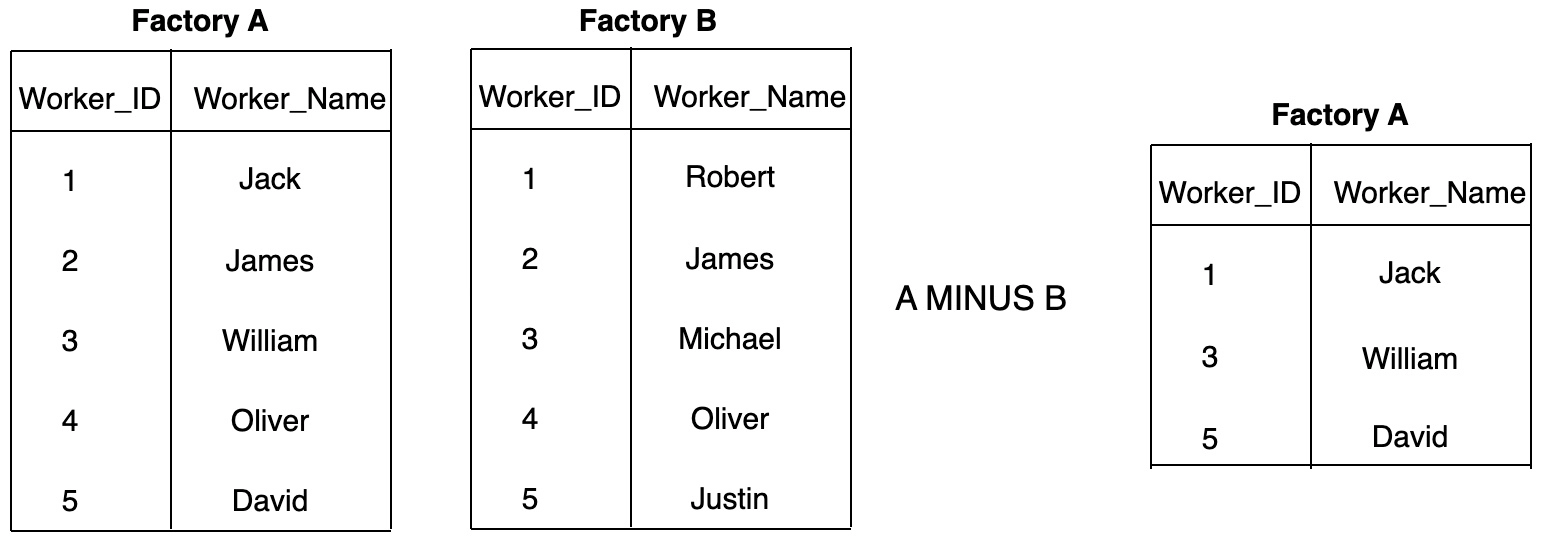
Given the information about two factory workers, we need to get those workers who work only in Factory A. This can be done by using the minus operator, and hence we remove the duplicate rows from the Factory A table.
The Venn diagram for the same can be:
Let’s learn more about the minus operator.
Minus Operator with a Single Expression
The syntax for SQL minus operator with a single expression can be given as:
Syntax of Minus Operator with a Single Expression
Select column_name from table_A Minus column_name from table_B;
The use of the minus operator with a single expression can be understood through the following example:
Example of Minus Operator with a Single Expression
We are given two tables: Student and Employees (the employed students). These tables consist of two columns only and have few records in them. We need to find the students who still need to be employed. We can create the tables as:
Creating Table 1 (Student):
CREATE TABLE Student (
	Student_ID INTEGER PRIMARY KEY,
	Student_Name TEXT NOT NULL,
	Gender TEXT NOT NULL
);

-- insert some values
INSERT INTO Student VALUES (1, 'Ryan', 'M');
INSERT INTO Student VALUES (2, 'Joanna', 'F');
INSERT INTO Student VALUES (3, 'Clara', 'F');
INSERT INTO Student VALUES (4, 'Robbin', 'M');
INSERT INTO Student VALUES (5, 'Jack', 'M');
INSERT INTO Student VALUES (6, 'Kailey', 'F');
INSERT INTO Student VALUES (7, 'John', 'M');

-- fetch some values
SELECT * FROM Student;
Output
Creating Table 2 (Employees):
CREATE TABLE Employees (
	Emp_ID INTEGER PRIMARY KEY,
	Emp_Name TEXT NOT NULL,
	Gender TEXT NOT NULL
);

-- insert some values
INSERT INTO Employees VALUES (1, 'Ryan', 'M');
INSERT INTO Employees VALUES (2, 'Jacob', 'M');
INSERT INTO Employees VALUES (3, 'Clara', 'F');
INSERT INTO Employees VALUES (4, 'Christin', 'M');
INSERT INTO Employees VALUES (5, 'Justin', 'M');
INSERT INTO Employees VALUES (6, 'Kailey', 'F');
INSERT INTO Employees VALUES (7, 'Vik', 'M');

-- fetch some values
SELECT * FROM Employees;
Output
So we need to remove the already employed students from the student table. That implies we need to delete the names of employees present in the student table. To do so, we use the minus operator. We use the SQL query as follows:
Select * from Student Minus Select * from Employees;
So, the minus operator will remove these common values from Employees.
The syntax for the SQL minus operator with where clause can be given as:
Syntax of Minus Operator with Where Clause
Select column_name from table_A where {condition} Minus column_name from table_B where {condition};
The use of the minus operator with a where clause can be understood through the following:
Example of Minus Operator with Where Clause
We have been given information about students who love outdoor and indoor games with their age and roll number. We need to find students who love playing indoor games only having an age greater than 14.
We create the two tables as follows:
Creating Table 1 (Outdoor_Games):
CREATE TABLE Outdoor_Games (
	Student_ID INTEGER PRIMARY KEY,
	Student_Name TEXT NOT NULL,
	Age INTEGER NOT NULL
);

-- insert some values
INSERT INTO Outdoor_Games VALUES (1, 'Ryan', 15);
INSERT INTO Outdoor_Games VALUES (2, 'Joanna', 17);
INSERT INTO Outdoor_Games VALUES (3, 'Clara', 14);
INSERT INTO Outdoor_Games VALUES (4, 'Robbin', 19);
INSERT INTO Outdoor_Games VALUES (5, 'Jack', 12);
INSERT INTO Outdoor_Games VALUES (6, 'Kailey', 18);
INSERT INTO Outdoor_Games VALUES (7, 'John', 13);

-- fetch some values
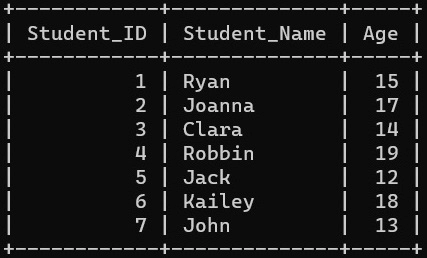
SELECT * FROM Outdoor_Games;
Output
Creating Table 2 (Indoor Games):
CREATE TABLE Indoor_Games (
	Student_ID INTEGER PRIMARY KEY,
	Student_Name TEXT NOT NULL,
	Age INTEGER NOT NULL
);

-- insert some values
INSERT INTO Indoor_Games VALUES (1, 'Ryan', 15);
INSERT INTO Indoor_Games VALUES (2, 'Jacob', 17);
INSERT INTO Indoor_Games VALUES (3, 'Clara', 14);
INSERT INTO Indoor_Games VALUES (4, 'Christin', 12);
INSERT INTO Indoor_Games VALUES (5, 'Justin', 9);
INSERT INTO Indoor_Games VALUES (6, 'Kailey', 18);
INSERT INTO Indoor_Games VALUES (7, 'Vik', 14);

-- fetch some values
SELECT * FROM Indoor_Games;
Output
In this example, we need to find students who love playing outdoor games only. So from the Outdoor_Games table, we need to delete the students who love playing indoor games too. To do so, we use the minus command, which completes the first part of the problem. Also, here, we need to select only the students with ages greater than 14, so we will use the where condition to select them. The SQL for the same can be given as:
Select * from Outdoor_Games where age > 14
Minus
Select * from Indoor_Games where age > 14;
The SQL minus operator will remove these common values from Outdoor_Games and only provide the unique data for students only playing outdoor games with ages greater than 14.
Yes, EXCEPT and MINUS in SQL are similar but not exactly the same. Both are used for set difference operations, retrieving records from the first query result that are not present in the second query result. However, EXCEPT is used in some database systems like PostgreSQL, while MINUS is used in others like Oracle.
Is the Minus operator case-sensitive when comparing the row values’?
No, the Minus operator is not case-sensitive in SQL when comparing row values; it treats values irrespective of their case.
How to check minus value in SQL?
To check for minus values in SQL, you can use a WHERE clause with a comparison operator such as < or <= along with the value 0, ensuring that only records with negative values are retrieved.
How do I remove minus in SQL?
To remove minus signs from values in SQL, you can use the ABS() function, which returns the absolute (positive) value of a numeric expression, effectively removing the minus sign.
Can the Minus operator be used with more than two tables?
No, the minus operator can’t be used to compare more than two tables at a time.
Conclusion
This article explored the concept of the minus set operator in SQL. We learned that the minus operator could be used with a single expression and a where clause with examples. We learned how by applying the subtraction concept from mathematics to databases, we could effectively eliminate redundant data and obtain unique records.
To learn more about SQL queries, we recommend reading the following articles:










 26+ registered

