Authoring Tool Accessibility Guidelines
Web content is created using authoring tools, which are software and services used by "authors" (web developers, designers, writers, and others) (static web pages, dynamic web applications, etc.).
The Authoring Tool Accessibility Guidelines (ATAG) documents describe how to:
- make authoring tools accessible so that disabled people can create web content.
- assist authors in creating more accessible web content — specifically, how to enable, support, and promote the creation of content that complies with Web Content Accessibility Guidelines (WCAG).
Who is ATAG for?
ATAG is primarily for authoring tool developers and includes the following categories of authoring tools:
1. HTML editors with what-you-see-is-what-you-get (WYSIWYG) functionality
2. website-building software, such as content management systems (CMS) and learning management systems (LMS), courseware tools, and content aggregators
3. program that converts documents to web content technologies, such as word processors and other office document apps that have Save as HTML or EPUB options.
4. Authoring tools for multimedia
5. User-generated content websites, such as blogs, wikis, photo sharing sites, online forums, and social networking sites.
6. Other sorts of authoring tools described in the glossary definition
Web Content Accessibility Guidelines(WCAG)
With the purpose of establishing a single, universally accepted standard for web content accessibility that fits individuals, organizations, and governments’ needs around the world, the W3C developed the Web Content Accessibility Guidelines (WCAG) in collaboration with individuals and organizations around the world.
The Web Content Accessibility Guidelines (WCAG) papers describe how to make web content more accessible to individuals with impairments. Web "content" refers to the data on a web page or in a web application and includes: - natural data like text, photos, and sounds.
- Structure, presentation, and other aspects of a website are defined by code or markup.
The Four Main Guiding Principles of WCAG 2.1
The four main guiding principles of WCAG 2.1 are given below:
Perceivable
1. Provide non-text content with text alternatives.
2. Provide captions and other multimedia choices.
3. Create material that can be delivered in various ways without losing its meaning, including through assistive devices.
4. Make material easy to see and hear for users.
Operable
1. Make all functions accessible using a keyboard.
2. Allow ample time for consumers to read and use stuff.
3. Content that causes convulsions or bodily reactions should not be used.
4. Assist users in navigating and locating material.
5. Make it easier to use non-keyboard inputs.
Understandable
1. Make the text readable and easy to understand.
2. Make content appear and behave in a consistent manner.
3. Assist users in avoiding and correcting errors.
Robust
1. Compatibility with present and future user tools should be maximized.
Web Accessibility Initiative – Accessible Rich Internet Applications (WAI-ARIA)
WAI-ARIA provides a framework for adding attributes to define user interaction features, their relationships, and their present state. WAI-ARIA defines navigation algorithms for identifying areas and common Web structures such as menus, principal content, secondary content, banner information, and other Web structures. Developers can utilise WAI-ARIA to identify parts of sites and make it easier for keyboard users to travel between them instead of pressing Tab repeatedly.
WAI-ARIA also includes mapping controls, live areas, and events to accessible application programming interfaces (APIs), including custom controls for rich Internet applications. Buttons, drop-down lists, calendar functions, tree controls (for example, expandable menus), and other widgets can use WAI-ARIA techniques. Few examples of ARIA are given below:
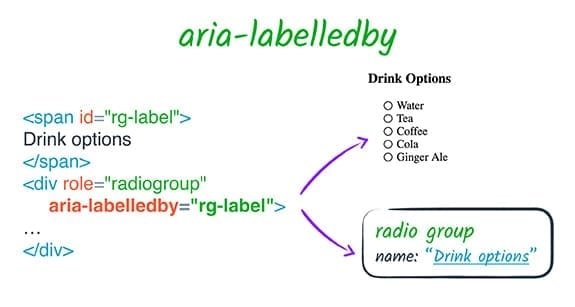
Source
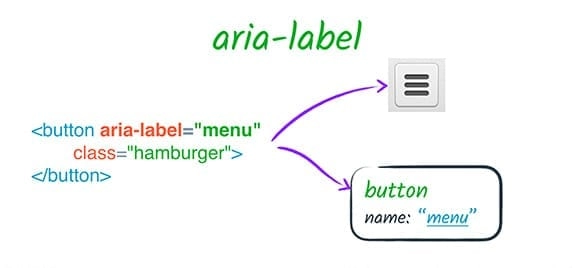
Source
FAQs
-
What happens when WAI-ARIA is enabled in earlier browsers?
WAI-ARIA coding methods have no impact on how older browsers render Web content. Web content that adds WAI-ARIA properties will just work as it does now in browsers that do not support WAI-ARIA.
-
Do WAI-ARIA methods add to the development process's complexity?
Although including WAI-ARIA support necessitates some additional effort, it is not much more than normal development. Implementing WAI-ARIA is relatively simple for those producing static Web pages or utilizing libraries that have WAI-ARIA built in. It's more difficult to create custom cross-browser JavaScript widgets, and implementing WAI-ARIA in them is correspondingly more difficult.
-
Is WAI-ARIA the same as the "ARIA" described by other organizations?
All publications and references to "ARIA" that are connected to making Web sites accessible, as far as we know, are actually references to WAI-ARIA.
Key Takeaways
From this article, we learned about the standards of web accessibility. We learned about User Agent Accessibility Guidelines (UAAG), Authoring Tool Accessibility Guidelines (ATAG) and Web Content Accessibility Guidelines(WCAG). We looked at the Four Main Guiding Principles of WCAG 2.1. We read about WAI-ARIA and its importance.
But this is not enough; you need something extra to excel in Vue.js truly. If you want to learn more about Vue.js, you can read our articles on Vue.js or take our highly curated Web Development course.






 40+ registered

