Do you think IIT Guwahati certified course can help you in your career?
Introduction
Static web pages are a key part of websites, which serve as an effective mechanism for delivering a message to visitors.
In this article, we will explain what static web pages are all about, their components, and how they differ from dynamic web pages.
What is a Static Web Page?
A static webpage is any kind of webpage that shows consistent content to all those who visit it. The information on this page does not change or depend on whoever accesses it or when they do it. Static web pages are built using HTML (Hypertext Markup Language) & CSS (Cascading Style Sheets), which define the structure, layout & styling of the page. Once a developer builds it, the content in a static webpage remains fixed unless changed manually.
Example
HTML
HTML
<!DOCTYPE html>
<html>
<head>
  <title>My Static Web Page</title>
</head>
<body>
  <h1>Welcome to My Static Web Page</h1>
  <p>This is a simple example of a static web page.</p>
  <ul>
    <li>Item 1</li>
    <li>Item 2</li>
    <li>Item 3</li>
  </ul>
</body>
</html>
Output
This code creates a simple static web page with a title bar/headline/title, paragraph(s), and an unordered list/bullet points/points/compositions. The same content will be displayed through each user’s browser.
Static web pages are great for giving information that doesn’t change frequently like company profiles, product descriptions, contact details as well as blogs etc. They take less time to build and they load faster because they don’t require much server resources in comparison to dynamic web pages.
Elements of a Static Web Page
HTML Structure
A static webpage’s foundation is its HTML structure. Various portions of the website such as headings/subtitles/titles/paragraphs/listings and images contain HTML tags indicating their respective functions within the site. The HTML code provides for basic structure and content on each page.
CSS Styling
Cascading style sheets govern visual display characteristics of html elements .One can define colors,sizes ,fonts,paddings ,in-line elements etc.CSS rules applied on html elements ensure consistent design that looks appealing throughout the webpage
Images & Media
Static web pages can include images, videos & other media elements to improve the user experience. These are incorporated in the HTML code with tags such as <img> for images & <video> for videos.
Links & Navigation
There are usually hyperlinks on static pages within the same website or external sources. Such links are created using the tag in HTML language. The navigation menus and buttons also enable users to move easily from one page of the site to another.
Footer & Contact Information
Most static web pages have a footer section which consists of copyright notices, contact information as well as links to social media profiles. This information is typically found at the end part of every page to ensure easy access.
For Example
HTML
HTML
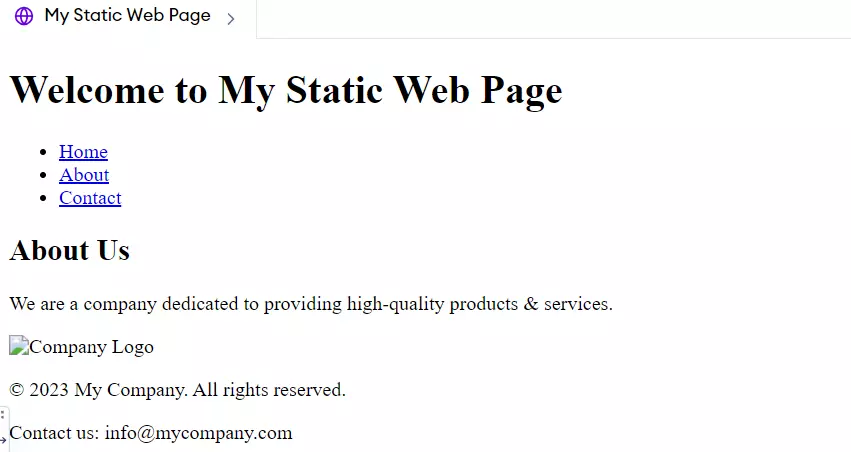
<!DOCTYPE html> <html> <head> <title>My Static Web Page</title> <link rel="stylesheet" type="text/css" href="styles.css"> </head> <body> <header> <h1>Welcome to My Static Web Page</h1> <nav> <ul> <li><a href="index.html">Home</a></li> <li><a href="about.html">About</a></li> <li><a href="contact.html">Contact</a></li> </ul> </nav> </header>
<main> <h2>About Us</h2> <p>We are a company dedicated to providing high-quality products & services.</p> <img src="company-logo.jpg" alt="Company Logo"> </main>
HTML structure in this case makes up the various parts of the page like header, main content & footer. tag is used to connect an external CSS file (styles.css) containing styling rules for the page. The navigation menu is represented by element while an image is embedded using the tag. Footer section contains copyright notice and contact information.
Static Web Page vs. Dynamic Web Page
Aspect
Static Web Pages
Dynamic Web Pages
Content Delivery
Content is fixed & does not change unless manually updated.
Content changes dynamically based on user input or server status.
User Interaction
Limited to basic forms and links; no server-side interaction.
High level of interactivity, with content varying by user actions.
Development Tools
Uses straightforward HTML, CSS, and minimal JavaScript.
Employs server-side languages (PHP, Python, etc.) and often a database.
Loading Speed
Faster load times due to serving simple HTML files directly.
Slower initial load due to server-side processing of content.
Maintenance
Easier to maintain due to simplicity; changes require manual updates.
More complex maintenance due to dynamic content sources.
Scalability
Less scalable in terms of content flexibility; good for smaller websites.
Highly scalable, suitable for complex applications like e-commerce.
Cost Effectiveness
Generally more cost-effective for hosting & development.
May involve higher costs due to more complex hosting needs and ongoing maintenance.
Frequently Asked Questions
Can a static web page be interactive?
Certainly, JavaScript can enable basic interactions on static web pages such as form validations or image sliders but they don’t have capacity to create new content as required.
How do I change something on a static web page?
In order to change contents of a static web page, one has to manually edit the HTML files and re-upload them as content cannot be changed after coding.
Do search engines like static web pages?
Yes, static web pages are generally more SEO-friendly due to their fast loading times & Search Engine Indexing; however, they lack dynamic content that could help some types of SEO strategies.
Conclusion
This article explains what a simple and informative website that uses only static web pages is all about. We know what static web pages mean, their main components and how they differ from dynamic ones. Static websites are made from HTML and CSS creating a fixed experience for viewers. Static websites are easy to build, quick in downloading & consume fewer server resources. On one hand, while presenting unchanging information, these sorts of sites are contrasted with dynamic ones which allow further user interactivity. Therefore defining whether you should go with either of them depending on what your site actually needs would be easier through understanding the differences between static and dynamic web pages respectively.








 7+ registered

