

Table of contents
1.
Introduction 
2.
Concepts
2.1.
Outlets
2.2.
Actions
2.3.
File's Owner
2.4.
Scenes and Segues 
3.
Disadvantages
4.
Frequently Asked Questions
4.1.
What is a XIB?
4.2.
How is a Storyboard different from a XIB?
4.3.
What is the storyboard interface?
4.4.
Is SwiftUI a replacement for storyboard?
4.5.
In design, what is storyboarding?
5.
Conclusion
Last Updated: Mar 27, 2024

Storyboard and Interface Builder

Author Riya Bhogra
0 upvote
Career growth poll
Do you think IIT Guwahati certified course can help you in your career?

Introduction 

Interface Builder (IB) is a WYSIWYG (What You See Is What You Get) editor for creating user interfaces. A drag-and-drop interface is used to add GUI components such as buttons, labels, and images. These controls are then "wired" to the source code of your view controller. The editor generates a file that you may load at runtime to recreate the user interface you've created.

When dealing with Auto Layout, IB comes in handy a lot. It can check layouts right away and tell you if a view has any confusing constraints. When working programmatically, this eliminates some trial-and-error.

The two types of files that are created from IB are: .xib and .storyboard.

Whereas, Storyboards are a more recent innovation than xibs. Storyboards are visual representations of full screens and user flows. You might be able to perform similar things with a xib (with some heavy lifting), but storyboards have additional features because they understand how view controllers and navigation work together.

Concepts

Outlets

You designate specific characteristics as outlets in your objects. They're just placeholders for now. When you load a xib/storyboard, the objects you've wired up in the xib/storyboard will be filled in.

Prefix a property with @IBOutlet to create an outlet. The editor will then have access to it.

Because the value may be nil until the xib/storyboard is loaded, the property is marked as an implicitly unwrapped optional.

The "IB" in IBOutlet refers to Interface Builder, but you'll see it in Storyboards as well because they serve the same purpose.

Actions

Methods can be marked as actions in your code. Then, in your xib/storyboard, you can connect controllers to trigger them.

@IBAction func tappedNext(sender: AnyObject) {
  NSLog("Tapped next")
}

IBAction, like IBOUlet, may be found in Storyboards.

File's Owner

If you need to do any further setup after the view has been loaded from the file, don't do it in your initializer; there's no guarantee that all of the views in your file have been instanced yet. Implement the awakeFromNib on the File's Owner instead.

Scenes and Segues 

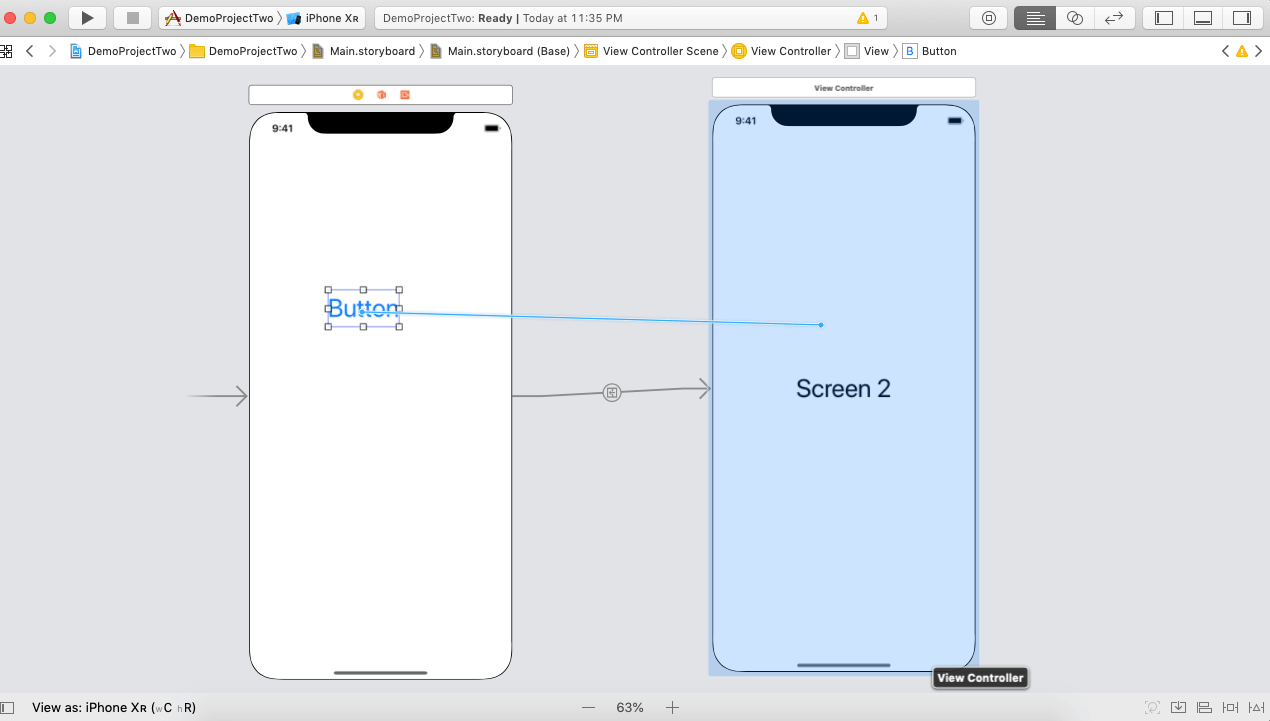
A scene is a name given to each screen in a storyboard. A storyboard will frequently include numerous scenes that depict a user flow. You might have a Signup.storyboard, for example, that covers the four screens that make up your signup flow.

A segue is a transition from one screen to the next. You may either connect it to your storyboard or use the performSegueWithIdentifier function.

func userDidTapOnNextButton(sender: AnyObject) {
  self.performSegueWithIdentifier("NameOfSegue", sender:self)
}

Disadvantages

  • IB has tradeoffs, just like any other productivity tool.
  • It can be challenging for a large team to work on a single file because they emit a massive XML file. You can't visually check a diff to see changes even if you avoid merging conflicts.
  • It can be tough to pinpoint a specific location. To work with your existing localization system, you'll almost certainly need to write import/export glue code.
  • A standard critique with Storyboards is that a single.storyboard file can contain dozens of screens, making editing difficult. You expect to reorganise your storyboards, breaking them down into smaller files that handle individual user stories, such as a single "Login" flow, much like you would with code.
  • Complex displays may force you to spend too much time wrestling with tools, even if you restrict a Storyboard to a single screen. It's sometimes easier to express intent with code.
  • Interface Builder and Storyboards are similar to Ruby on Rails, an agile web framework. They make incredibly prevalent design patterns easier to understand, but they aren't a cure-all. Every website that has to scale is forced to abandon agile frameworks' productivity "magic."

Frequently Asked Questions

What is a XIB?

With a single UIView, Xib files are used.
It takes up more memory than a storyboard and is somewhat slow.
From iOS5 onwards, it's compatible.

How is a Storyboard different from a XIB?

All of your Scenes, such as View Controllers, Nav Controllers, TabBar Controllers, and so on, can be laid up on a single storyboard.
Prior to iOS 5, it isn't compatible.
It's usually quick and uses less memory.

What is the storyboard interface?

The storyboard was initially introduced in iOS 5 to help developers save time while creating user interfaces for iOS apps. It's a visual representation of an iOS app's user interface. It can be described as a series of screens, each of which represents a ViewController and its associated Views.

Is SwiftUI a replacement for storyboard?

SwiftUI is not a replacement for storyboards; but, in some circumstances, it may be a suitable replacement for xib. SwiftUI, on the other hand, is still far from giving the capabilities of xib, in my opinion. Just check the SwiftUI forum to see how developers are having trouble replicating what is simple with xib, storyboards, and autoLayout.

In design, what is storyboarding?

A storyboard is a means of graphically structuring a story that shows a visual sequence of events. They're designed to tell a tale and depict the process and experience of a particular event.

Conclusion

In this article, we have extensively discussed Storyboard and Interface Builder. We have also discussed its objects as well as the disadvantages.We hope this blog has helped you enhance your knowledge regarding the same. 

Refer to our Guided Path on Coding Ninjas Studio to upskill yourself in Data Structures and AlgorithmsCompetitive ProgrammingJavaScriptSystem Design, and many more! If you want to test your competency in coding, you may check out the mock test series and participate in the contests hosted on Coding Ninjas Studio! But if you have just started your learning process and are looking for questions asked by tech giants like Amazon, Microsoft, Uber, etc; you must look at the problems, interview experiences, and interview bundle for placement preparations.

Nevertheless, you may consider our paid courses to give your career an edge over others!

Do upvote our blogs if you find them helpful and engaging!


Happy Learning!

Live masterclass


