Do you think IIT Guwahati certified course can help you in your career?
Introduction
Have you ever wondered how our computer performs multiple tasks simultaneously, like surfing the web with music in the background? This is possible due to threads which allow different parts of the program to run concurrently. But we also need to prioritise our thread, which must be executed through thread priority in java.
In this article, we will understand thread priority in java and use examples to know how to set and get thread priorities in java and much more.
What is Thread Priority in Java?
In a multithreading environment, threads reside in a ready queue, awaiting execution. The thread scheduler, responsible for processor allocation, prioritizes threads for execution. Thread priority in java, a key factor in this process, is assigned by the programmer or automatically by the JVM(Java Virtual Machine) if unspecified. Ranging from 1 to 10, priority influences the order of thread execution.
In multitasking scenarios, where multiple threads contend for resources, priority becomes crucial. The scheduler chooses which thread to run based on their assigned priorities. Understanding and managing thread priority is essential in multithreaded programming, influencing application performance by determining the sequence of thread execution and resource allocation.
Constants in the Thread Class
The static final integer constants defined in Java Thread Class are:
public static final int MIN_PRIORITY
This represents the minimum thread priority. In this a thread can have a value is 1. Threads with this priority are considered less urgent by the thread scheduler. Typically used for background tasks or threads that should have lower resource allocation.
public static final int MAX_PRIORITY
This represents the maximum thread priority. In this a thread can have a value is 10. Threads with this priority are considered more urgent by the thread scheduler. Often used for critical tasks or threads requiring higher resource allocation.
public static final int NORM_PRIORITY
This is the default thread priority if not explicitly set. In this a thread can have a value is 5. It represents normal thread priority. Threads with this priority are scheduled in a balanced manner and compete fairly for resources.
Setter & Getter Method of Thread Priority
The thread priorities Method in Java are:-
setPriority(): In this method, the priority of a thread is set, and the range is [1,10]. If the user selects any priority not in this range, an IllegalArgumentException is thrown. It is also known as a setter.
Syntax:
 // x represents the priority [1,10] for the thread
 public final void setPriority(int x)
getPriority(): this method is used to show the priority of the given thread. It is also known as a getter.
Syntax:
 // returns the priority of thread1
thread1.getPriority()
Examples of Thread Priority in Java
In this section, we will understand the thread priority in java using some examples.
Example 1
In this example, we explain using the Thread Priorities Method and static final integer constants in Java.
Java
Java
public class CN_thread extends Thread {
    public void run() {
        System.out.println("My thread priority is " + Thread.currentThread().getPriority()+" and my name is  "+ Thread.currentThread().getName());
          System.out.println();
    }

     public static void main(String[] args) {
         // setting and declaring threads
        CN_thread thread1 = new CN_thread();
        thread1.setPriority(Thread.MIN_PRIORITY);

        CN_thread thread2 = new CN_thread();
        thread2.setPriority(Thread.NORM_PRIORITY);

        CN_thread thread3 = new CN_thread();
        thread3.setPriority(Thread.MAX_PRIORITY);
        // starting the threads
        thread1.start();
        thread2.start();
        thread3.start();
    }
}
You can also try this code with Online Java Compiler
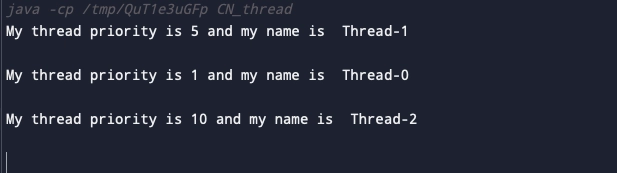
In the above code, first, we make three instances of CN_thread and give them priorities as minimum, normal and maximum using the static final integer constants. Then we call the threads using the start method. The output will be per the priorities that are being assigned.
Example 2
In this example, we create Custom Threads and set up priorities using final integer constants in java.
Java
Java
public class NinjaCustom extends Thread {
    // Default constructor
    public NinjaCustom() {
        super();
    }

    //Constructor with the thread name and priorities as parameter
    public NinjaCustom(String name, int priority) {
        super(name);
        setPriority(priority);
    }

    public void run() {
        // custom thread code goes here
        System.out.println(getName() + " with priority = " + getPriority());
    }

   	public static void main(String[] args) {
        NinjaCustom thread1 = new NinjaCustom("Ninja is on Thread 1", Thread.MAX_PRIORITY);
        NinjaCustom thread2 = new NinjaCustom("Ninja is on Thread 2", Thread.MIN_PRIORITY);
        // starting
        thread1.start();
        thread2.start();
    }
}
You can also try this code with Online Java Compiler
In the above code, we make two threads and set their priorities as maximum and minimum. We have two constructors above one is the default constructor and the other constructor takes two parameters, a name and priority value and a run() method that displays the result. Thread with max priority will be executed first.
Example of IllegalArgumentException
An IllegalArgumentException is a type of exception that is commonly encountered in programming, especially in Java and other object-oriented languages. It occurs when a method or constructor is called with an argument that is not appropriate or valid for the operation being performed. In simpler terms, it's thrown when the input provided to a method is not acceptable according to the method's specifications.
For instance, let's consider a hypothetical Java method that calculates the area of a rectangle:
public double calculateRectangleArea(double length, double width) {
    if (length <= 0 || width <= 0) {
        throw new IllegalArgumentException("Both length and width must be positive");
    }
    return length * width;
}
In this example, the calculateRectangleArea method takes two parameters: length and width. It calculates the area of a rectangle using these parameters. However, before performing the calculation, the method checks whether both length and width are positive values. If either of them is not positive (i.e., zero or negative), it throws an IllegalArgumentException with an appropriate error message.
Suppose someone calls this method with negative values:
double area = calculateRectangleArea(-5, 10);
Since the length is negative in this case, the method will throw an IllegalArgumentException with the message "Both length and width must be positive."
This exception is helpful for catching and handling scenarios where incorrect or invalid input is provided to methods, making it easier to diagnose and fix issues during development.
How to Retrieve the currently executing thread object Reference in Java?
In Java, you can retrieve the currently executing thread object reference by using the currentThread() method of the Thread class. This method is a static method, meaning it is called on the Thread class itself rather than on an instance of the Thread class. For example,
Java
Java
public class GetCurrentThreadExample {
    public static void main(String[] args) {
        // Get the currently executing thread
        Thread currentThread = Thread.currentThread();

        // Display information about the current thread
        System.out.println("Current Thread: " + currentThread);
        System.out.println("Thread Name: " + currentThread.getName());
        System.out.println("Thread ID: " + currentThread.getId());
        System.out.println("Thread Priority: " + currentThread.getPriority());
    }
}
You can also try this code with Online Java Compiler
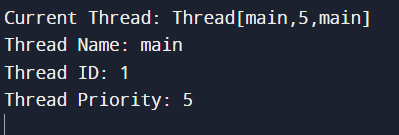
In this example, the Thread.currentThread() method is used to obtain a reference to the currently executing thread. The obtained Thread object can then be used to access various properties of the thread, such as its name, ID, and priority.
Output:
Frequently Asked Questions
Which data type is thread priority in Java?
In Java, thread priority is represented using the int data type. It helps the JVM decide the order in which threads should be executed, though it’s not guaranteed. Priorities range from 1 (lowest) to 10 (highest).
What are the priority levels of threads?
Java defines three main thread priority levels: Thread.MIN_PRIORITY (1), Thread.NORM_PRIORITY (5), and Thread.MAX_PRIORITY (10). By default, threads run at normal priority (5), but you can adjust this range based on your program’s needs to influence scheduling.
What decides thread priority in Java?
Thread priority in Java is determined by the operating system's thread scheduler. Java provides thread priority levels (1 to 10), but actual behaviour can vary across platforms due to differences in how the scheduler is implemented.
Why set thread priority?
Setting thread priority allows developers to influence the order of thread execution, prioritising certain threads over others based on the urgency of their tasks.
What is the minimum thread priority in Java?
The minimum thread priority in Java is represented by Thread.MIN_PRIORITY, which is equal to 1.
What is the maximum priority of a thread in Java?
The maximum thread priority in Java is 10, which is the highest priority level. However, relying solely on thread priority for critical behavior is discouraged due to unpredictable behavior across different operating systems.
Conclusion
This article has explained the basics of thread priority in java and how to set and get thread priorities. We have seen some examples to understand the concept of thread priority and how it's applied to our programs and also discussed some FAQs.
You can learn more about threading and its related concepts:









 5+ registered

