Introduction
Sometimes you might open too many chrome tabs in a system that consumes a lot of RAM which eventually leads to slowing down the performance of the Operating system. Although, it will not crash the whole OS. The reason behind it is that whenever the OS RAM gets full, it transfers some data into secondary memory, which helps the OS prevent a sudden crash. Virtual Memory is a storage allocation scheme that allows secondary memory to be addressed as if it were the main memory. Yet, this process will make the system slow so to avoid this situation it is recommended to upgrade RAM as well as Solid-state drive as it performs better than Hard Drive.
Source:memegenerator
In this article, we will learn more about virtual memory and its uses.
Virtual Memory
As the complexity and functionalities of desktop applications are increasing, the primary memory(RAM) requirements are also increasing. Like PC games, photo editing software like Photoshop and even the Chrome browser require a lot of primary memory(RAM). The virtual memory concept helps in overcoming this dilemma without crashing the OS.
The main objective of virtual memory is to increase the storage capacity of primary memory. Virtual memory is the operating system's sizable secondary memory. It allows the computer system's hardware and software to support physical memory while transferring data from primary memory to secondary memory, such as a hard drive. At any time, the primary memory is not available, but at the same time, the pages need some extra memory, then requests are forwarded to the hard disk for swapping files like virtual memory. It occupies the small block of memory in the hard disk.
How Virtual Memory works?
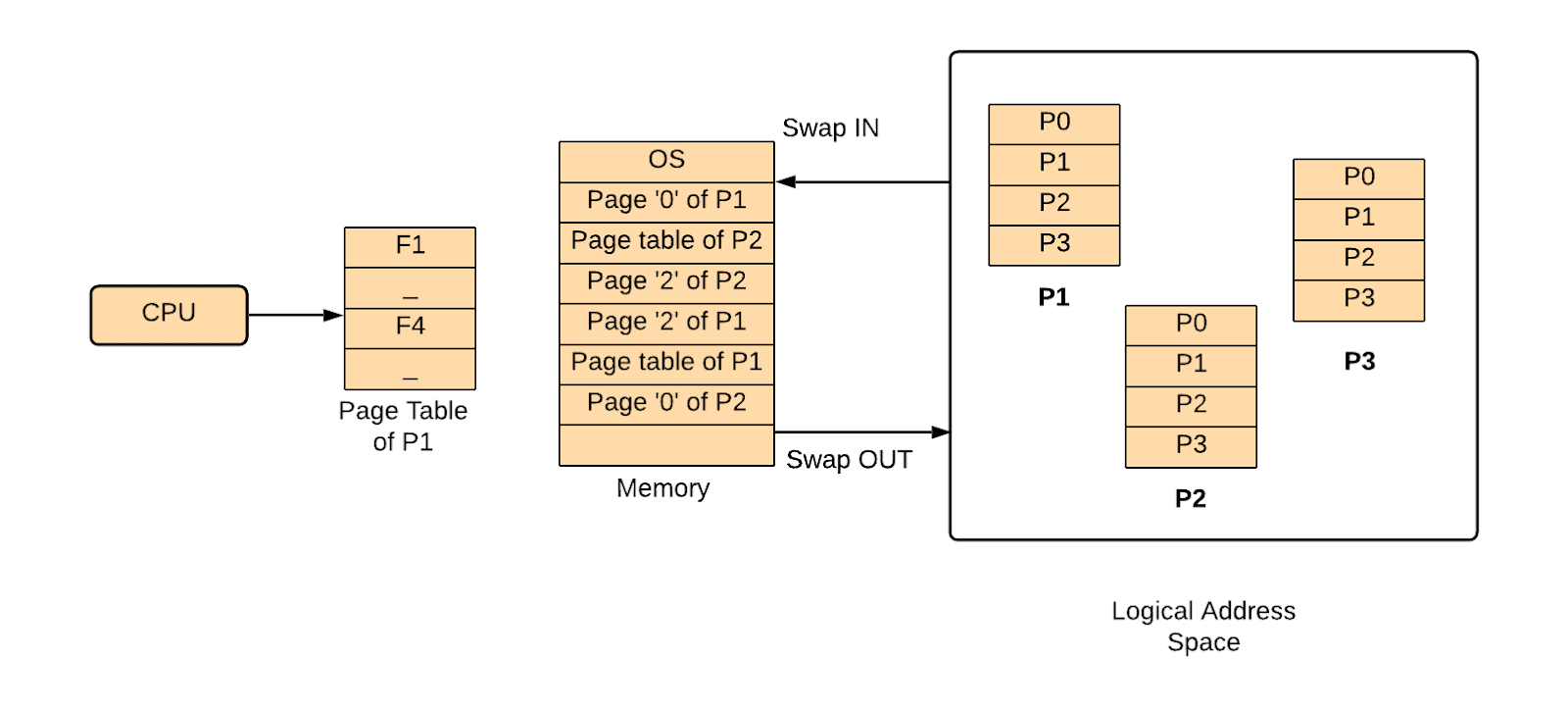
P1, P2, and P3 are the processes that need to be executed they are currently available in the logical Address Space. As there is limited memory space available only some part of each process is stored in the memory line Page’0’ of P1 and Page Table of P1.
As per the degree of programming is concern, more and more processes should be included in the main memory. But as you know, the main memory is limited. So, the Main Memory is divided into parts called as 'Frames' and the process is divided into 'Pages' so that a part of the process(a page) can be accommodated in a frame(part of Main Memory). A Page Table keeps track of the pages and where they are present in the Main Memory. So, only a few pages from each process are loaded in the main memory from the Logical Address Space. After that whenever the process is executed by the CPU the required pages are loaded into the primary memory using the Swap IN and Swap OUT function also known as Roll IN and Roll OUT function. So whenever a user calls for any process it creates an illusion that all the processes are available in the primary memory but this is not the case only a few pages of the process are available in the main memory. The page replacement is done through the Page replacement Algorithms.
Consider that the CPU is executing Process P1 and looking to P1 in Page Table but the P1 page is not available this is known as Page Fault. It can be solved using Page Fault Handling read further about it in this article.
Demand Paging
Demand paging works on the principle that when a process is swapped in, its pages are not swapped in all at once. Instead, they are only used when the process requires them (On-demand). Only those pages are loaded at first which will be required by the procedure right away.
In the page table, pages are not moved into memory but are designated as invalid. The rest of the table is empty when an entry is invalid. Pages loaded into memory are marked as valid, along with information about where the swapped-out page can be found.
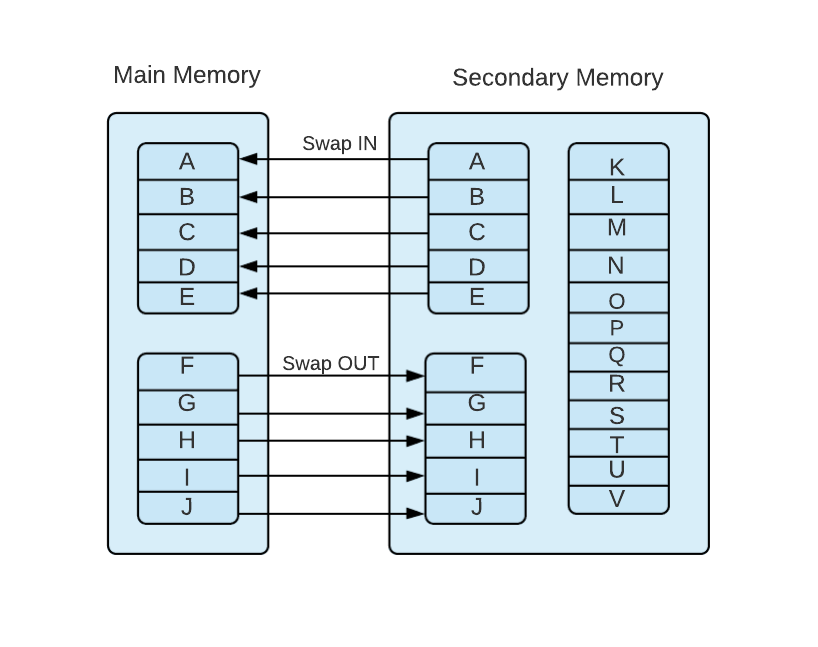
Suppose a program addresses a page not present in the main memory because it was swapped out recently. In that case, the processor recognizes the invalid memory reference as a page fault and switches control from the program to the operating system, which requests the page back into memory.
Advantages
- Large virtual memory.
- More efficient use of memory.
- There is no limit on the degree of multiprogramming.
Disadvantages
- Compared to simple paged management solutions, the number of tables and the amount of processing overhead for managing page interrupts are higher.
Page Replacement
Only a few pages of a process are loaded into memory at first, as discussed in Demand Paging. This allows us to store more processes in memory at once. What happens, though, when a process wants more pages and there isn't enough free RAM to accommodate them?
To address this issue, take some steps:
- Place the process in the wait queue until any other process has completed its execution, freeing up frames.
- Alternatively, to release frames, eliminate some other process from memory.
- Alternatively, discover any pages that aren't being used at the moment and move them to the disc to free up frames. This is known as Page replacement, and it is the most widely used strategy. We have some fantastic algorithms for efficiently replacing pages.
Thrashing
Thrashing refers to a process that spends more time paging than executing. To put it another way, the process doesn't have enough frames to hold all of the pages it needs to run, so it swaps pages in and out often to keep running. Occasionally, pages that will be needed shortly must be swapped out.
When the CPU utilization is low, the process scheduling mechanism loads numerous processes into memory simultaneously, allocating a limited number of frames to each process to improve the level of multiprogramming. As the memory fills up, the process begins to take a long time to swap in the required pages, resulting in low CPU utilization because most processes are waiting for pages. As a result, the scheduler loads more processes to increase CPU use; as a result, the entire system eventually comes to a halt.
Causes of Thrashing
- High degree of multiprogramming:
If the number of processes in memory continues to grow, the number of frames assigned to each process will shrink. As a result, each process will have fewer frames available. As a result, page faults will become more frequent, more CPU time will be wasted switching in and out of pages, and utilization will continue to decline.
- Lacks of Frames:
When a process has fewer frames, fewer pages may be stored in memory, necessitating more frequent shifting in and out. This could result in thrashing. As a result, each process must be given a sufficient number of frames to avoid thrashing.
Recovery for Trashing
- You can prevent the system from thrashing by ordering the long-term scheduler not to put the processes into memory after the threshold.
- If the system is already thrashing, tell the mid-term scheduler to pause some of the processes until the system is no longer thrashing.

 412+ registered