Table of contents
1.
Introduction
2.
Virtual Service Scripting
2.1.
Script properties
2.1.1.
Service functioning
2.1.2.
Virtual responses
2.1.3.
VirtResponse test steps
2.1.4.
Response dispatching
2.1.5.
Response dispatching
2.2.
Script language
2.3.
Script objects
2.4.
Writing script code
3.
Virtual Service Events
3.1.
Service-Related Events
3.2.
Target Property
3.3.
Script Objects
4.
SSL Virtual Services
4.1.
Create SSL keystore
4.2.
Configure SSL settings
4.3.
Change test requests
5.
Frequently Asked Questions
5.1.
Does ReadyAPI use Java?
5.2.
How does a virtual server work?
5.3.
How can you call a method in a groovy script?
6.
Conclusion
Last Updated: Aug 13, 2025

Virtual Service Scripting and events in Ready API

Author Nagendra
0 upvote
Career growth poll
Do you think IIT Guwahati certified course can help you in your career?

Introduction

Ready API helps Agile and DevOps development teams improve API quality by allowing them to manage and run automated functional, security, and performance tests through a single centralized interface. Ready API empowers software teams to share testing projects and artifacts, report and fix errors straight from the testing IDE, and distribute licenses among team members.

This blog explains the details of Virtual Service Scripting and events in ready API, along with the details of Virtual Service Events and SSL Virtual Services in Ready API.

Without further ado, let's get started.
API Image

Virtual Service Scripting

Although you can create virtual APIs using ReadyAPI's strength and flexibility, you might want to employ scripts to implement particular behaviour for which there aren't already defined options. Here are some scenarios when using scripts might be appropriate:

  • Transfer values from the request to the answer, maybe with some modifications.
     
  • To choose the response to return, read some data from a request and use this value.
     
  • Instead of having the response hard-coded in service characteristics, read the response (or portions of it) from an external file or database.
     
  • Designing unique HTTP responses.

Script properties

The Scripts can be used in a variety of contexts:

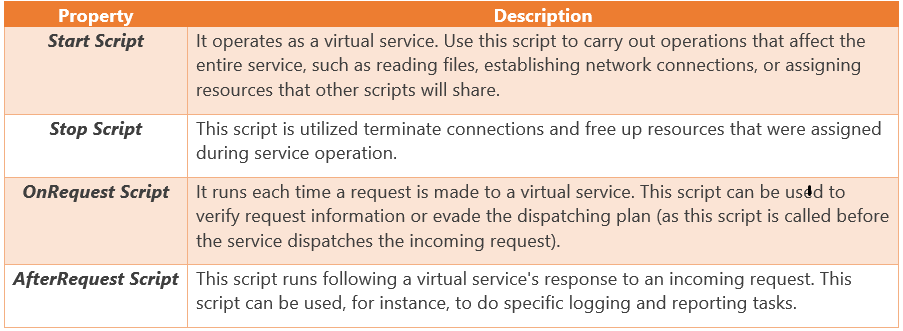
Service functioning

There are several script properties available for each virtual service that enable you to build script handlers for particular events:
Service functioning Table

Virtual responses

Before the virtual service provides the response to the client, the script code that you enter in the Script's property of a virtual response is run.

VirtResponse test steps

The script core for SOAP and REST VirtResponse test phases are similar to what you define for virtual responses. It is executed before the test step sends a response to the client.

Response dispatching

You can utilize the script dispatch approach when checking incoming requests and returning the name of a fake answer that your virtual service should send to the client.

Response dispatching

With the help of the validation actions—for which ReadyAPI does not provide pre-defined checks—you may use them to validate incoming requests.

Script language

Groovy and JavaScript are supported using the "script" attributes. The language used by the virtual service is determined by the Script Language attribute of your project. Projects utilise Groovy by default. This language's syntax is similar to Java's and can interact with Java objects and libraries.

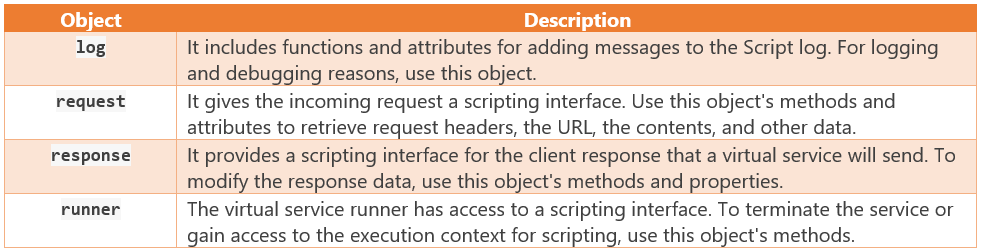
Script objects

The items that are frequently used in service scripts are listed below. You can look over the message above the script edit box in the product user interface to determine which objects are available in each script property:
Scripts Object Table

Writing script code

The script editors support modern features that facilitate quicker and easier code authoring:

  • Use the Code Completion list to view the available objects, methods, and properties. Press CTRL+SPACE or choose Edit > Code Completion from the menu to bring up the list.
     
  • For easy editing, open a script in a separate window. Click the button in the script editor's toolbar to accomplish this.
     
  • Use the built-in Find/Replace dialogue to look for and replace a string. Press CTRL+F to activate it or choose Edit > Find / Replace from the menu.
     
  • Identify line numbers to improve navigation. Press ALT+L to reveal or hide the numbers or choose Edit > Show Line Number from the menu.
     
  • Press CTRL+G to swiftly navigate to a line by its number or choose Edit > Go to Line from the menu.
     
  • Expand or contract code areas. For this, select Edit > Folding from the menu.
     

Let's look into the details of Virtual Service Events.
Virtual Service Events

You can leverage the script properties of your service and its virtual requests to execute custom actions when the virtual service is operational. Creating event handlers in the Events manager is an alternative method to accomplish this:

  • On the toolbar, select Events.
     
  • To add a new event handler, click in the ensuing dialogue.
     
  • Click OK after choosing the event type, then type the script code.
     

The dialog's event list is project-based. In other words, you can construct event handlers in this dialogue for virtual services and other project objects.

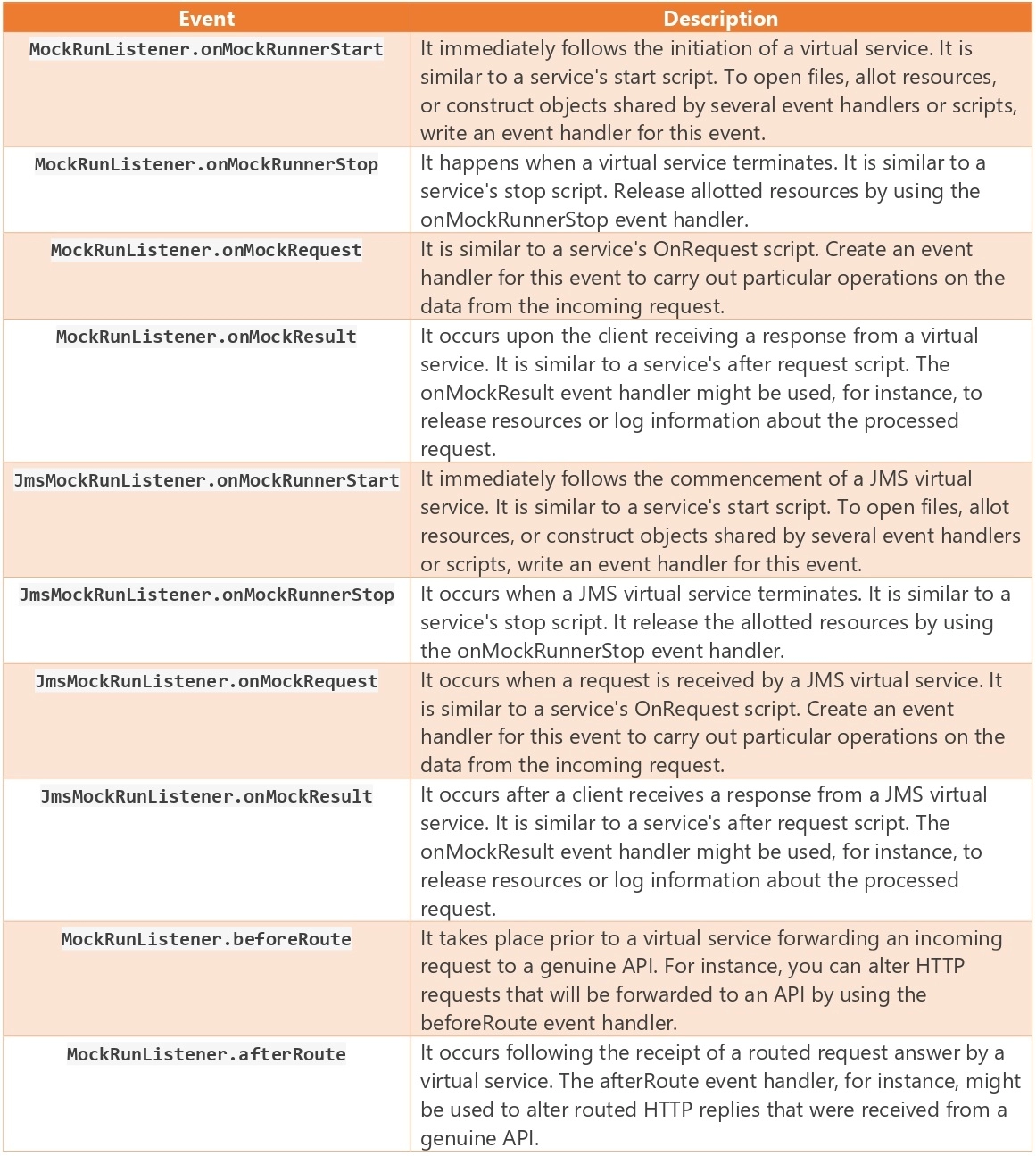
Service-Related Events

The following are the Service-Related events:

Service Events Table

Target Property

The Target attribute is present in every event. The name of the virtual service to which the event will apply is specified. Any virtual service in your project will start to trigger an event if this property is left unfilled.
The same event handler can be built for several virtual services. By looking up the virtual service's name in the script code, you may identify it. Use the runner.mockContext.modelItem.name attribute to obtain this name.

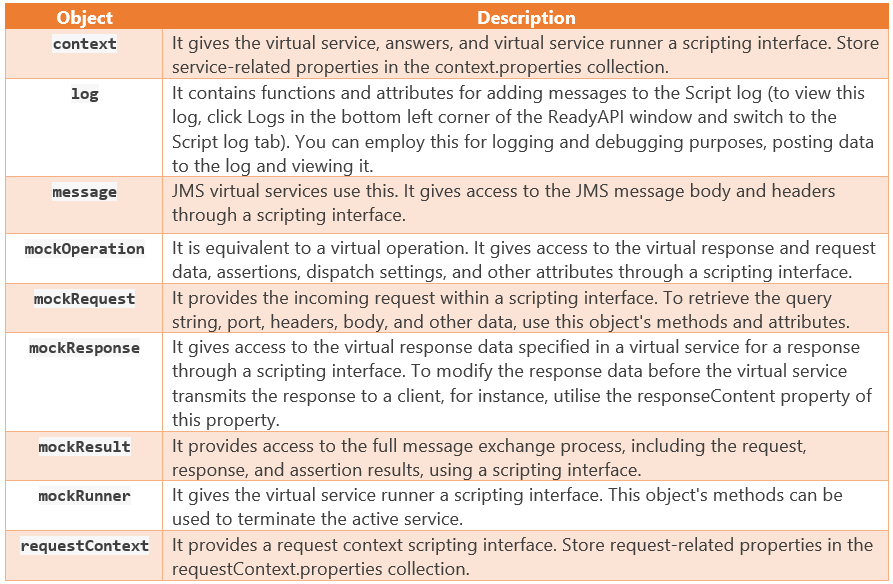
Script Objects

The following are the service objects:

Scripts Object Table
  • These event handlers are not executed when you run your service on a remote machine, unlike script properties, which are preserved as part of the virtual service data.
     
  • All of the virtual services in your project share the event handlers by default. You can utilise the Target property of your event handlers to identify the service for which it was called, or you can use the runner.mockContext.modelItem.name property in script code to distinguish between the virtual services.
     
  • The ReadyAPI disregards the event handlers' result values.
     
  • When these event handlers' code contains exceptions, ReadyAPI does not let you know about it. ReadyAPI just terminates the event handler call if an exception occurs.
     
  • Event handlers cannot use the script debugger.
     

Let's dive into the details of SSl Virtual Services.

SSL Virtual Services

By default, virtual services typically operate on unsecured connections (the HTTP protocol). You might want your service to function via HTTPS (SSL) to test how clients behave across secure connections.

This requires the following:

  • A repository of SSL keys.
     
  • Set up your virtual service's Protocol settings.

Create SSL keystore

You need a keystore with private and public keys in order to use SSL. If you don't already have it, you must create it. Perhaps using keytool, a command-line tool built into Java, is the simplest method to accomplish this. Portecle or other instruments are potential substitutes.

Use the following command line:

Windows Command:

"C:\Program Files\Java\jdk-11\bin\keytool" -genkeypair -alias readyapi -keyalg RSA -keystore "C:\My folder\readyapi-keys.jks"

Linux Command:

keytool -genkeypair -alias readyapi -keyalg RSA -keystore ./ready-api.jks

Configure SSL settings

You must mention the SSL keystore in your virtual service settings after it has been generated:

  • In the Navigator panel, choose the service you want. Go to the property editor by selecting it from the product window's right side.
     
  • Select the https protocol, then click SSL Settings in the Info area.
     
  • Set up the SSL settings in the ensuing Preferences dialogue.
     

The settings don't apply only to your project or virtual service; they also apply to ReadyAPI.

  • To enable virtual APIs to work over HTTPS, click the Enable virtual service SSL option.
     
  • Enter the name of the keystore file in the Virtual service KeyStore box.
     
  • Enter the keystore password in the virtual service password field (not the key pair password).
     
  • Enter the keypair password in the Virtual service key password box.
     
  • Select the Client authentication check box and then add the certificate to the service trust store if you wish to use a certificate to authenticate a client. Clear the option if not.

Change test requests

You must modify the following queries in your functional tests or client code after configuring your virtual service attributes and setting SSL parameters:

  • Change every request you make to the service from the HTTP protocol to the https protocol.

Send test requests and examine responses before starting the virtual service.


Frequently Asked Questions

Does ReadyAPI use Java?

ReadyAPI uses the tools .jar and attaches .dll files from the Java JDK to execute Groovy debugging.

How does a virtual server work?

A virtual server replicates the functionality of a dedicated physical server, making resource reallocation and workload adaptation simple. It resides as a partitioned region inside a physical server transparently to users.

How can you call a method in a groovy script?

Groovy allows us to add a method called call to a class and then call the method directly.

Conclusion

In this article, we have extensively discussed the details of Virtual Service Scripting and events in ready API, along with the details of Virtual Service Events and SSL Virtual Services in ReadyAPI.

We hope that this blog has helped you enhance your knowledge regarding Virtual Service Scripting and events in Ready API, and if you would like to learn more, check out our articles on ReadyAPI. You can refer to our guided paths on the Coding Ninjas Studio platform to learn more about DSADBMSCompetitive ProgrammingPythonJavaJavaScript, etc. To practice and improve yourself in the interview, you can also check out Top 100 SQL problemsInterview experienceCoding interview questions, and the Ultimate guide path for interviews. Do upvote our blog to help other ninjas grow. Happy Coding!!

Thank You Image
Live masterclass